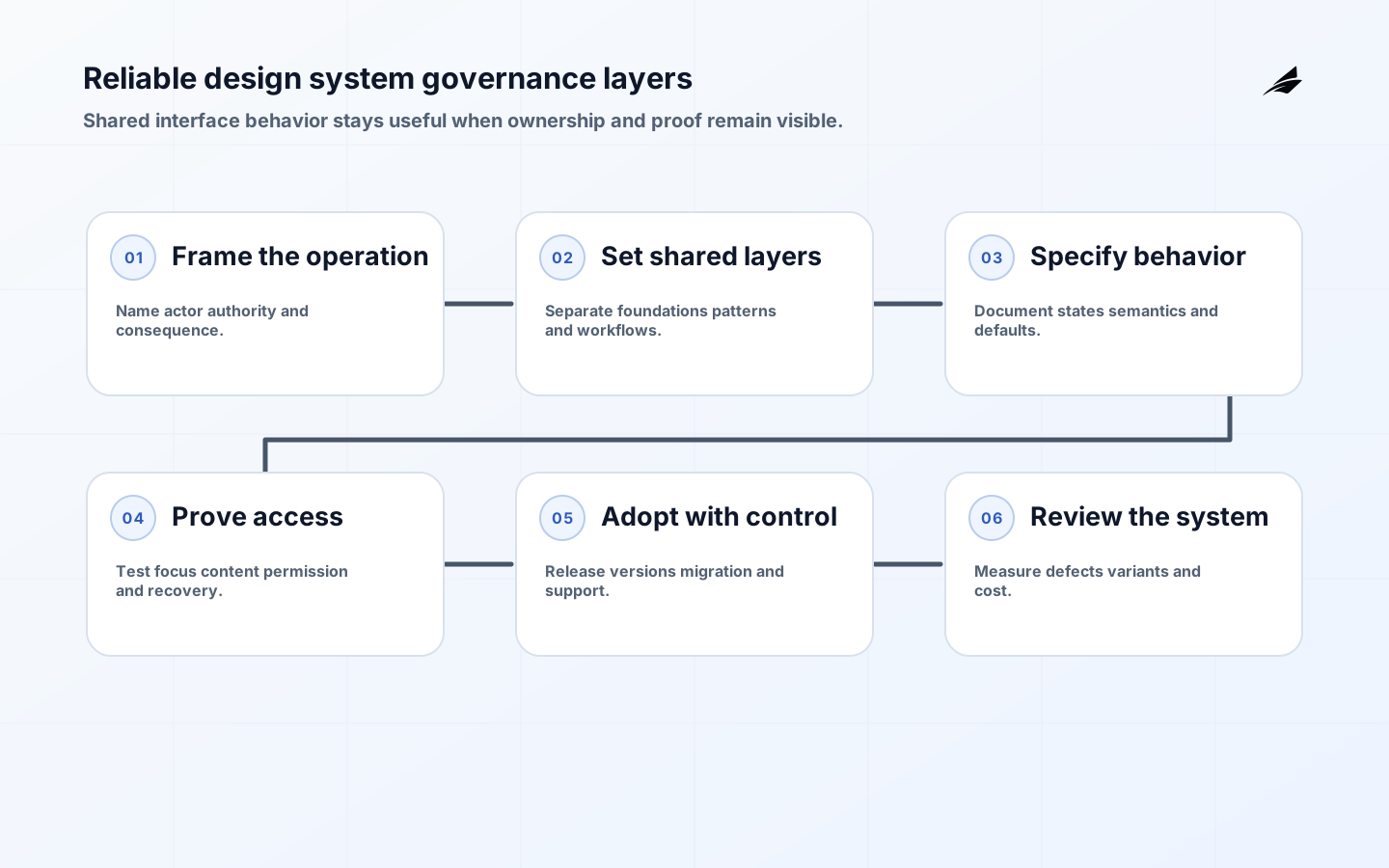
A design systems checklist becomes useful when it protects people from inconsistent behavior, not when it merely records that a component exists. In digital operations, a shared control may appear in a permissioned queue, an approval form, a customer portal, and a support console. Each context can expose different failure and accessibility risks. The checklist should therefore connect intent, ownership, semantics, variation, verification, release, and operating support. It gives IT managers and delivery teams a common way to ask whether a shared pattern is ready to carry real work.
Make the design system decision explicit
Start with one operational journey and its consequence. Identify the actor, data supplied, action authorized, result promised, and person who handles an exception. A component library may support the journey, but it is not the whole design system: content, accessibility, package behavior, release notes, support, and governance also determine whether teams can use it safely.
Record why a shared boundary is needed. Repeated defects, inconsistent labels, duplicated validation, slow implementation, or accessibility remediation are stronger reasons than a desire for visual polish. Link the work to the error-handling checklist when a shared status or error component will shape recovery across products.
Define the shared boundary before implementation
The U.S. Web Design System is a useful comparison because it presents foundations and components with guidance that explains how to use them. The lesson for an internal design system is not to copy a public visual language; it is to publish enough context that a consumer can choose a supported pattern, understand its states, and know when a local workflow should remain outside the shared boundary.

Separate foundations, primitives, patterns, and workflows. Foundations define meaningful values such as focus, surface, text, spacing, and density. Primitives define interaction and semantics. Patterns combine primitives for recurring tasks. Workflows remain product-owned when their authority, policy, or lifecycle is domain-specific. This separation keeps a central system from absorbing every feature while still making recurring behavior consistent.
| Layer | Checklist question | Proof of readiness |
|---|---|---|
| Foundations | Do names describe intent and can themes or products use them safely? | Token documentation, examples, contrast and responsive checks |
| Component | Are states, semantics, focus, content, and extension points explicit? | API, keyboard checks, assistive-technology check, visual regression |
| Pattern | Does the recurring task have consistent guidance and recovery? | Journey examples with loading, empty, error, permission, and long content |
| Governance | Who accepts changes and supports consumers? | Owner, contribution route, release and deprecation policy |
| Operations | How will use, defects, and exceptions be observed? | Adoption inventory, support path, measures, and review cadence |
Specify behavior, not only appearance
For every reusable control, describe the normal, loading, empty, error, disabled, read-only, selected, and permission-denied states that matter. State what a consumer must provide, what the component guarantees, and what it deliberately leaves to the product. A table should not claim to own business sorting rules when it only provides the interaction; a form field should not hide whether validation is local or server-driven.
Use semantic APIs and safe defaults
Prefer props that name intent, such as status, emphasis, or selection behavior, and avoid arbitrary style injection that makes review impossible. Choose defaults that are accessible and predictable. Require an accessible name when a control cannot infer one, reject unsupported combinations early, and expose a testable way to render the state a consumer needs. Enterprise systems such as Carbon Design System illustrate the value of usage guidance alongside code; a local system needs the same relationship.
Make accessibility a release requirement
Use WCAG guidance to define outcomes for keyboard access, focus, names and roles, contrast, reflow, input assistance, status, and error correction. For composite controls, consult the ARIA Authoring Practices Guide for interaction expectations, then test the actual product context. A pattern that works in isolation can fail when a consuming page changes focus order, hides a label, or inserts long content.
| Risk | What to check | Evidence |
|---|---|---|
| Keyboard and focus | Can users reach, operate, and leave the control? | Manual keyboard path, focus visibility, and focus restoration |
| Name and status | Do assistive technologies receive the purpose and result? | Accessible tree review and announcement test |
| Content and layout | Do long labels, zoom, and translation preserve action? | Long-content, reflow, localization, and high-zoom cases |
| Error correction | Is the problem associated with the right input and explained? | Field-level validation and recovery task |
| Permission | Is a restricted action understandable and enforced? | Role-based render plus server-side negative case |
Control variation and exceptions
Operations need variation in density, labels, roles, and workflow context. Make supported variation semantic and tested. A compact table can change row height without removing headers or status meaning; a warning can change copy without relying on color alone. If a product needs a new state or slot, review whether it belongs in the shared contract or in a product-owned wrapper.
An exception record should include the user need, current limitation, affected products, proposed behavior, accessibility impact, owner, release plan, and a review trigger. Do not accept “temporary override” without a time or condition for reconsideration. Repeated exceptions often signal that the shared component has the wrong abstraction or that a workflow should remain local.
Verify the system with real consumers
Build one proof slice that crosses foundations, component API, documentation, automated checks, and a consuming journey. Include a real permission boundary, slow or missing data, long content, and a recovery path. Review the result with product support or operations staff who did not write the implementation. If they cannot explain what a pending or denied state means, the component is not ready for broad use.
Use a small matrix of evidence rather than one large visual snapshot. Test behavior and semantics at the component layer, composition and content in the product, and package or migration behavior during release. The REST API contracts checklist is a useful companion when a shared interface state must line up with server responses.
Release through controlled adoption
Start with a product area that has a clear owner and a reason to change. Publish the package with version, changelog, migration notes, supported browsers or runtimes, accessibility guarantees, and an issue path. Keep a route for legacy use while a consuming team learns the contract. Do not force a full-screen rewrite as the first adoption gate; it makes teams hide exceptions and makes learning expensive.
Set a rule for new work and a trigger for old work. New components should use the supported foundation when the behavior fits. Existing screens can migrate at the next meaningful change, recurring defect, or platform upgrade. Review package size and runtime effects so a shared dependency does not create a slower or less usable interface.
Operate the shared component capability
Track adoption with quality and cost. Useful signals include integration time, duplicate variants, recurring accessibility defects, release failure, visual regression noise, package weight, upgrade effort, support questions, and exception age. Review whether a change reduces user confusion or operator correction. The caching strategy checklist offers a comparable reminder: a reusable technical mechanism needs explicit freshness and invalidation behavior, not only a documented API.
Run a recurring boundary review
Every few weeks, review new contribution requests, exceptions, defects, and consumer feedback. Retire components that no longer have a user or owner. Split a component whose API hides several unrelated behaviors. Promote a local pattern only after more than one context demonstrates a stable contract. The system stays healthy when it can say no clearly and change when evidence says the boundary is wrong.
A shared component also depends on neighboring contracts. When a status control mirrors API failures, compare it with the REST API contracts checklist; when a cached badge can outlive its source, review the caching strategy checklist. For teams that are standardizing failure language across products, the error-handling checklist provides a useful boundary. This prevents the design system from promising a visual state that the surrounding service cannot explain or recover.
The checklist should remain useful after the initial release. Record who owns component health, where consumers report a regression, how deprecated behavior is found, and what signal makes an exception urgent. A design system that cannot answer those questions shifts cost to product teams and support. Review error handling for reliable operations alongside component changes when a new alert or status pattern changes how people recover. The system’s quality is measured in the work it makes clearer, not in the number of documented variants.
Include the people who support the workflow in that review. Ask them to find the component owner, interpret its empty and error states, and describe how a consumer should migrate after a breaking change. Their questions often expose missing labels, unclear defaults, and undocumented recovery. A reliable system is one whose contract can be followed without private context, even when the original designer or engineer is unavailable.
Design systems checklist takeaways
- Define the user journey, authority, owner, and reason to share before building.
- Separate foundations, components, patterns, and product-owned workflows.
- Document states, semantics, content, accessibility, variation, and performance.
- Verify the component in a real consumer with failure and permission cases.
- Release with migration evidence and measure outcomes, not component counts.
Design systems checklist questions
What makes a shared component reliable?
It has a clear user intent, semantic API, documented states, accessible interaction, realistic examples, tests at the right layers, an owner, and a migration path. Reliability includes how consumers recover when a dependency or permission changes.
Is following ARIA guidance enough?
No. ARIA guidance helps with roles and interaction patterns, but the component still needs correct content, focus, state transitions, data behavior, and integration testing. Use guidance as a baseline and verify the task in context.
How should exceptions be reviewed?
Ask what user need is not served, whether the current API can be extended safely, who owns the exception, what evidence proves it, and when it will be revisited. Multiple similar exceptions should trigger a boundary decision.
Conclusion: make shared behavior operable
A design system checklist is a way to keep reusable behavior honest. Define the boundary, make accessibility and states explicit, control variation, prove the pattern in a real operation, and measure the result after release. Teams can move faster when the shared system carries decisions they can inspect and recover from.