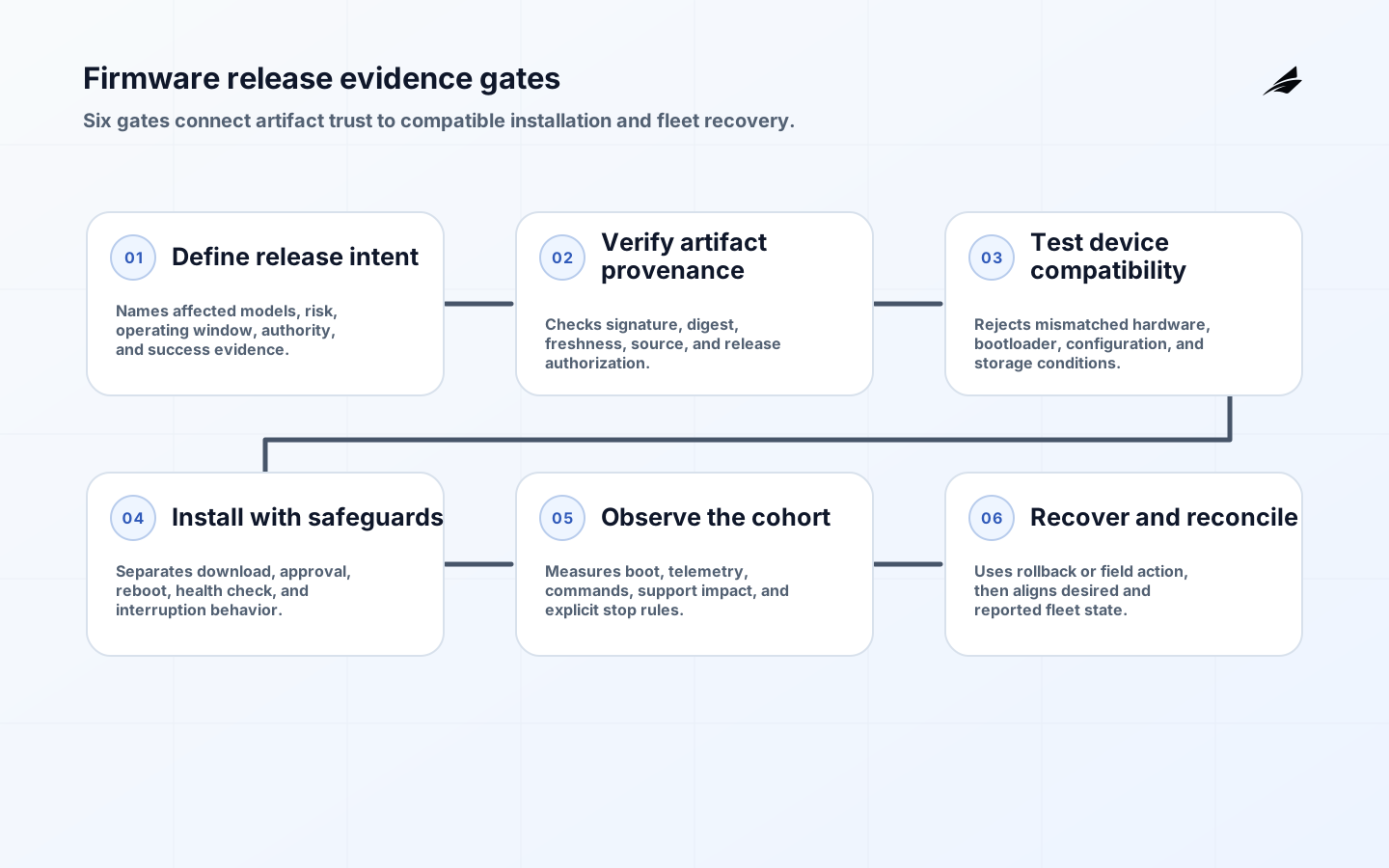
Firmware updates are a fleet-control problem before they are a download problem. The first build should answer which artifact is authorized, how a device verifies it, which hardware and configuration combinations are compatible, how installation fails safely, and how the team proves what happened. NIST's IoT baseline names secure software update as a core capability, while Uptane's standard shows why signed metadata, role separation, and rollback resistance matter for connected fleets.
Define the update purpose and risk
Name the problem an update solves: vulnerability, defect, compatibility, or performance. Link it to affected models, hardware revisions, bootloader versions, configuration ranges, and operating constraints. An update improving one model may brick another if compatibility is implicit. Treat artifact, metadata, rollout policy, and recovery image as one release unit.
Decide what remains possible while an update is pending. A sensor may keep measuring; a gateway may buffer; a controller may stay in safe local mode. Define whether an update can be postponed, who approves an exception, and what happens with low power or poor connectivity. This turns update behavior into an operating contract.
Establish authenticity and integrity
The device should verify source, target, completeness, and current policy. Use a protected trust root and rotation plan. NIST's device catalog gives concrete update and device-security capability questions that can become procurement and acceptance tests.
Separate artifact signing, release authorization, target selection, and device verification where risk justifies it. Record version, digest, signer or role, release time, compatibility, and instructions as protected metadata. Never make a filename or version string the trust decision. A valid signature on an incompatible image is still unsafe.
| Update decision | Question to answer | Evidence |
|---|---|---|
| Authenticity | How does device verify source, target, integrity, freshness? | Trust chain, metadata test, key owner |
| Compatibility | Which models and configurations may install? | Version matrix and rejection tests |
| Recovery | What happens after interruption or failed health check? | State machine and power-loss test |
| Operations | Who can target, pause, revoke, support? | Role map and approval |
Model compatibility before the first build
Create a matrix for model, board revision, bootloader, storage, radio, configuration schema, local safety mode, and dependencies. Include unknown and unsupported combinations. A device should remain on its known-good image when compatibility cannot be established. Test full storage, interrupted power, duplicate delivery, stale metadata, and missing dependency.
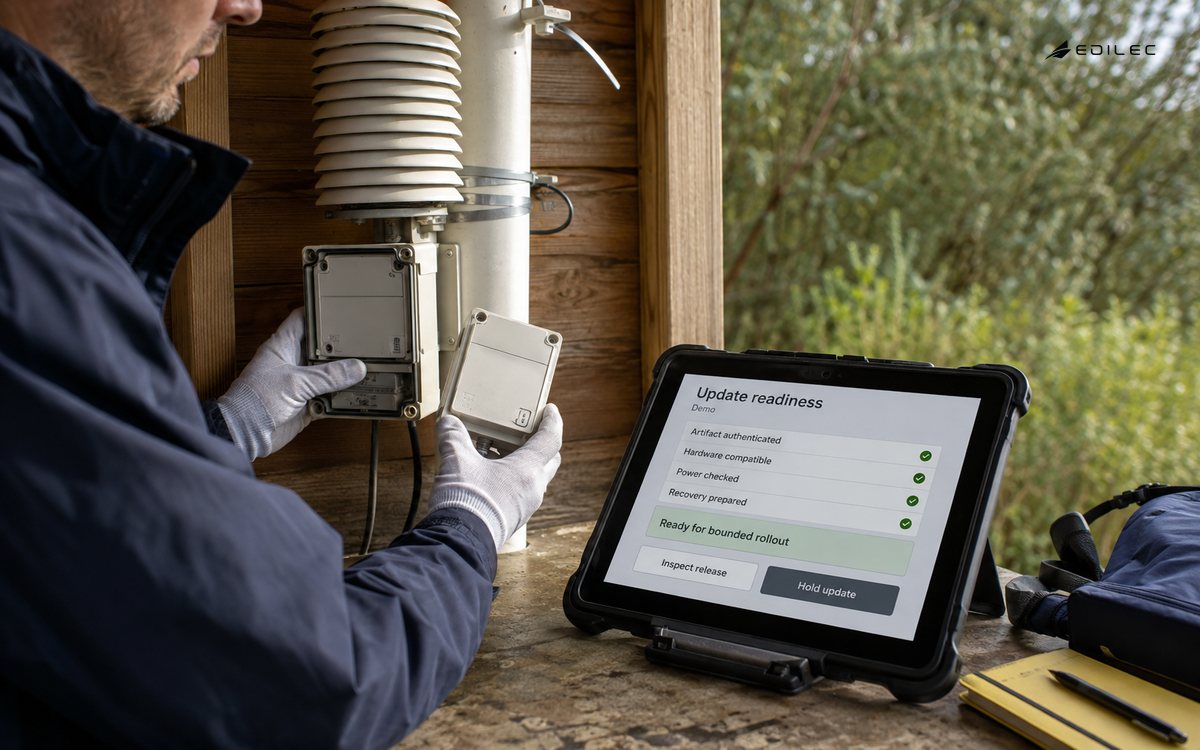
Keep backward and forward compatibility explicit. Firmware may change telemetry fields, command behavior, calibration constants, or cryptographic algorithms. Pair image with schema and migration plan, and define how cloud or gateway treats old and new versions during rollout. A successful install can still create data or control failure.
Design rollback and recovery
NIST's platform firmware resiliency guidance emphasizes protecting firmware, detecting unauthorized changes, and recovering rapidly. Define an install state machine: downloaded, verified, staged, booted, health-checked, accepted, or reverted. Preserve the previous image where hardware supports it, and protect rollback from attack or repeated failure loops.
A rollback is not simply sending an older file. Decide how the device knows an image is unhealthy, how many attempts are allowed, how state is preserved, and how the fleet service marks it. Test power loss at every stage. If rollback is impossible, define safe recovery mode, field procedure, and replacement path before build.
Stage the fleet deliberately
Start with lab devices, then representative canary, then cohorts selected by model, geography, connectivity, and business criticality. Hold on evidence: install success, boot health, telemetry continuity, command compatibility, resource use, and support impact. A percentage is not a safe cohort if it excludes a rare critical revision.
Give rollout a stop rule and human owner. Pause when failure, stale telemetry, reboot loops, or customer impact crosses the threshold. Show devices unreachable, deferred, failed verification, pending reboot, or awaiting field action. Do not hide exceptions in a success percentage.
| Failure case | Device behavior | Fleet action |
|---|---|---|
| Wrong target | Reject before install | Record compatibility failure |
| Interrupted power | Resume safely or revert | Flag state and cohort |
| Stale metadata | Reject and request fresh policy | Investigate time and repository |
| Repeated boot failure | Enter bounded recovery | Pause cohort and route field work |
Build update operations and evidence
The fleet service should show desired and reported version, compatibility decision, artifact status, install state, last check-in, and exception reason. Operators need views for urgent updates, low connectivity, and hands-on recovery. Keep an immutable record of who approved release and which policy selected each device.
NIST's software update profile is useful for flaw handling, customer communication, testing, and time expectations. Build those activities into release workflow. A secure artifact without a support plan leaves customers unable to make a safe deployment decision.
Protect the update service itself
Limit who can create, approve, publish, target, pause, or revoke an update. Separate development signing from production authorization. Protect keys, build inputs, release metadata, and fleet targeting. Monitor unusual release size, target expansion, signing time, or failed verification. Make emergency revocation possible and test it.
Threats include compromised build workers, stolen signing keys, replayed old images, downgrade attacks, malicious mirrors, and dishonest success reports. Uptane is relevant when role separation and freshness protect an availability-sensitive fleet. Use it as a design reference, not as a substitute for a device-specific threat model.
Approve the first build with evidence
Prove artifact provenance, signature verification, compatibility rejection, interrupted install behavior, rollback or safe recovery, telemetry continuity, command safety, and support visibility. Test a wrong model, old metadata, low storage, bad time, and interrupted network. Capture expected and actual state transitions.
Link the release decision to the firmware updates checklist, device identity guide, and offline sync guide when update authority, identity, and intermittent connectivity intersect.
A firmware release scenario
Treat the update manifest as an operational contract. It should state the target population, compatibility rules, artifact digest, release authority, minimum bootloader, required storage, expected duration, reboot behavior, health checks, and recovery route. A device or fleet service can then reject an incomplete release before the first bytes are installed. This is stronger than relying on release notes that a device cannot enforce.
Separate download from installation. A device may safely download and verify an image while waiting for a local operating window, battery threshold, or command approval. Show those states to operators. This reduces pressure to install during a poor connectivity interval and gives the fleet a truthful view of what is ready, pending, or blocked.
Firmware changes should be tested against telemetry and commands, not only boot success. Confirm units, sampling, identifiers, configuration migration, local safeguards, and command semantics. A device that boots but stops reporting a critical signal is not healthy. Put these checks in the cohort gate and retain their result with the device version.
Use release metadata to support incident response. An investigator should be able to identify when a cohort was selected, which policy selected it, which artifact was offered, which verification step failed, and whether the device reported a health check. Protect the record from casual edits. This creates a defensible boundary between a bad artifact, a bad target rule, and a field condition.
Key rotation and signing recovery deserve their own rehearsal. Practice an expired trust anchor, a revoked signer, a compromised build output, and a repository that serves stale metadata. Define which releases remain available, how the fleet pauses, and how devices return to a trusted path. A recovery design that exists only on paper will be too slow during a real vulnerability response.
After an update, compare the desired fleet state with reported versions, health, telemetry continuity, and support exceptions. Close the release only when the unresolved set has an owner and an action. Devices that remain offline are not successful or failed; they are an explicit risk population requiring a plan.
Define the device-side experience for every update state. A field technician should know whether a device is downloading, waiting for approval, rebooting, healthy, reverted, or blocked. Avoid a single progress indicator that hides a safety hold or lost connection. Clear states reduce repeated manual attempts and make support conversations actionable.
Firmware changes should be tested against the records and actions that make the device useful, not only whether it boots. Confirm units, sampling cadence, identifiers, configuration migration, local safeguards, command semantics, and offline buffering. A device that starts successfully but emits a changed unit or stops confirming a critical command is not healthy. Put these checks in the cohort gate, retain their result with the device version, and require an owner for any exception.
Use a post-release review that compares predicted risk with observed behavior. Examine failures by model, geography, connectivity, and installation stage. Record whether the cause was artifact, targeting, device condition, or operator process. Feed that result into the compatibility matrix and release gate before the next cohort.
Keep a fleet exception queue that distinguishes unreachable devices from devices that rejected, installed, or failed an image. Give each state an owner, age, and next action. This prevents the rollout dashboard from treating a missing report as success and helps the team plan field work without repeating unsafe retries.
Key firmware-update takeaways
- Treat firmware, metadata, targeting, and recovery as one release.
- Verify authenticity, integrity, freshness, and compatibility on device.
- Define rollback or safe recovery before the first build.
- Use cohorts exposing hardware and connectivity diversity.
- Keep update exceptions visible to operators and support.
Frequently asked firmware-update questions
Do all firmware updates need automatic rollout?
No. Automation can reduce delay, but criticality, connectivity, physical safety, and recovery capability should determine automatic, approved, or field-assisted release. Policy and exception path must be explicit.
What is the most important firmware update test?
Test an interrupted installation on a device that is not the ideal lab case, then prove resulting device state and fleet record. A clean install proves only the happy path.
Conclusion: firmware updates in practice
Firmware updates are dependable when authenticity, compatibility, recovery, rollout authority, and fleet evidence are designed together. Make the first build prove those decisions so later releases can be faster without becoming less accountable.