ERP Integration: Contracts, Reconciliation, and Safe Change
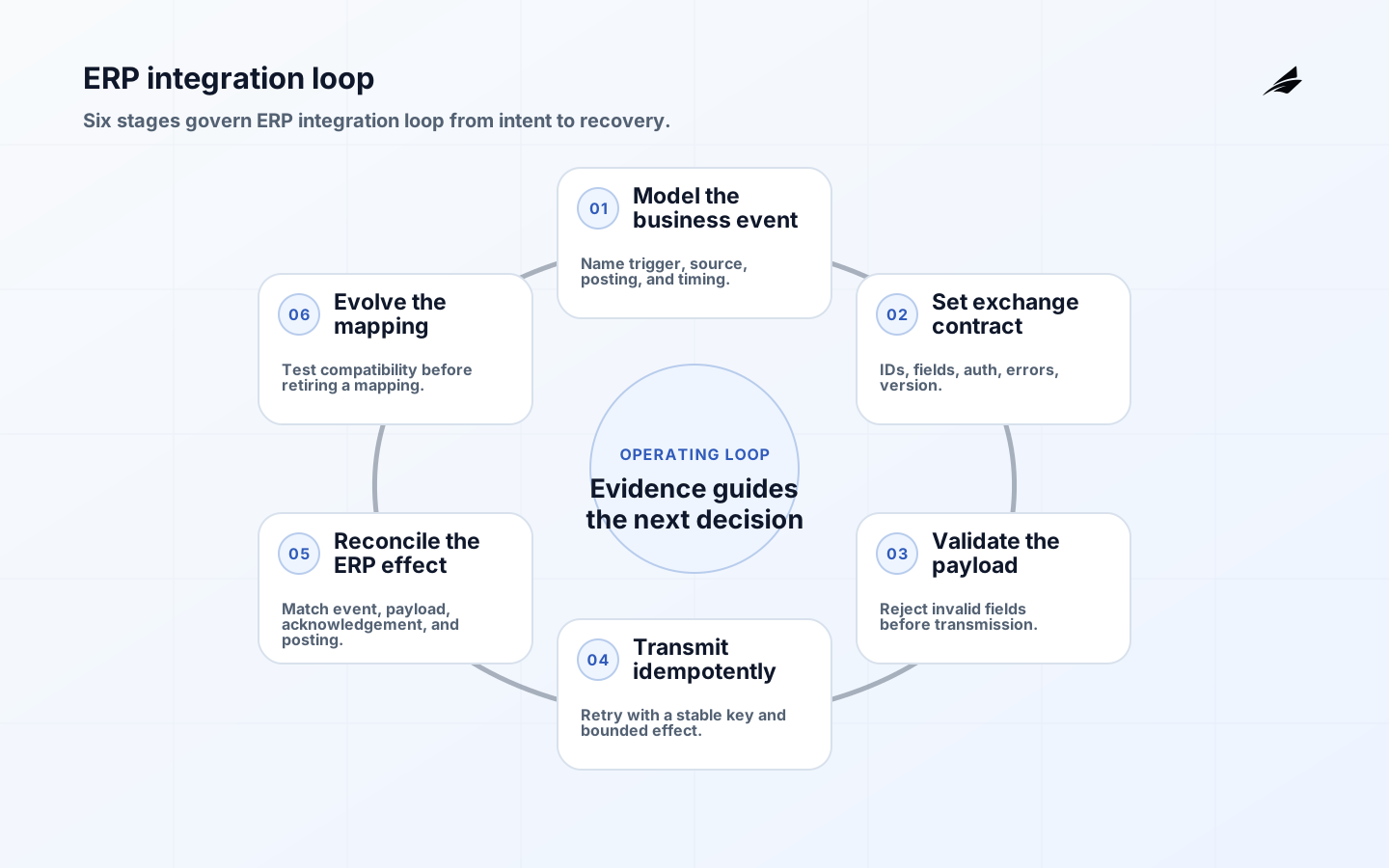
Treat ERP integration as an operating capability for ERP owners, integration architects, and finance operations teams, not as a collection of screens or integrations. Its useful output is a synchronized transaction that preserves business meaning across enterprise boundaries. For ERP integration, success means users can act on the output and explain why it deserves trust. The failure case is equally concrete: a transport success is mistaken for a posted transaction. Start with whether a cross-system transaction is accepted, pending, rejected, or needs repair, then name the evidence that lets a reviewer separate a sound result from a convenient guess.
The ERP integration capability becomes governable when the integration contract defines ownership, timing, identity, validation, acknowledgement, and compensation for each business event. A record may be technically valid yet still unusable if a retry creates a duplicate invoice, order, payment, or inventory movement. Document the normal ERP integration case, the delayed ERP integration case, and the disputed ERP integration case before selecting tools. The team should be able to state who may create an ERP business event, message, acknowledgement, and reconciliation item, who may alter it, which system is authoritative, and how a correction reaches consumers. Keep business key, idempotency, event version, acknowledgement state, and reconciliation total visible in that conversation so the design stays close to real work.
The boundary of ERP integration
Start by writing the ERP integration boundary as a sentence that a domain owner and an operator would both recognize. For ERP integration, the service owns an ERP business event, message, acknowledgement, and reconciliation item; it does not own every copy, view, export, or downstream decision that uses the result. This ERP integration distinction prevents a read model from quietly becoming a second authority. It also gives reviewers of ERP integration a place to ask whether a requested field belongs here or should be supplied by another capability.
A useful ERP integration boundary names entry conditions, exit conditions, and the state that must survive a handoff. In ERP integration, the entry record should carry enough identity and context to support validation, while the exit record should expose freshness, ownership, and the next permitted action. When a dependency is unavailable for ERP integration, the system should preserve the last confirmed state and an explicit reason rather than inventing a successful outcome. That behavior makes hold downstream action until the posting state is known and owned a deliberate operational choice.
Decisions that need an owner in ERP integration
Assign responsibility by decision, not by job title alone. The accountable owner for ERP integration approves meaning and material change; the process operator handles routine exceptions; the technical owner maintains availability and evidence; and a security or records reviewer checks access where the consequence warrants it. For ERP integration, write these roles beside the state transition so an aged or disputed item has a person who can move it forward.
The first reference point is SAP Integration Suite API Management. Use it for the part of ERP integration concerned with business key, idempotency, event version, acknowledgement state, and reconciliation total. The ERP integration reference is not a template for copying an implementation; it is a precise vocabulary for stating what is constrained, what is validated, and what evidence should remain inspectable. Translate that vocabulary into local acceptance tests that a reviewer can run against a synchronized transaction that preserves business meaning across enterprise boundaries.
Evidence and controls for ERP integration
Evidence should answer three different questions about an ERP business event, message, acknowledgement, and reconciliation item: what was received, what rule or policy was applied, and who accepted the resulting state. Microsoft Dynamics 365 integration patterns is useful here because it connects protection and recovery to an operating risk rather than to an abstract checklist. Apply that lens to ERP integration by recording the actor, time, decision, affected scope, and correction path for material changes.
Do not confuse a complete log with an understandable record. A useful ERP integration evidence trail links the source value to the transformation, validation result, exception decision, and consumer notification. For ERP integration, retain the inputs that explain whether a cross-system transaction is accepted, pending, rejected, or needs repair and redact or restrict details that do not belong in a broad operational view. If a ERP integration reviewer cannot reconstruct the state without asking the original author to remember it, the control is too fragile.
Operating ERP integration day to day
Daily operation should expose the small set of states that matter to ERP owners, integration architects, and finance operations teams: current, provisional, blocked, corrected, and retired. AWS Making retries safe with idempotent APIs provides a useful operating perspective for designing data or service paths around reliability, ownership, and recovery. In ERP integration, pair every status with a clock, an owner, and a safe next action. That makes the ERP integration queue actionable instead of turning it into a pile of unresolved alerts.
Lineage becomes practical when a person can follow a synchronized transaction that preserves business meaning across enterprise boundaries backward to its source and forward to its consequence. CloudEvents specification helps frame that path as a chain of events and activities rather than a decorative diagram. Use the ERP integration chain to test a late input, a duplicate, a permission denial, and a correction. Each ERP integration scenario should leave behind enough context for the next operator to distinguish an expected state from an accidental one.
Design checks for ERP integration
Run these ERP integration checks with the person who owns the decision and the person who will handle its exceptions. The goal is not to predict every edge case; it is to prove that ERP integration has a visible contract, a bounded failure response, and a reviewable correction route. Use a real ERP integration record or a representative fixture, and require the team to name the evidence before calling the check complete.
| Contract field | ERP question | Evidence |
|---|---|---|
| Business identity | Which transaction is this? | Order, invoice, or journal key |
| State | What does acknowledgement mean? | Accepted, posted, rejected, pending |
| Authority | Which system decides? | Owner and source timestamp |
| Correction | How is a mismatch repaired? | Replay, patch, or compensation rule |
Failure modes and recovery in ERP integration
Recovery for ERP integration starts by protecting the affected decision while uncertainty is still visible. RFC 6902 JSON Patch gives a domain-specific reference for thinking about a retry creates a duplicate invoice, order, payment, or inventory movement, access, reliability, or change. For ERP integration, use it to set a containment rule, a named resolver, an expiry or review point, and proof that the final state was reconciled. No operator should have to guess which side effect already happened before the ERP integration recovery path runs.
A correction is a new piece of evidence, not an eraser. Preserve the prior ERP integration state, identify the changed input or rule, state who approved the repair, and notify consumers whose decisions may have relied on the earlier result. If the correction cannot be completed safely, leave an ERP business event, message, acknowledgement, and reconciliation item in an explicit pending or blocked state. For ERP integration, that is more honest and more recoverable than reporting a clean value that no longer describes reality.
| Integration fault | Containment | Reconciliation proof |
|---|---|---|
| Timeout after write | Do not blindly replay | Lookup by idempotency key |
| Schema change | Reject incompatible payload | Version test and rollout record |
| Partial batch | Freeze affected range | Count and amount comparison |
| Duplicate posting | Protect account or stock | Reversal approval and ledger match |
An implementation sequence for ERP integration
Begin with one consequential ERP integration path that is narrow enough to observe and important enough to expose weak ownership. In ERP integration, choose a decision that occurs often, has a known operator, and can be compared with an existing result. Write the ERP integration contract, instrument its evidence, and define the stop condition before adding automation. A small ERP integration path is valuable only when it includes the uncomfortable case that normally appears after launch.
Run the first ERP integration release with a named observer and a short review window. Compare the expected and actual states of an ERP business event, message, acknowledgement, and reconciliation item, inspect representative exceptions, and ask whether a person could recover without private knowledge. Expand only after the process owner for the ERP transaction can explain the result, the support route is tested, and the team has a bounded response for a transport success is mistaken for a posted transaction. Record the decision to expand as part of the release evidence.
Measures that support ERP integration review
Measure the outcome that ERP integration exists to improve, then pair it with quality and control signals. Useful measures include reconciled messages, aged exceptions, duplicate prevention, and posting latency; a single volume or speed number will hide whether the service is producing trustworthy decisions. Segment the ERP integration view by source, owner, state, or consumer when a total could conceal a concentrated failure. The ERP integration measure should help a team decide what to inspect next, not merely make the dashboard look active.
Review a small sample of ordinary and exceptional ERP integration records at the same cadence as the business decision. Ask whether business key, idempotency, event version, acknowledgement state, and reconciliation total was present, whether the assigned owner could act, and whether the evidence would satisfy a challenge several weeks later. Turn one recurring ERP integration exception into a dated improvement with a verification measure. This keeps ERP integration connected to learning rather than treating governance as a static approval ceremony.
For a wider operating view, compare ERP integration with API contracts, event metadata, and safe patch or compensation practices with the adjacent guidance, the related architecture, and the companion operations guide. Keep those links as context rather than as substitute authority: ERP integration still needs its own owner, evidence, and correction decision.
Key takeaways
- Define ERP integration around whether a cross-system transaction is accepted, pending, rejected, or needs repair, with a boundary that names what it does not own.
- Keep business key, idempotency, event version, acknowledgement state, and reconciliation total close to the state transition and make the accountable owner visible.
- Use explicit provisional, blocked, corrected, and complete states when a transport success is mistaken for a posted transaction is possible.
- Bound retries, corrections, and replays so hold downstream action until the posting state is known and owned leaves reviewable evidence.
- Pair reconciled messages, aged exceptions, duplicate prevention, and posting latency with representative records and an exception review cadence.
- Expand ERP integration only after operators can explain the result and recover from a credible failure.
Frequently asked questions
How should ERP integrations handle retries?
Use a stable business idempotency key, distinguish transport failure from business rejection, and reconcile before replaying a side effect. For ERP integration FAQ 1, make the answer visible in the record, the state label, and the handoff available to the process owner for the ERP transaction.
What is the most important ERP integration contract?
Define the business event, required fields, authority, acknowledgement states, effective time, error semantics, and correction route. For ERP integration FAQ 2, make the answer visible in the record, the state label, and the handoff available to the process owner for the ERP transaction.
How can teams detect silent drift?
Compare counts, amounts, status distributions, and representative records across systems, then assign each variance to an owner. For ERP integration FAQ 3, make the answer visible in the record, the state label, and the handoff available to the process owner for the ERP transaction.
Conclusion
The ERP integration service is dependable when its boundary, authority, evidence, and recovery path are understandable to the people who use it. Keep an ERP business event, message, acknowledgement, and reconciliation item tied to a real decision, make uncertainty visible, and give every correction an owner and a reason. The resulting service will be easier to change because business key, idempotency, event version, acknowledgement state, and reconciliation total remains explicit even as tools, sources, and consumers evolve.