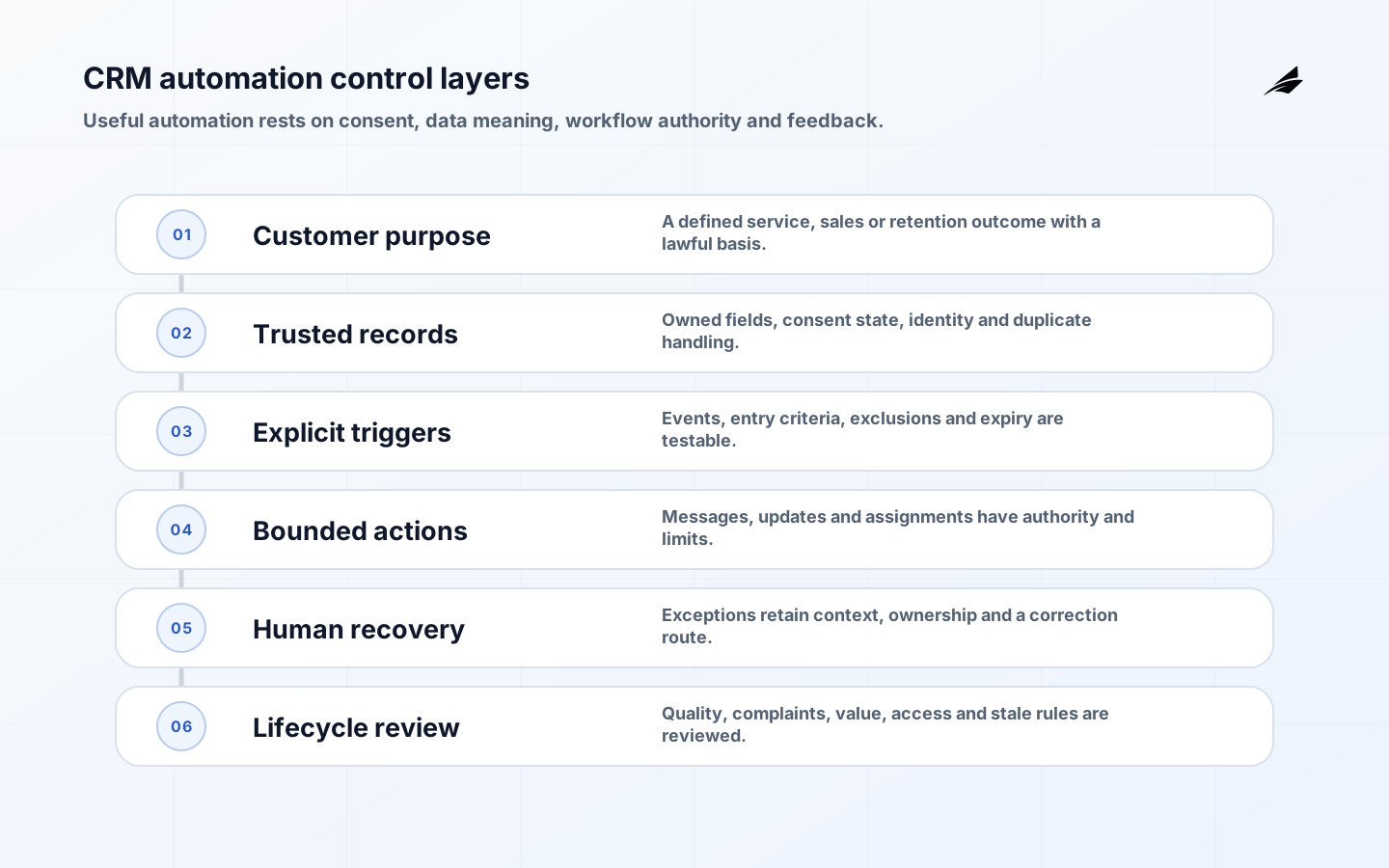
CRM automation turns a record event into a sales, service or marketing action. The useful question is not how many automations a platform can run, but whether each one advances a legitimate customer outcome using accurate data and recoverable rules. This plain-language guide explains how to design CRM automation that staff can understand, customers can trust and operators can repair.
For technical structure, read Edilec's CRM automation architecture guide. The operations leader guide helps assign ownership, while moving CRM automation into production covers service concerns. Here, the focus is the workflow from trigger through customer effect.
Key takeaways
- Write the customer and staff outcome before configuring a trigger.
- Treat identity, consent and suppression as decision inputs, not cleanup fields.
- Use explicit entry, exit, expiry and conflict rules for every workflow.
- Keep consequential decisions and ambiguous exceptions with qualified people.
- Measure changed customer and operating outcomes, not activity volume alone.
Start with a customer purpose
A good automation statement names an event, eligible population, action, owner and measurable result. For example: when a verified enterprise trial requests procurement information, assign the account to the correct regional team within ten minutes and create one visible task. That is more testable than 'automate lead nurturing.' It also exposes decisions about territory, duplicate ownership, working hours and what happens when required data is absent.
Map the current path before automating it. Observe delays, re-entry, workarounds, customer complaints and approvals. Remove obsolete notifications and fields first. Distinguish assistance from authority: summarizing a call can help a seller, while changing a legal contact, credit status or consent state requires stricter controls. A workflow should not inherit decision rights merely because the CRM makes the action easy.
| CRM automation example | Useful trigger | Required guardrail | Outcome measure |
|---|---|---|---|
| Lead assignment | Qualified event with complete territory data | Conflict and capacity rule | Time to accepted ownership |
| Renewal reminder | Contract window and active relationship | Suppression and account-owner review | On-time renewal action |
| Case escalation | Severity or elapsed-time threshold | Named queue and acknowledgement | Time to qualified response |
| Lifecycle message | Verified behavior and permitted purpose | Consent, frequency and exit rules | Customer action and complaint rate |
| Record enrichment | Trusted source update | Field authority and provenance | Completeness without overwrite defects |
Make CRM data fit for the decision
Define the customer, account, contact, opportunity and case identities the workflow relies on. Decide how duplicates are detected and which relationships are authoritative. Give critical fields a definition, source, owner, allowed values and freshness rule. A lead score built on stale job roles or a renewal flow built on duplicate accounts will execute consistently and still be wrong.

Consent and communication preference need history, scope, source and effective time. Do not reduce them to one mutable checkbox. The NIST Privacy Framework provides a voluntary structure for managing privacy risk, while applicable law depends on audience and channel. The FTC's CAN-SPAM compliance guide explains U.S. Commercial-email duties, and the ICO's electronic-mail marketing guidance covers current UK privacy and electronic-communications considerations.
Design explicit triggers and exits
For each workflow, specify entry criteria, evaluation time, action order, waiting periods, re-entry policy, cancellation conditions and maximum lifetime. Define precedence when several automations target the same record. A customer who opens a support case during an upsell sequence may need service recovery, not another promotional message. Make that priority an owned rule rather than an agent's workaround.
Prefer deterministic rules for eligibility, authorization, calculations and legally significant suppression. AI can assist with classification, drafting or summarization when uncertainty is visible and review is proportionate. Never let free-form model output directly construct privileged queries or updates. Validate allowed objects, fields and values, and retain the evidence that supported the action.
Control access, change and recovery
Use separate identities for users, integrations and automation services. Restrict who can publish workflows, edit consent fields, export audiences or impersonate owners. Review inherited roles and sandbox data. The NIST Cybersecurity Framework connects these protections to governance, detection and recovery; the OWASP ASVS helps teams turn application security expectations into verification work.
Version workflow definitions and configuration alongside a change record. Keep a plain-language diff that business owners can review. Provide pause, drain and rollback procedures. Undoing a message is impossible, so rollback may mean stopping future sends, correcting the record and communicating appropriately. For data updates, preserve before-and-after values and use compensating actions rather than deleting audit history.
| Control | Design question | Test | Failure signal |
|---|---|---|---|
| Eligibility | Who may enter and why? | Boundary and excluded records | Ineligible entry rate |
| Suppression | What must prevent action? | Opt-out, complaint, legal hold and open case | Suppression breach |
| Frequency | How often can this occur? | Concurrent and repeated journeys | Contact pressure |
| Authority | Which fields or messages may change? | Role and service-account access | Unauthorized attempt |
| Recovery | How is harm stopped or corrected? | Pause, drain and compensating action | Time to contain |
Test with realistic customer journeys
Build scenarios that cross channels and time: duplicate contacts, missing owner, changed territory, late consent update, bounced email, open complaint, customer deletion request, integration outage and daylight-saving transition. Test the resulting customer experience, record history and staff queue. Confirm that a workflow does not restart unexpectedly when a record is merged or backfilled.
Pilot with one team and a controlled population. Compare assignment time, manual touches, conversion or resolution, complaint rate, correction effort and customer opt-out behavior against baseline. Review false positives and excluded customers. A workflow that saves internal clicks but creates more customer contacts or shifts cleanup to another team has not improved the system.
Operate CRM automation as a portfolio
Maintain an inventory with purpose, owner, population, data dependencies, channels, permissions, last review and retirement criteria. Monitor failed actions, queue age, stale waits, volume changes, customer complaints and manual overrides. Alert on outcomes that require action, not every expected rejection. Give support staff a way to see which automation touched a record and why.
Review the portfolio quarterly or after major product, policy or schema changes. Retire overlapping, ownerless and low-value workflows. Revalidate suppression and access when vendors or regions change. Include platform licenses, integration, data-quality work, content, support and compliance review in cost. A small collection of owned workflows usually outperforms a dense web of invisible triggers.
Worked example: enterprise lead assignment
A B2B company wants qualified enterprise requests assigned within ten minutes. Discovery shows that delays come from missing country, duplicate accounts and disagreement over named-account ownership. The team first defines a qualified event, required fields, territory source, named-account precedence and working-hours behavior. It excludes students, partners and existing support requests from the first release.
When a request arrives, the workflow validates consent and purpose, resolves the contact to an account, checks named-account ownership and assigns an available regional queue. It creates one task and sends a transactional acknowledgement. It does not start promotional nurture when the person has opted out or an open complaint exists. Ambiguous account matches go to sales operations with both candidates and provenance.
Testing includes personal email domains, multinational headquarters, two simultaneous form submissions, an owner on leave, a territory change and a merged duplicate. The workflow must not create competing opportunities or re-enter when enrichment updates the record. A pause test confirms that staff can see unassigned requests and use a documented manual allocation path.
The pilot compares accepted ownership time, duplicate creation, first meaningful response, correction effort and complaints with the prior process. Volume of tasks is not a success metric. After four weeks, the team adds only the regions whose source data and capacity rules meet the quality promise, and it schedules a review before the next territory redesign.
The workflow decision record lists its purpose, eligible forms, territory-table version, consent and suppression dependencies, service identity, publication approvers, fallback queue and retirement condition. Sales operations reviews exceptions; privacy reviews channel and purpose changes; platform engineering reviews triggers and integration load. This makes it possible to change one concern without silently rewriting the entire customer journey.
A monthly sample follows assigned requests through opportunity outcome and customer contact history. The team checks whether fast assignment created rushed, duplicate or irrelevant outreach, and whether certain regions or company sizes are misrouted more often. Those findings guide source-data and rule improvements before more automation is added.
CRM automation implementation checklist
- Outcome, eligible population and accountable owner are named.
- Identity, field authority, consent history and duplicate policy are defined.
- Entry, exit, expiry, precedence and re-entry rules are testable.
- Permissions, publication rights, logs and recovery procedures are verified.
- Pilot measures customer outcome, complaints, staff effort and correction cost.
- Inventory includes review and retirement dates.
Frequently asked questions
What should be automated first in a CRM?
Choose a frequent, low-consequence delay with clear inputs and ownership, such as task assignment after a qualified event. Avoid beginning with broad autonomous outreach or irreversible record changes.
Can automation fix poor CRM data?
It can validate, enrich and route corrections, but it cannot invent authority or meaning. Fix critical definitions, sources and duplicate handling for the chosen workflow before scaling.
Where does AI fit in CRM automation?
AI can classify, summarize and draft where uncertainty is acceptable. Keep eligibility, consent, permissions and consequential approvals in explicit controls, and evaluate model behavior on representative records.
Conclusion
Reliable CRM automation begins with a customer purpose and ends with observable outcomes. Govern the data, make rules explicit, constrain authority, test whole journeys and retire stale workflows. The goal is not a CRM that acts constantly; it is a CRM that helps the right person or system act at the right time for a defensible reason. Treat customer complaints, staff overrides and silent workarounds as design evidence, because they often reveal problems before aggregate conversion or activity metrics do. Make those signals visible to workflow owners.