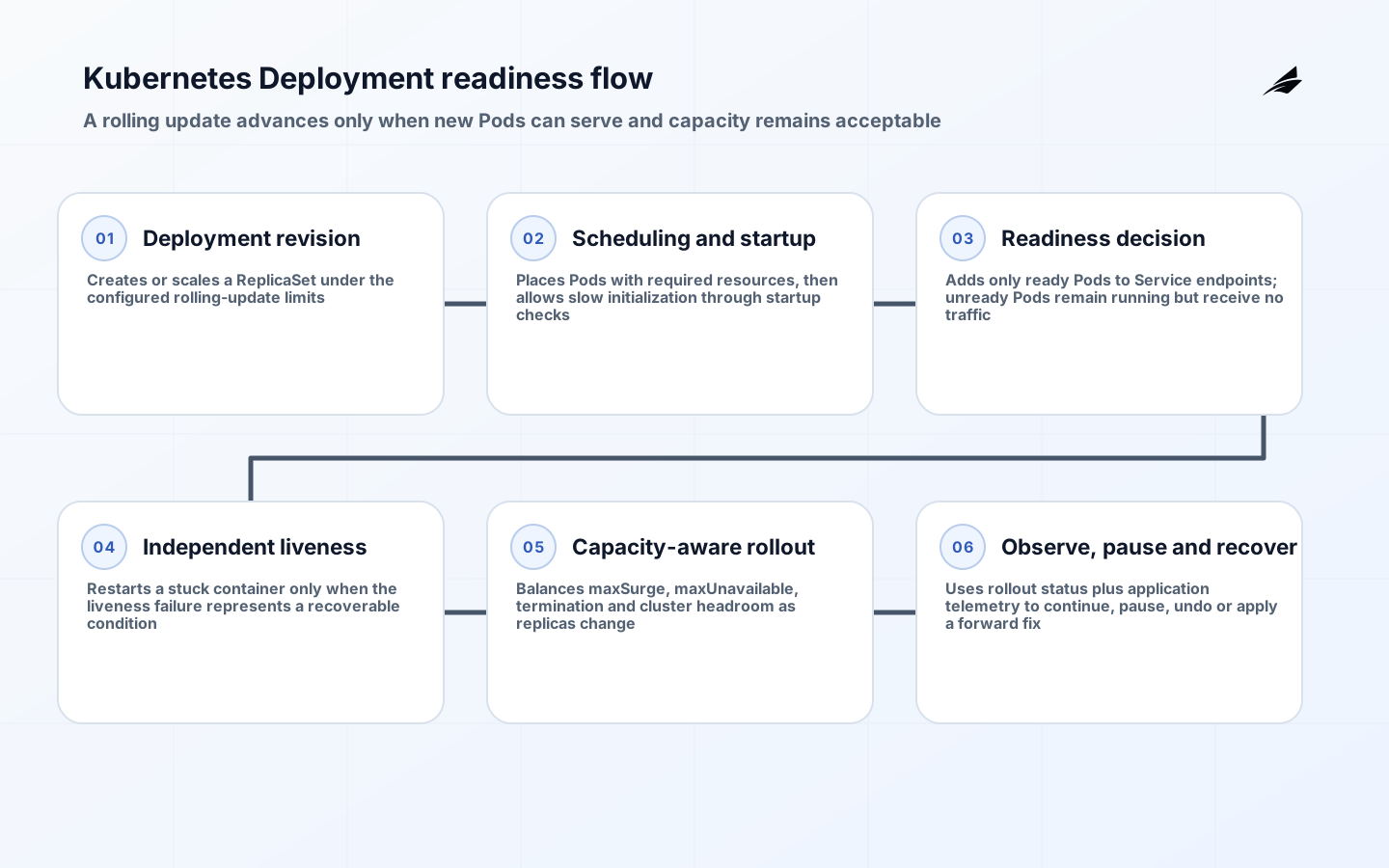
Kubernetes deployments are a cornerstone of modern cloud-native application development, but their implementation often leads to instability and complexity when approached without precision. Unlike traditional deployment strategies, Kubernetes deployments require explicit configuration to manage rolling updates, rollbacks, and resource allocation. This article focuses on actionable implementation details that ensure deployments are stable, efficient, and aligned with production requirements without unnecessary overhead. The goal is to provide concrete, tested configurations that address real-world challenges, such as handling application restarts, managing resource constraints, and ensuring smooth transitions between versions.
Core Deployment Concepts: Beyond the Basics
The Kubernetes Deployment resource is the primary mechanism for managing application updates. However, many teams misunderstand its role, treating it as a simple versioning tool rather than a comprehensive control plane for application lifecycle management. A deployment defines the desired state of a pod, including the number of replicas, image tags, and health checks. Crucially, it also specifies how updates should occur—through rolling updates, blue-green deployments, or canary releases. Understanding these mechanisms is essential for avoiding unintended downtime and ensuring that updates are applied safely.
Liveness Probes: Preventing Dead Applications
Liveness probes are critical for detecting when a container has become unresponsive. Without them, Kubernetes may continue to run a container that has stopped working, leading to cascading failures. The Kubernetes documentation emphasizes that liveness probes should be configured to run at intervals that match the application’s typical response times. For example, a web application might require probes every 10 seconds, while a database service might need longer intervals. Misconfigured probes can cause unnecessary restarts or prolonged downtime, so precise tuning is necessary.
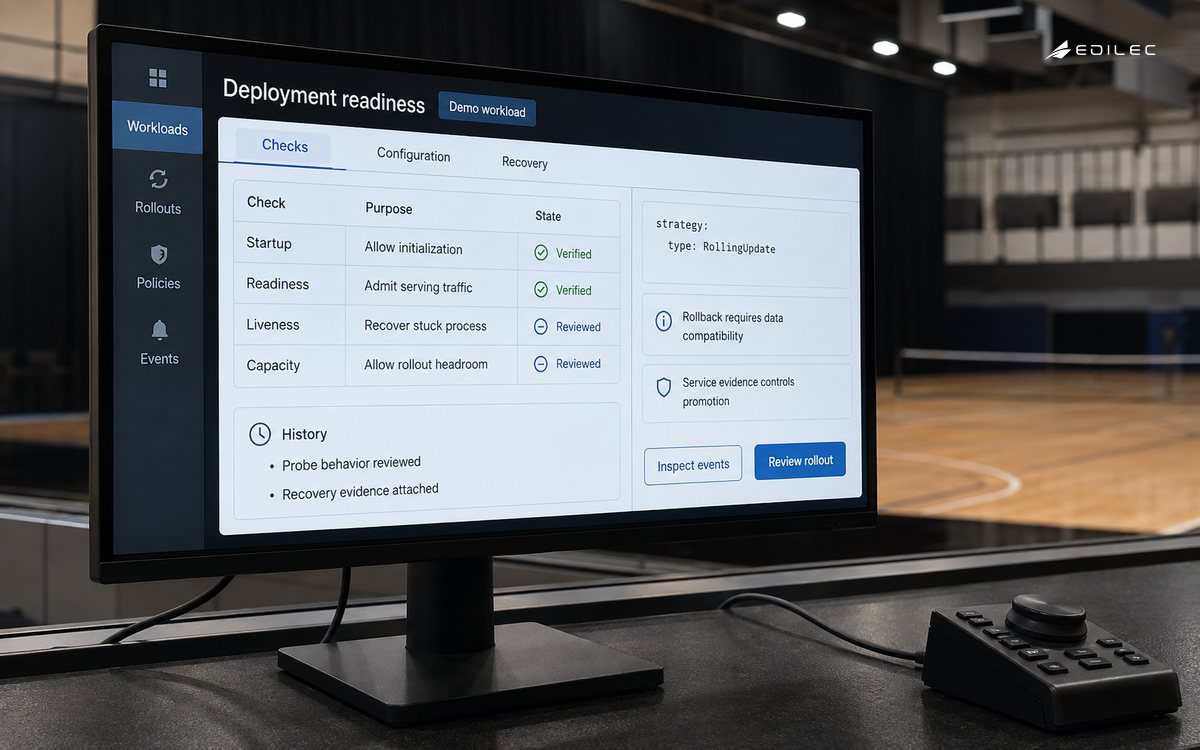
- Liveness probes must be tested in staging environments before production deployment.
- Avoid using liveness probes for services that require long-running processes, such as databases.
- Ensure the probe command is specific to the application’s health checks (e.g., HTTP status codes for web services).
Readiness Probes: Ensuring Service Availability
Readiness probes determine when a pod is ready to receive traffic. Unlike liveness probes, readiness probes are used to control traffic flow during deployments. If a pod fails a readiness check, it is removed from the service, preventing traffic from being routed to a non-functional instance. This is particularly important for applications that require high availability, such as e-commerce platforms or financial services. Misconfigured readiness probes can lead to service outages, so they must be carefully aligned with the application’s operational requirements.
| Probe Type | Purpose | Configuration Example | Common Pitfalls |
|---|---|---|---|
| Liveness Probe | Detects unresponsive containers | exec: ["/app/check-health"] | Overly frequent probes causing restarts |
| Readiness Probe | Controls traffic to healthy pods | httpGet: path: /health, port: 8080 | Incorrect path causing pods to be marked unhealthy |
| Startup Probe | Ensures containers start before readiness | exec: ["/app/startup-check"] | Missing startup probe for long-running services |
Resource Management: Avoiding Resource Starvation
Resource constraints are a common source of instability in Kubernetes deployments. Many teams allocate resources based on historical data or guesswork, leading to under-provisioning or over-provisioning. The Kubernetes documentation provides guidance on setting resource limits and requests, but practical implementation requires careful consideration of the application’s behavior. For instance, a microservice that handles high traffic may need more CPU and memory than a background task. Misconfigured resource limits can cause pods to be evicted or lead to performance degradation.
| Resource Type | Recommended Minimum | Maximum for High Traffic | Monitoring Tool |
|---|---|---|---|
| CPU | 200m | 1000m | Prometheus |
| Memory | 50Mi | 250Mi | Heapdump |
| Disk Space | 1Gi | 5Gi | StorageClass |
Disruption Budgets: Managing Unplanned Downtime
A PodDisruptionBudget limits how many Pods in a replicated application may be unavailable during voluntary disruptions handled through the Eviction API. It is not a downtime allowance, does not prevent involuntary failures, and does not constrain every deletion or a Deployment rolling update. Set it from the application’s quorum and serving-capacity needs, align its selector with the owning workload, and test node drains with the cluster operator. Availability still depends on replicas, placement, readiness, capacity, dependencies, and graceful termination.
In practice, disruption budgets must be calculated based on the application’s tolerance for downtime. For instance, a payment processing system might have a disruption budget of 2 minutes, while a content delivery network might tolerate up to 15 minutes. Teams often underestimate the impact of deployment-related downtime, leading to rollbacks that are too aggressive or too passive. It’s essential to test disruption budgets in staging environments before applying them to production.
Rollback Strategies: Ensuring Rapid Recovery
Rollbacks are a key part of Kubernetes deployments, allowing teams to revert to a previous version if a deployment fails. However, the default rollback mechanism may not be sufficient for complex applications. For example, if a deployment causes a service outage, the rollback might take too long or fail to restore the application to a stable state. To address this, teams should implement automated rollback triggers based on specific metrics, such as error rates or latency thresholds. This ensures that rollbacks happen quickly and without manual intervention.
Testing Approaches: Validating Deployment Stability
Testing deployments in production environments is a common pitfall. Many teams deploy directly to production without adequate testing, leading to instability. Instead, teams should implement a multi-stage testing process: staging, canary, and production. This allows for incremental validation of the deployment’s impact on the application. For example, a canary deployment might gradually route traffic to the new version while monitoring for errors. This approach minimizes the risk of widespread outages and ensures that the deployment is stable before full rollout.
Security Checklist: Protecting Deployments from Threats
Security is a critical aspect of Kubernetes deployments that often gets overlooked. The Kubernetes security checklist provides a framework for identifying vulnerabilities in deployment configurations. For example, insecure container images, misconfigured network policies, or excessive permissions can lead to security breaches. Teams should integrate security checks into their deployment pipeline, such as using tools like Trivy or Clair to scan container images for vulnerabilities before deployment.
Deployment Configuration Verification
Verify deployment configuration integrity by implementing automated validation checks against the deployment specification. This ensures that the deployment manifest adheres to the intended configuration without deviations. Use tools like Kubernetes' built-in validation hooks or custom validators to check for common misconfigurations such as incorrect resource requests, missing security contexts, or invalid labels. These checks should be integrated into the CI/CD pipeline to prevent invalid deployments from reaching production.
For deployments with complex resource requirements, implement a pre-deployment validation step that checks for resource constraints and interdependencies. This step should validate that the resource requests and limits align with the application's expected workload and avoid over-provisioning or under-provisioning. The validation should also ensure that the deployment does not violate any resource quotas or share critical resources with other workloads.
Deployment Configuration Precision
Implement precise deployment configuration by defining explicit roll-out strategies within Kubernetes deployments. This includes specifying the maximum number of simultaneous deployments, the desired state for each rollout phase, and the rollback threshold for triggering automatic rollbacks. By explicitly defining these parameters, you ensure that deployments proceed in a controlled manner, minimizing the risk of service disruption during updates.
Use the maxSurge and maxUnavailable fields in the deployment spec to enforce roll-out constraints. These parameters directly control the number of pods that can be unavailable during a deployment and the number of pods that can be temporarily over-provisioned. For example, setting maxSurge: 1 ensures that only one additional pod is deployed during a rollout, while maxUnavailable: 0 does not by itself guarantee availability; readiness, capacity, dependencies, and application behavior still determine the outcome during the update process.
Deployment Configuration Parameters
The maxSurge and maxUnavailable parameters in Kubernetes deployments define the maximum number of pods that can be scaled beyond the desired state during a rolling update. These values must be explicitly set to avoid unintended over-provisioning or under-provisioning during deployment phases. For example, a maxSurge: 1 allows one additional pod to be deployed while the existing pods are being updated, ensuring continuous service availability during the transition.
A maxUnavailable value of zero prevents the Deployment controller from intentionally reducing available replicas below the desired count during a rolling update, but it is not a zero-downtime guarantee. New Pods may fail readiness, nodes or dependencies may fail, and insufficient spare capacity may stall the rollout. Choose maxSurge and maxUnavailable from measured capacity and availability needs, then observe readiness, error rate, latency, saturation, and rollout progress before advancing.
Deployment strategy selection
Selecting the appropriate deployment strategy is critical for minimizing downtime and ensuring smooth transitions during updates. Rolling updates with a rolling update strategy are ideal for stateless applications, as they allow for incremental traffic shifts while maintaining application availability. This approach requires careful configuration of the maxSurge and maxUnavailable parameters to balance the load between new and existing pods. For stateful applications, blue-green deployments provide a safer path by maintaining two identical environments—one active and one standby—allowing for seamless traffic switching without downtime. The choice between these strategies should be guided by application statefulness, team capacity, and the tolerance for brief service interruptions.
When implementing rolling updates, the maxSurge parameter determines the number of additional pods that can be scheduled beyond the desired number during a deployment. This is particularly important for applications with high traffic volumes, as it ensures that the system can handle temporary spikes in demand without overwhelming the infrastructure. Conversely, maxUnavailable specifies the number of pods that can be taken offline during the update process. These parameters must be set based on the application's resilience requirements and the infrastructure's capacity to avoid service degradation during the transition.
Key takeaways
- Treat a Deployment as a desired-state and rollout controller, not as proof that an application is healthy.
- Give startup, readiness, and liveness probes different jobs; a failed readiness check should remove traffic without automatically restarting a healthy process.
- Set requests and limits from observed workload behavior, and validate scheduling capacity before choosing rollout surge settings.
- Use PodDisruptionBudgets for supported voluntary disruptions, while separately designing for involuntary failures and Deployment updates.
- Make rollback a tested application and data procedure; reversing an image does not reverse an incompatible schema or external side effect.
Frequently asked questions
Should every container have all three probe types?
No. Use a startup probe when initialization can legitimately take longer than steady-state health checks. Use readiness when the Pod may be running but unable to serve traffic. Use liveness only when restarting is a valid recovery for the detected failure. A poorly chosen liveness probe can amplify an overload or dependency outage, so test failure behavior before enabling it.
Does a PodDisruptionBudget protect against every outage?
No. It constrains supported voluntary evictions for selected Pods. It does not prevent node or application failures, and direct deletion can bypass it. Replication, topology, capacity, graceful termination, dependency resilience, and tested recovery remain necessary.
How should maxSurge and maxUnavailable be chosen?
Choose them from minimum serving capacity, startup duration, cluster headroom, dependency limits, and the speed at which telemetry can identify harm. Test the values under representative load and node placement. Percentages and absolute values behave differently at small replica counts, so calculate the actual Pod counts for each workload size.
When is kubectl rollout undo insufficient?
It is insufficient when the release changes data, queues, contracts, credentials, or external state in a way the prior version cannot understand. Use backward-compatible migrations, feature controls, reconciliation, and an explicit recovery procedure for those effects.
Conclusion
A production-ready Kubernetes Deployment connects manifest semantics to application behavior. The useful checklist therefore spans probes, resources, rollout capacity, graceful shutdown, disruption handling, security context, telemetry, data compatibility, and recovery. Validate the complete path in a production-like environment, expose the release gradually, and stop or reverse it when service evidence crosses agreed limits. Kubernetes can coordinate desired state, but the team remains responsible for defining what safe progress and safe failure mean for the service.