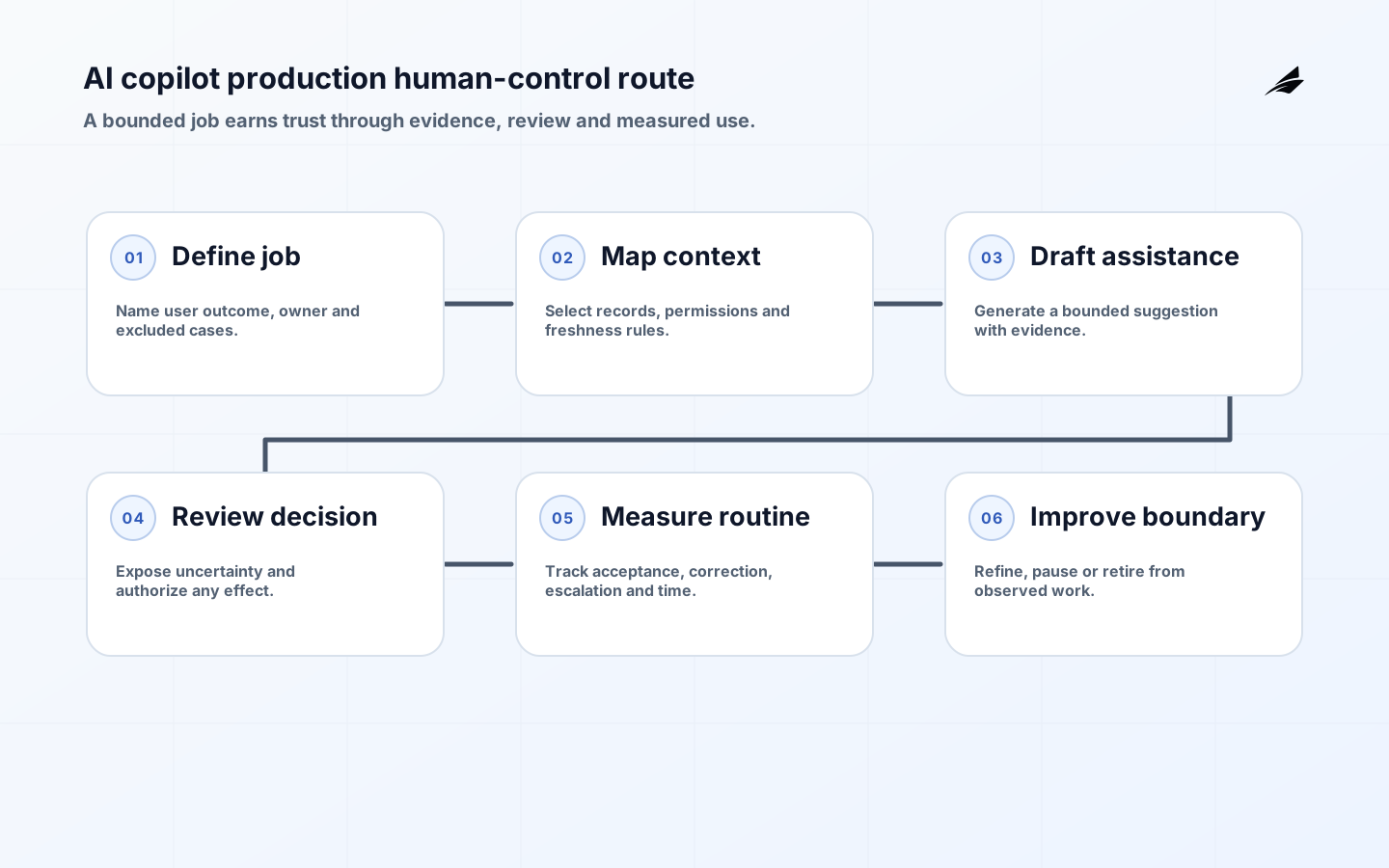
An AI copilot becomes a production product when it appears inside somebody's daily work, competing with established tools, time pressure, and professional judgment. Its value is not the number of suggestions it generates; it is the quality of decisions and completed work it helps a person produce. That requires a clear job map, role-aware context, visible evidence, editing control, and a route for users to reject the suggestion and continue without drama. The OpenAI agents guide is useful for thinking about agent components, but an effective copilot is primarily a work-design problem. AI Copilots for AI Automation supplies a practical perspective for engineering teams.
Map the job before the interface
Observe the current workflow closely enough to identify the costly pause: finding a policy, summarizing a case, comparing records, preparing a draft, or deciding which exception needs attention. Identify the user role, decision, source systems, handoffs, quality standard, and what happens after the suggestion. A copilot that adds a separate chat window can increase context switching even when its answers are good. Design the assistance around the user's existing moment of work. A support specialist may need cited draft language beside a ticket; an engineer may need an explanation linked to the repository context; a manager may need a compact variance explanation with a route to source data. The UI should preserve agency rather than disguise an automated decision as advice.

| Work moment | Useful copilot behavior | User control |
|---|---|---|
| Research | Find and cite approved sources | Open the source, narrow scope, or ignore the suggestion. |
| Drafting | Prepare a structured first draft | Edit every field and choose whether to send or save. |
| Triage | Highlight evidence and propose a route | Override the route and record a reason when needed. |
| Execution preparation | Assemble a pending action with current state | Review and explicitly confirm any material effect. |
Make evidence and uncertainty visible
Users calibrate trust from what they can inspect. Show source links, date or version, relevant record identifiers, and a concise description of missing information. Do not replace evidence with a persuasive rationale. A copilot should clearly distinguish a quoted policy, an extracted fact, an inference, and a recommended next step. When it cannot determine an answer, say why and direct the user to the ordinary path. This also reduces automation bias: people are less likely to accept a convenient suggestion as fact when the interface exposes its basis and limitations. Role and tenant checks belong before information enters the copilot context; a helpful screen must not become an alternate route around established access controls.
- Place assistance where the user already performs the decision or handoff.
- Show citations, record references, and source freshness for material recommendations.
- Support edit, dismiss, retry, and non-AI continuation without penalizing the user.
- Limit context to the user's current role, tenant, and declared task.
- Treat feedback as product evidence, not as an unstructured pile of thumbs-up signals.
Protect the copilot boundary
A copilot reads user input, documents, and connected service responses, all of which may contain misleading or sensitive material. The OWASP Top 10 for LLM Applications is relevant because a user-facing assistant can be exposed to prompt injection, sensitive-data disclosure, and excessive agency. Keep permissions, calculations, and state changes in deterministic services. When the copilot proposes a tool action, present the effect and use an authenticated workflow boundary for approval and execution. Maintain redaction and retention rules for logs and feedback. The product should help users work with data they are already permitted to use, not make it easier to aggregate or expose data beyond that role.
Pilot with real routines
Pilot with a representative group of users and their actual cases. Define a baseline before launch: time to complete work, error or rework categories, escalation volume, and user effort. Then measure accepted and edited suggestions, successful completion, time saved, source-open rate, corrections, abandonment, and incidents. Avoid treating usage alone as success; people may use a copilot because it is mandated or because there is no alternative. Interview users about where the assistance interrupts them, where it improves confidence, and what evidence they need to make a call. The NIST Generative AI Profile supports this attention to human interaction and post-deployment monitoring.
| Signal | What it may mean | Product response |
|---|---|---|
| High acceptance, low source opening | Users may be over-relying on opaque advice | Improve evidence visibility and sample outcomes for quality. |
| Frequent edits to one field | The task or source contract is incomplete | Fix the structured input or prompt rather than hiding the edit. |
| Low repeat use | The assistance does not fit the work moment | Observe workflows and reduce context switching. |
| Rising escalation quality | Users receive clearer case evidence | Preserve the pattern and consider careful expansion. |
Operate a shared service
Keep release ownership close to the work. A change that improves drafting for one support queue may create confusion for another, so pilot notes should identify the role, workflow stage, evidence sources, and support contact affected. This gives product teams a practical way to expand a copilot only after the first routine is genuinely stable.
Support feedback should distinguish incorrect content, missing evidence, poor workflow fit, access problems, and user-training questions. Those categories lead to different owners and fixes, and they stop a copilot team from treating every complaint as an undifferentiated model-quality issue.
Adoption is an operating condition, not a launch announcement. Identify who trains users, answers first-line questions, owns knowledge articles, and decides when feedback represents a product defect versus a local process issue. Explain the copilot's scope in plain work terms and show users what it can and cannot do at the point of use. Avoid performance incentives that pressure staff to accept suggestions or suppress reports of bad output. A successful pilot often reveals that different roles need different levels of context, explanation, and control; design those differences deliberately instead of offering one generic assistant to everyone. Keep product analytics interpretable by linking events to the workflow stage rather than tracking every interaction. When users choose the non-AI route, treat that choice as evidence about the job design. It may signal a missing source, an interface interruption, a confidence gap, or a legitimate case where human judgment should remain primary.
- Name a product owner, domain owner, and support route before inviting users into a pilot.
- Train users on evidence display, correction controls, escalation, and the non-AI workflow.
- Collect structured feedback tied to the job step, suggestion type, and observed outcome.
- Review usage by role and case complexity to avoid one average hiding a poor user experience.
- Do not reward acceptance rate; reward completed work, appropriate challenge, and safe escalation.
- Publish release notes when a change alters the copilot's context, authority, or visible behavior.
A production copilot needs product ownership, technical support, domain stewardship, and a release process. Version its prompts, retrieval settings, models, and interface behavior; test material changes against representative routines; and preserve a rollback or feature flag. Publish an understandable support route for incorrect, unsafe, or inaccessible suggestions. Make the non-AI workflow reliable, because dependency outages and uncertain cases are normal operating conditions. Engineering teams should review feedback and incident categories with the people who own the job, then convert confirmed patterns into tests, better data, or interface changes. This creates a collaboration tool rather than a novelty layer that users quietly work around.
Frequently Asked Questions
Question: What should an AI copilot be allowed to do first? Answer: Start with a bounded assistive task, such as drafting or classification, and keep external writes behind deterministic permissions or human approval until evidence supports a wider boundary.
Question: How should a team measure a copilot? Answer: Measure completed work, correction rate, escalation quality, time saved, and harmful or unauthorized outcomes rather than usage volume alone.
Does a copilot need to automate actions to be valuable? No. Cited research, drafting, and case preparation can materially improve work while keeping the person in control. How should teams measure trust? Look at correction patterns, source inspection, escalation quality, repeat use, and interviews, not a single satisfaction score. Can a copilot access all company information? No. It should respect existing roles, tenant boundaries, and data purpose. What is the difference from a general chatbot? A production copilot is integrated with a defined job, approved context, controls, and support model. AI guardrails adds important context for those controls.
Key Takeaways
- Build copilots around a real decision or handoff inside established work.
- Expose evidence, uncertainty, editing controls, and a dependable non-AI route.
- Enforce role-aware context and keep consequential action behind conventional controls.
- Measure completed work and correction patterns, then improve with the people who use the service.
Conclusion
An AI copilot becomes dependable when it strengthens professional judgment instead of trying to replace it invisibly. Map the job, show the evidence, preserve user control, and operate the product with the same care as any shared work system. That is how assistance becomes genuinely adopted rather than merely available.
Run a copilot readiness review
A production copilot should be reviewed on a real work sample rather than a polished demonstration. Select ordinary tasks, ambiguous requests, missing context, stale records, malicious instructions and cases that require escalation. For each case, retain the source context, the proposed answer or action, the confidence or uncertainty signal, the reviewer decision and the time saved or added. The NIST Generative AI Profile is useful because it treats generative behavior as a lifecycle risk, while the NCSC secure AI guidance keeps design, deployment and operation connected.
Adoption is an operating measure, not a vanity count of enabled users. Track acceptance, correction, override, escalation, time-to-complete and harm avoided by job type. A copilot that drafts a response may need different controls from one that changes a ticket, sends a customer message or edits a record. Give each action a deterministic authorization check and preserve the distinction between a suggestion and a committed effect. For related practice, see the AI copilot guide, AI guardrails, and human-in-the-loop automation.
Further Edilec context: AI copilot practical guide, AI guardrails guide, Human-in-the-loop guide. The operating decision applies those references specifically to ai copilots in production: job design, evidence and human control.
Source trail: NIST AI RMF supplies the lifecycle frame; NIST Generative AI Profile adds generative-system risk considerations; NCSC secure AI guidance follows design into operation; and the OWASP LLM Top 10 helps test prompt, output and agency risks. These references support a copilot boundary that remains reviewable.