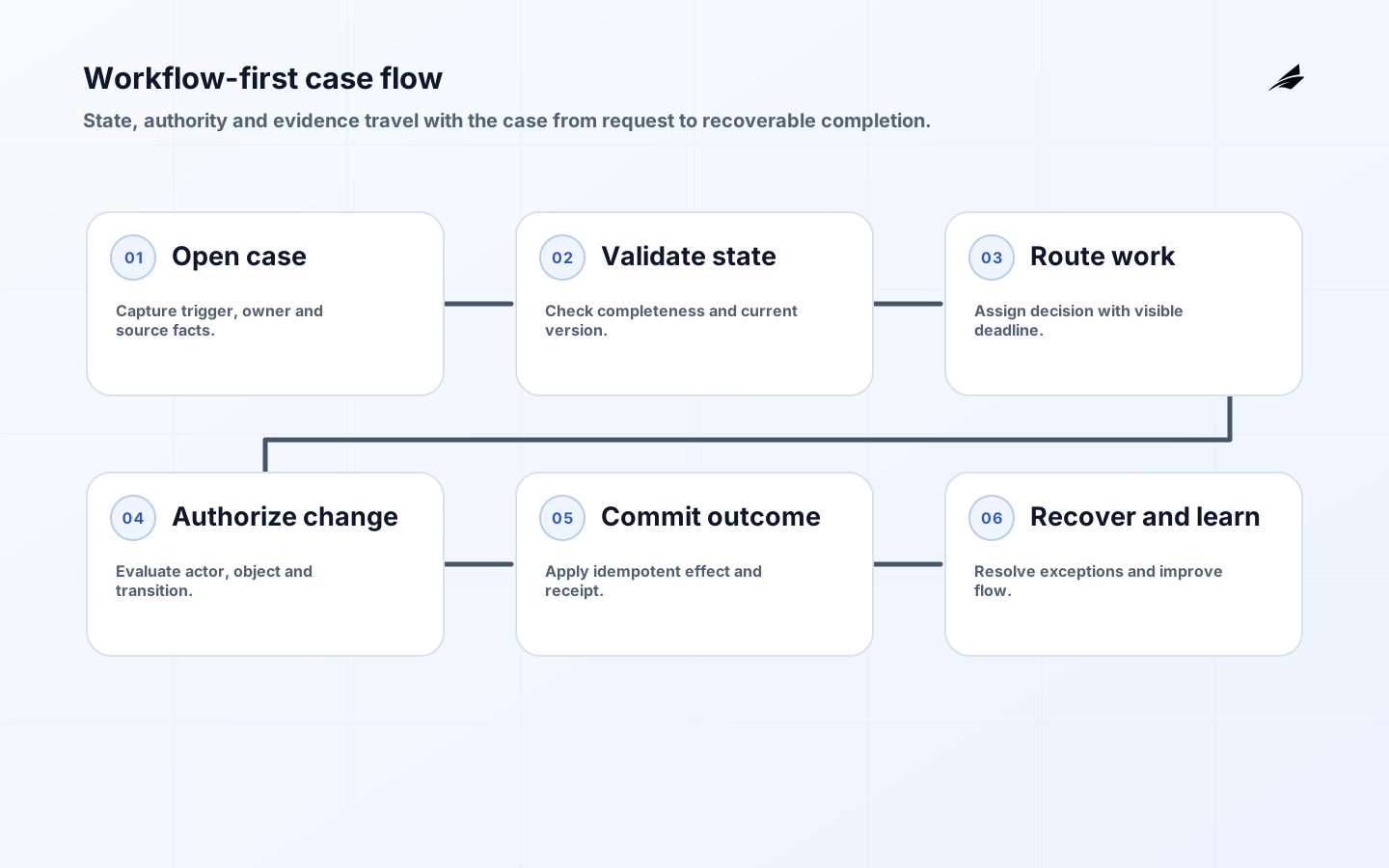
Workflow-first web applications are designed around a unit of work and its lifecycle rather than around a collection of screens. The central object may be a request, claim, order, inspection, approval or support case. For that object, the team defines how work begins, which states are true, who owns the next decision, what evidence is required, what external systems are authoritative and how the case ends or recovers. Interface design then gives each actor a clear view of the current state and permitted next actions. This approach prevents the common failure in which a polished portal records data while the actual workflow survives in inboxes, chat and spreadsheets.
For connected implementation decisions, see admin dashboard architecture, API platform design, approval workflow software, and multi-role business applications. These guides are most useful when their controls are adapted to the same records, owners and consequences rather than applied as independent checklists.
Translate process meaning into enforceable software
A process model is a communication tool, not an executable truth by itself. The Object Management Group’s BPMN specification offers shared notation for events, activities, gateways, messages and participants. Use only the detail needed to expose decisions and handoffs, then translate each material transition into application rules: preconditions, actor, input, resulting state, emitted event, external effect and failure behavior. Store a stable case identifier and transition history so support can reconstruct how a record reached its current state.
Security and accessibility must shape the transition, not be added after the screen. OWASP ASVS provides testable requirements for authorization, validation, session handling and logging. WCAG 2.2 applies to the complete responsive process, including status messages, focus movement, errors and authentication. The NIST SSDF connects requirements and verification to the development lifecycle, while OpenTelemetry concepts help teams correlate traces, metrics and logs across transitions and integrations.
Model an approval that can change while it waits
Consider a purchase request that requires budget and security review. The case begins with a requester, supplier, amount, cost centre and evidence. Submission validates required fields and freezes the reviewed version. Budget approval and security review may proceed in parallel, but each decision binds to that exact version. If the requester changes the supplier or amount, the application invalidates affected approvals and explains why. A generic “pending” label would hide whether the case awaits a reviewer, missing evidence, an unavailable integration or a changed request; explicit states preserve ownership and reporting.

The workflow also crosses systems. Finance owns the cost-centre status, identity services own current roles, and procurement owns the purchase order. The application should fetch current authority at the point of action, use idempotent commands for external creation, and keep receipts that connect the case to the resulting order. If order creation times out, the case enters a recoverable exception state rather than inviting a second click that may duplicate the purchase. Acceptance means a user can complete, deny, revise and recover the journey, while support can explain every state from visible evidence.
| Case concern | Design decision | Test case |
|---|---|---|
| State | Use factual states with allowed transitions | Missing evidence and reopened case |
| Ownership | Name person, queue or service responsible now | Unavailable reviewer and acknowledged handoff |
| Authority | Check permission at each transition | Direct API attempt by an unauthorized actor |
| Integration | Use contract, timeout and idempotency rules | Lost response after external success |
| Evidence | Retain version, actor, reason and receipt | Explain an approval after source data changes |
Key takeaways
- Model states and transitions before designing screens or navigation.
- Give every case an owner, an allowed next action, and a route for missing information or reversal.
- Keep system authority explicit when a workflow crosses multiple records.
- Make status, errors, and handoffs accessible to every person performing the work.
- Release one complete journey and measure delay, rework, and completion quality.
Start with a state model
Name states as facts, not as vague labels. A request might be received, awaiting information, ready for review, approved, fulfilled, cancelled, or corrected. For every transition, define the actor, preconditions, required data, emitted event, and visible result. This makes policy discussions concrete: can a reviewer approve their own request, may a completed case reopen, and who is responsible when an upstream record changes? Include states that represent ambiguity rather than forcing people to misuse a convenient label. An explicit waiting-for-information state is more useful than an invisible note because it can have an owner, a service target, and a reportable reason. The model becomes a shared contract for product, engineering, operations, and quality work.
| State | Allowed actor | Required evidence |
|---|---|---|
| Received | Intake service or coordinator | Source identifier and basic validation |
| In review | Assigned specialist | Current facts and decision criteria |
| Awaiting information | Case owner | Missing item, requester, and due date |
| Completed | Authorized worker | Outcome, timestamp, and external update receipt |
Design ownership and handoffs
A workflow stalls when responsibility is implied rather than visible. Decide whether ownership belongs to a person, a queue, a team, or a service, and show that fact near the case state. Handoffs need a reason and acknowledgement, especially when the recipient must make a different kind of decision. Avoid a generic comments field as the only coordination mechanism; use structured fields for the item requested, deadline, and effect on the case. For high-volume work, provide a queue that explains why an item is there and what will happen if no one acts. That design makes work measurable and reduces the private messages that conceal bottlenecks from managers and support staff.
Set data and authority rules
Workflow-first web applications usually compose data from more than one system. Document which system owns the customer, financial value, eligibility rule, and final outcome. When the application stores a local work state, identify how it is reconciled if an upstream record changes after review begins. Keep stable IDs and source timestamps so a person can investigate a discrepancy. Authorization must be evaluated for the transition, not inferred from the ability to view a page. The OWASP Application Security Verification Standard is a useful control reference for access checks and auditability. A workflow is trustworthy only when it can prevent an unauthorized step and explain a legitimate one.
| Rule | Why it matters | Implementation evidence |
|---|---|---|
| One authority per fact | Avoids silent conflict between copies | Source reference and reconciliation rule |
| Server-side transition checks | Prevents bypassing hidden interface controls | Negative authorization tests |
| Immutable decision record | Explains outcome after data changes | Actor, time, prior state, reason |
| Idempotent integration updates | Avoids duplicate external effects | Command key and delivery receipt |
Make the workflow accessible
Operational work often involves repeated form entry, status changes, and dense queues. Make the sequence understandable without relying on colour, hover, or a mouse. Put labels and instructions next to the fields they govern; preserve focus after an action; and announce success or failure in a way assistive technology can perceive. WCAG 2.2 offers concrete success criteria for these reviews. Design error messages to say what is wrong, where it is, and whether existing work was saved. Accessibility testing should use realistic workflow conditions, including long cases, intermittent errors, and keyboard-only reassignment. A path that is merely usable in a quiet demonstration may break down for a person processing a queue all day.
Build and test a vertical slice
Build one case through all meaningful layers: intake, identity, state transition, validation, data read, notification, audit event, and recovery. This slice surfaces design disagreements earlier than a collection of disconnected pages. Test normal, denied, incomplete, duplicate, and delayed paths with examples supplied by the process owner. Apply NIST SSDF practices to define security requirements, control the build, and verify the implementation. The release criterion should be evidence that a real user can complete the selected journey and that support can diagnose a failure, not a percentage of screens marked complete.
Review the workflow against real operating conditions
Use a tabletop exercise to run representative cases through the state model with the people who perform the work. Give each participant the information they would actually have at that moment and ask them to choose the next action. Include a missing document, an unavailable approver, an upstream change, a duplicate message, and an urgent exception. Notice where the group needs a private conversation or external spreadsheet to continue; that is usually an unmodelled rule, ownership gap, or missing evidence field. Then rehearse recovery: who detects a stalled case, who can correct a mistake, and what outcome is communicated to the requester? This review produces better requirements than a static flowchart because it tests whether the model supports human judgment and coordination under the imperfect conditions that distinguish production work from a demo.
| Scenario | Question to test | Expected evidence |
|---|---|---|
| Incomplete intake | Can a case wait without losing accountability? | Visible missing item, owner, due date, and next action |
| Reassignment | Does responsibility move without obscuring prior work? | Handoff reason, recipient acknowledgement, and preserved history |
| Policy change | What happens if a rule changes during review? | Re-evaluation path, notification, and recorded policy version |
| Duplicate event | Can an upstream message arrive twice safely? | Idempotent transition and one explainable case history |
| Dependency delay | Can users see a pending result and recover later? | Durable status, retry owner, and correlation identifier |
| Unauthorized attempt | Does the system reject a forbidden transition? | Server denial, useful message, and security event |
| Correction | Can a legitimate mistake be repaired transparently? | Reversal or amendment reason linked to original decision |
| Urgent exception | Who may override the normal route and why? | Controlled authority, expiry, and post-event review |
| Absence | What happens when the assigned person is unavailable? | Queue fallback, escalation timing, and accountable manager |
| Data mismatch | Which record resolves disagreement between systems? | Authority rule, reconciliation task, and visible state |
| High volume | Does queue work remain understandable at peak? | Bounded query, sort explanation, and ageing indicators |
| Release rollback | Where do new cases go if the path is withdrawn? | Business fallback, duplicate prevention, and user communication |
Measure flow and improve
Emit events at state changes, assignments, validation failures, escalations, and outcomes. Correlate them with a case ID while avoiding unnecessary sensitive content. The OpenTelemetry Specification can help connect user actions to service calls and dependency issues. Review cycle time by state, queue age, rework, abandonment, and exception reasons. Then speak with people who used the release: did the software remove a handoff or simply document it more neatly? DORA research is a useful prompt to connect delivery measures with organizational outcomes. Change one constraint at a time, such as unclear ownership or a slow integration, and verify that the intended operating result improved.
Frequently asked questions
Does every workflow-first application need a workflow engine?
No. A clear state model and server-side transition rules are needed regardless of tooling. A dedicated engine can help when processes are long-lived, highly configurable, or require orchestration across many services, but it also introduces an operational product that must be governed and supported.
How should teams handle exceptions?
Represent recurring exceptions explicitly with a reason, accountable owner, and recovery route. Do not hide them in free-text comments or administrator changes. Rare events can have a controlled escalation procedure, but they still need enough evidence to explain what happened and restore the case safely.
Conclusion
Workflow-first web applications make the path to a legitimate outcome visible. By modelling states, ownership, authority, and recovery before development, a team can build software that respects how work actually happens and improves it with evidence over time.