Kubernetes GPU scheduling begins with an integer extended-resource request, but efficient accelerator operations do not end there. Default scheduling can place a pod on a node with a healthy advertised device; it does not know whether the job should wait for a larger allocation, whether CPU and memory are balanced, whether devices share a fast interconnect, or whether an interactive notebook should displace a training run. Those choices require workload classes, queue admission, node policy, and device telemetry.
Stranding appears in several forms: an idle GPU on a node whose remaining CPU or memory cannot fit pending work; scattered free devices that cannot satisfy a multi-GPU job; capacity held by dormant notebooks; incompatible model, driver, partition, or topology; and a queue that admits work in arrival order despite different size and priority. Measure each form separately. A cluster-wide utilization average can look healthy while the only devices suitable for an urgent workload remain unavailable.
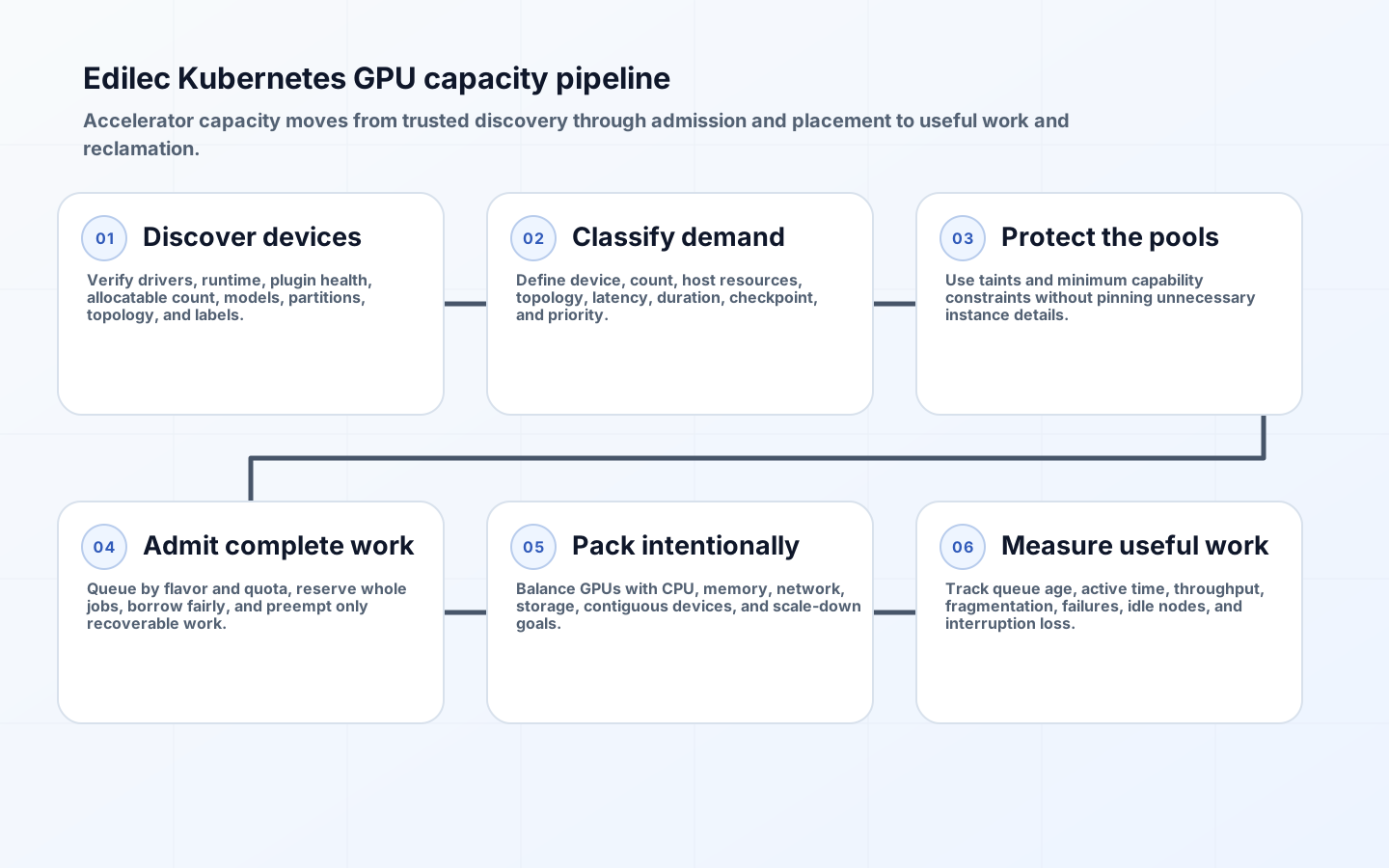
Classify GPU workloads through six capacity stages
Create workload classes for interactive development, online inference, single-GPU batch, distributed training, and maintenance. For each, record accelerator model or capability, count, partition or sharing mode, CPU, memory, local disk, network, topology, runtime, maximum queue wait, run duration, checkpoint ability, preemption tolerance, and priority. Map classes to approved node pools and quotas. This turns individual manifests into a capacity portfolio and exposes requests that are more specific than the application requires.

| Workload class | Admission objective | Placement emphasis | Interruption policy |
|---|---|---|---|
| Online inference | Low activation and serving latency | Warm compatible nodes near dependencies | Protect replicas and roll gradually |
| Interactive notebook | Bounded startup and idle lifetime | Small shared or partitioned devices where supported | Warn, checkpoint and reclaim idle sessions |
| Single-GPU batch | High throughput over time | Bin pack GPU plus balanced CPU and memory | Queue and preempt only if restartable |
| Multi-GPU training | Gang availability and topology | Co-located devices and fast fabric | Checkpoint before controlled preemption |
| Opportunistic experiment | Use spare capacity | Broad compatible pool | Lowest priority and fully restartable |
Establish trustworthy device discovery and health
Administrators install vendor drivers and a device plugin. The GPU scheduling guide explains that a plugin exposes resources such as nvidia.com/gpu or amd.com/gpu, requested through container limits. The device plugin framework registers devices with kubelet and reduces allocatable count when a device becomes unhealthy. Monitor plugin readiness, registration, allocatable resources, driver and runtime versions, node health, and allocation failures.
Use Node Feature Discovery or another governed mechanism for model, memory, interconnect, partition, and capability labels. Protect labels used for isolation from untrusted kubelet modification. Validate that every node image contains compatible driver, container runtime hooks, monitoring exporter, and plugin. Roll upgrades through a canary pool with actual kernels and models. A node that advertises a GPU but fails initialization after allocation creates a costly retry loop and misleading capacity count.
Isolate GPU pools without over-constraining pods
Taint accelerator nodes so ordinary workloads do not consume their CPU and memory accidentally, and add tolerations only to approved GPU workloads. Pair the taint with affinity or node selectors that express the minimum compatible capability. Avoid pinning exact instance types when several models can run the job; broad capability labels give node autoscaling more acquisition options. Conversely, do not let a job land on an untested device merely because the generic extended resource name matches.
Balance non-GPU resources. A container that asks for a whole GPU but very little CPU and memory may leave the device underfed; an oversized host request can strand devices. Derive class defaults from profiler evidence and expose exceptions. For multi-GPU jobs, include local storage, network interface, NUMA, and interconnect requirements where the vendor stack and scheduler support them. Kubernetes' integer resource alone does not express every topology relationship.
Queue admission before creating unschedulable demand
Batch work benefits from admission control rather than thousands of active Pending pods. Kueue's ClusterQueue governs resource flavors, nominal quotas, borrowing, cohorts, and preemption for admitted workloads. Create LocalQueues for teams or namespaces and ClusterQueues for capacity policy. Model accelerator type and topology as resource flavors where appropriate, and set quotas from real inventory. Admission should reserve the complete workload before it starts when partial startup wastes capacity.
Fair sharing is a policy decision, not a default synonym for equal jobs. Weight tenants, set borrowing and lending rules, and establish PriorityClasses from business need. Kueue preemption documentation explains within-queue and cohort behavior. Require checkpoints before making long jobs preemptible, and measure lost compute from every interruption. For online inference, keep queue-based batch policy from consuming the emergency headroom needed for serving recovery.
| Observed waste | Likely cause | Correction | Verification metric |
|---|---|---|---|
| Free GPU but pod Pending | Model, topology, taint or non-GPU mismatch | Inspect scheduler filters and loosen only false constraints | Pending reasons by workload class |
| One free GPU on many nodes | Scattered placement | Bin pack compatible single-GPU work | Largest contiguous free block |
| GPU allocated but low device use | Dormant session or input bottleneck | Idle policy, profiling, CPU and I/O balance | Active time plus allocation time |
| Queue wait high while nodes idle | Admission flavor differs from node labels | Reconcile flavors and inventory | Admitted capacity versus allocatable |
| Nodes stay up after jobs finish | Autoscaler blocked by pods or constraints | Repair scale-down blockers and pool policy | Empty accelerator-node duration |
Tune bin packing with fragmentation evidence
The scheduler's resource bin packing guidance describes MostAllocated and RequestedToCapacityRatio scoring through NodeResourcesFit, including weighting extended resources. Favoring nodes with allocated GPUs can leave other nodes empty for scale-down and preserve contiguous devices for larger work. Scheduler-wide changes affect every workload using that profile, so test a dedicated profile and compare throughput, pending time, fragmentation, and consolidation before rollout.
Do not optimize solely for device allocation percentage. Track useful accelerator active time, memory occupancy, model throughput, job completion, queue age, startup, checkpoint overhead, allocation failures, health losses, energy or cost, and idle node duration. Distinguish reserved from used GPU time. Sharing or partitioning can improve small-workload density where vendor support and isolation are acceptable, but it adds performance interference and observability complexity. Publish which classes may share and how contention is tested.
Coordinate GPU queues with node autoscaling
Queue admission and node provisioning must share the same capacity vocabulary. Resource flavor labels, workload affinity, NodePool or node-group constraints, zones, and accelerator offerings should describe compatible sets. If a ClusterQueue admits a workload for a flavor that the node autoscaler cannot create, the job moves from queued to indefinitely Pending and may block fairness calculations. Test every flavor by scaling its node pool to zero and admitting a representative workload.
Keep a small warm floor for latency-sensitive classes and let batch capacity scale more aggressively. GPU nodes often have long launch, driver initialization, image pull, and model-loading paths, so measure from admission through useful computation. Consolidation should not remove a node between closely spaced jobs when replacement cost exceeds idle cost. Use separate timing and disruption policies for accelerator pools rather than copying CPU-node defaults.
Cloud capacity shortages require fallback policy. Decide whether a workload may use another accelerator model, zone, purchasing option, or smaller device count, and validate numerical behavior and performance before declaring those substitutions compatible. Some training jobs can resume on a different shape from checkpoints; serving replicas may require model recompilation or distinct images. Encode acceptable alternatives through classes and admission, not incident-time manifest edits.
Cost attribution should follow allocation and useful work. Label jobs, queues, owners, model versions, and environments; associate node idle with the capacity policy that retained it. Report queue wait, job runtime, allocated GPU-hours, active GPU-hours, interrupted work, and failed starts together. This reveals whether poor economics come from scheduling fragmentation, application input pipelines, idle development sessions, checkpoint loss, or conservative reliability headroom, each of which needs a different owner.
Key takeaways
- Classify workloads by device, topology, service objective, duration, and checkpoint ability.
- Treat device-plugin health and governed capability labels as the scheduling foundation.
- Protect GPU nodes with taints while keeping workload constraints as broad as compatibility permits.
- Use queue admission, quotas, cohorts, and priority for batch capacity rather than uncontrolled Pending pods.
- Measure fragmentation and useful device work, not only cluster-wide allocation.
Frequently asked questions
Why are GPU requests commonly specified as limits?
Extended devices are integer resources and are not overcommitted like CPU. Kubernetes permits specifying the GPU limit, with the request defaulting accordingly, or equal request and limit values.
Can multiple pods share one GPU?
Only through vendor-supported partitioning or sharing mechanisms beyond the basic whole-device model. Validate isolation, performance, metrics, and failure behavior for the chosen stack.
Is high GPU utilization always the goal?
No. Online services may reserve headroom for latency and failover. Optimize against workload objectives and useful throughput, with utilization as one input.
Conclusion
Efficient GPU scheduling is a pipeline from trustworthy device inventory through workload classification, admission, placement, execution, and reclamation. Kubernetes provides the device and scheduler primitives; queueing and organizational policy decide who receives scarce capacity and when. When teams measure compatibility, fragmentation, queue delay, and useful work together, they can raise utilization without turning accelerators into an unpredictable shared bottleneck.