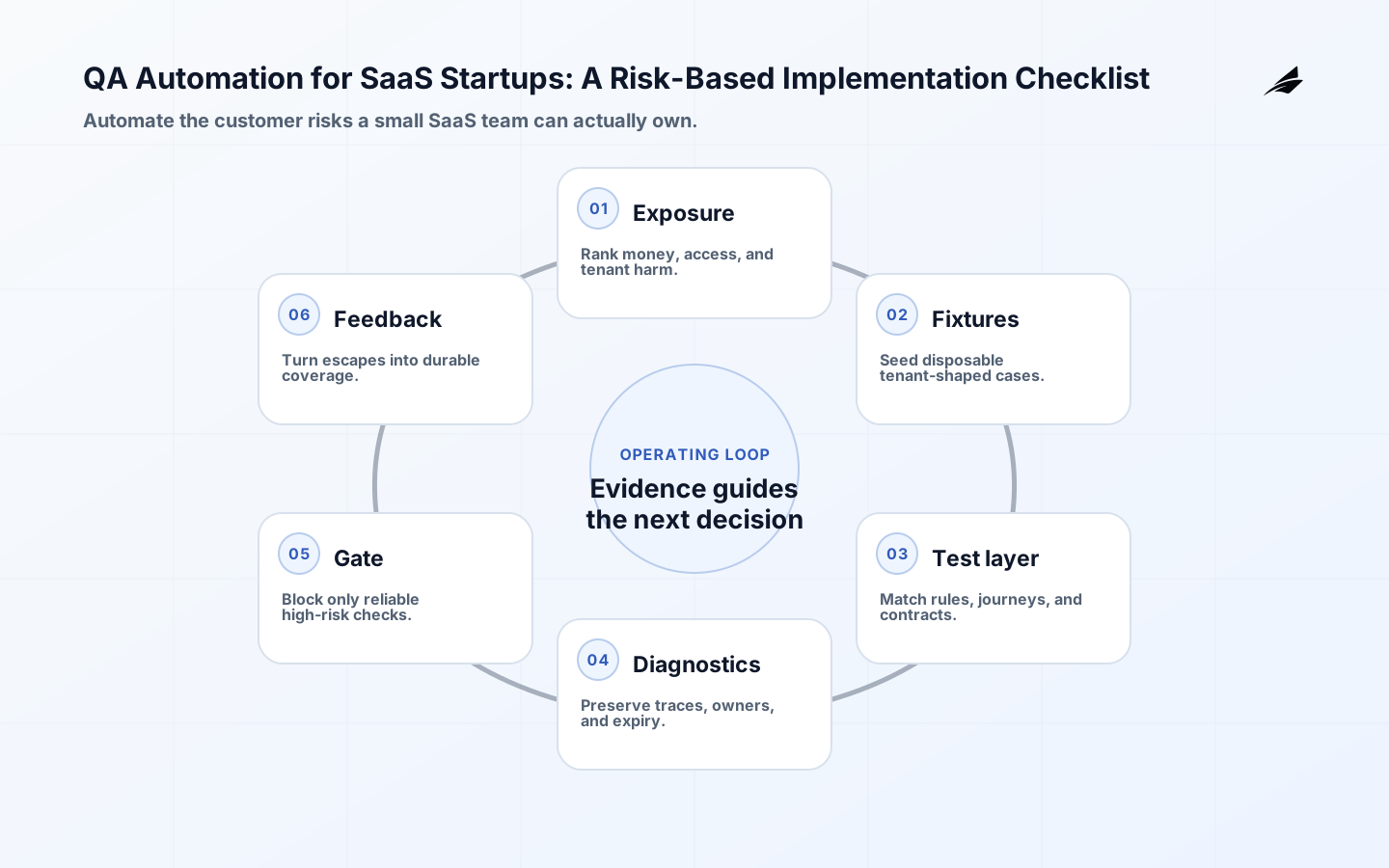
Rank QA by risk. Name owner and failure; define expansion controls.
See the SaaS startup QA guide, the SaaS startup QA FAQ, and the broader SaaS QA checklist. References: Playwright Best Practices, NIST SSDF, OWASP ASVS 5.0, WCAG 2.2, and UK service QA guidance. Apply them to actual risks.
Prioritize startup risks for first automation
For a small SaaS team, rank automation by the cost of a wrong result and release frequency. Begin with billing state, entitlement changes, login, and tenant boundaries, then cover one journey from signup to first value. Put pricing and permission rules in unit or API checks; reserve browser coverage for customer handoffs. Keep exploratory testing for workflows whose contract is still moving, and record why each check earns maintenance.
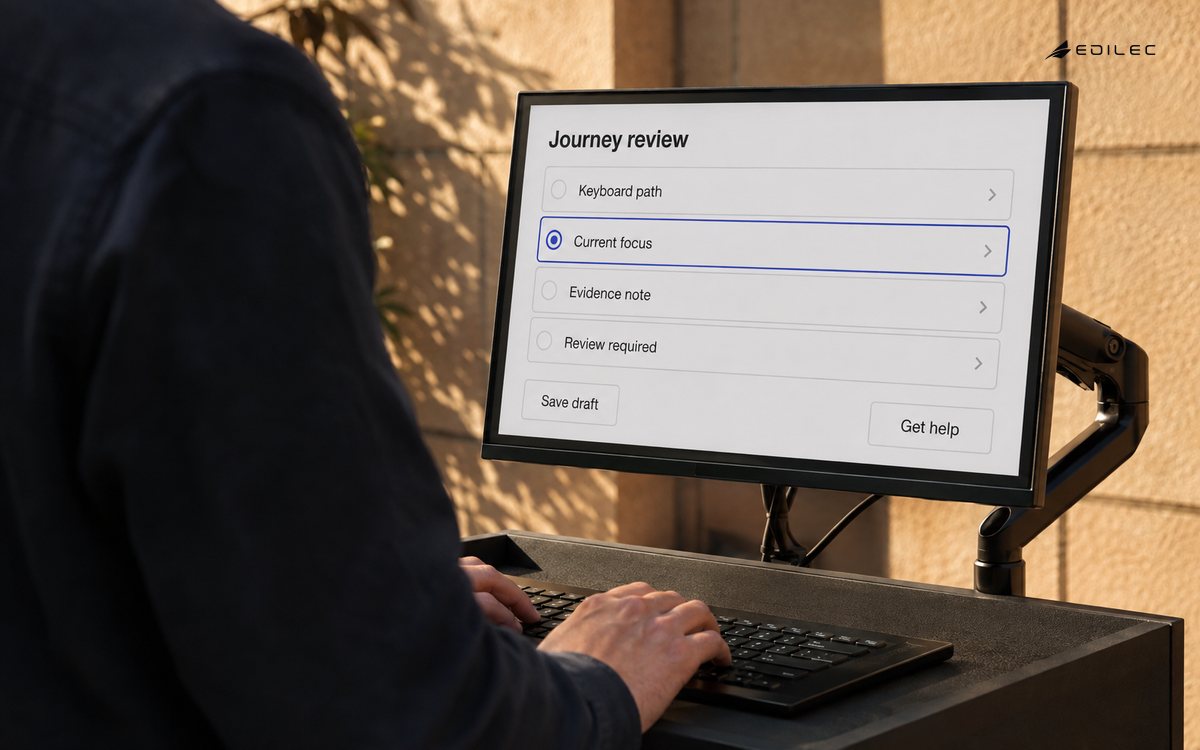
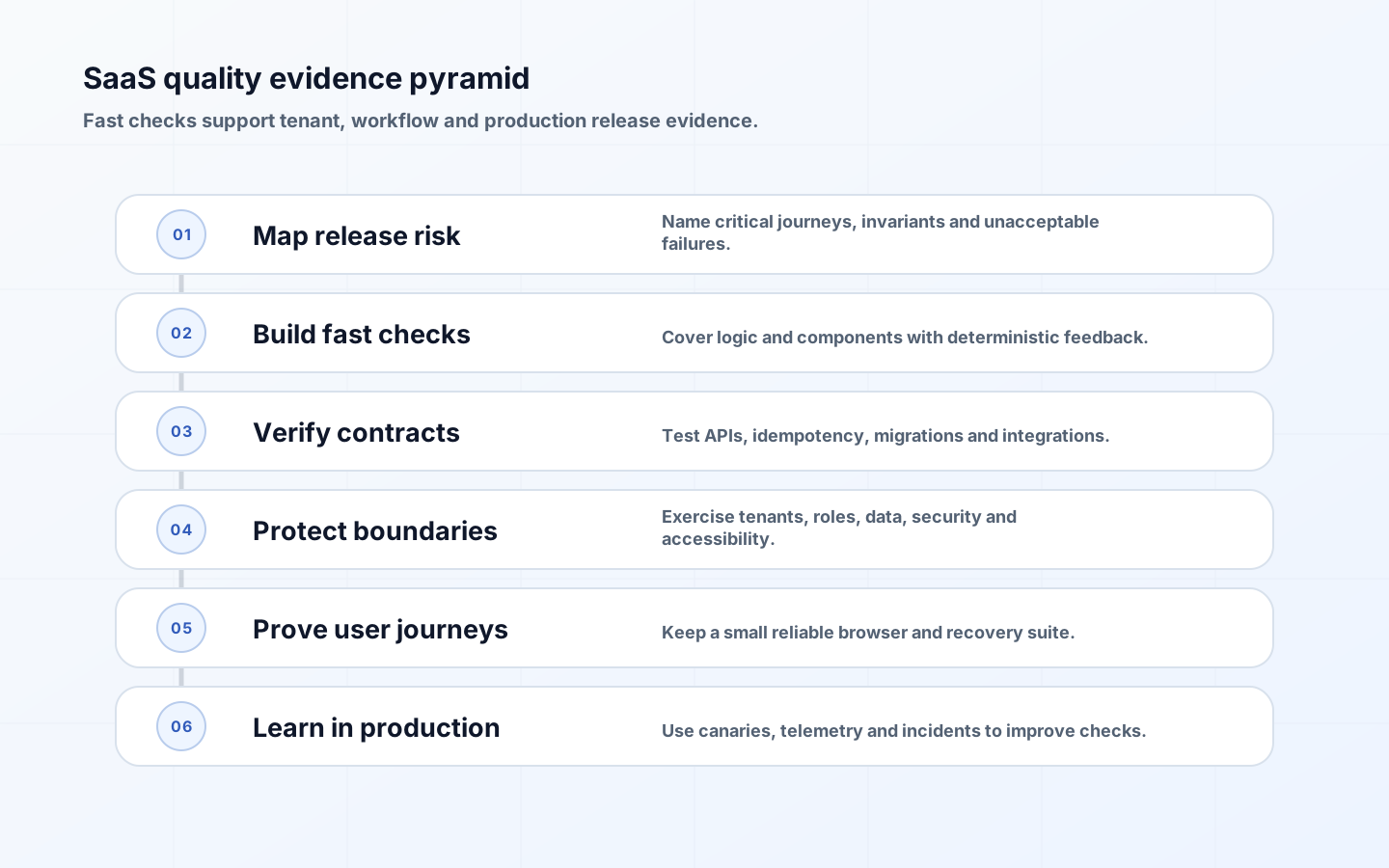
Score each SaaS workflow for lost revenue, bad entitlement, data exposure, support burden, likelihood, and ease of recovery. A monthly export or tenant-switch action may outrank a frequently used cosmetic control because one defect can disclose or misstate a customer’s records. Define the expected response before writing the assertion: which role sees which state, what receipt is created, and what audit event is emitted. Use Playwright’s best-practice guide for user-visible behavior, isolated tests, and resilient role- or contract-based locators.
| Test layer | Best use | Common misuse |
|---|---|---|
| Static analysis | Types, lint, dependency and policy checks | Treating a clean build as behavior proof |
| Unit | Pure rules, transformations and edge cases | Mocking implementation details |
| Contract | API, event and schema agreement | Ignoring semantic business compatibility |
| Integration | Database, queue, identity and provider boundaries | Using an unrealistic shared test environment |
| Browser journey | A few customer-visible outcomes | Repeating every unit case through the UI |
| Production | Errors, latency, synthetic probes and escaped defects | Collecting signals without an owner |
Model tenant-safe test environments
Give each pull request a cheap path that can create a tenant, seed roles, exercise the API, and remove its data without depending on another developer’s account. Use a production-like stage for migrations, identity callbacks, queues, storage, and vendor limits. Version its flags and configuration, and expose environment drift in the report. If a shared stage is unavoidable, allocate unique tenant and correlation identifiers per run and fail loudly when cleanup leaves records behind.
Build fixtures around SaaS states rather than only happy-path rows: trial ending tonight, failed renewal, seat downgrade, suspended member, delegated administrator, empty project, large export, DST boundary, non-ASCII company name, and two tenants with similar identifiers. Prefer synthetic customer data. If a production-shaped sample is unavoidable, minimize and mask it, limit access and lifetime, and delete it after the run. Keep provider sandbox keys and administrator fixtures out of logs and test artifacts.
Diagnose and retire flaky checks
Intermittent SaaS failures often reveal an unowned contract: a webhook arrives eventually, a renewal crosses midnight, a queue is drained by another test, or a selector changes with a flag. Control time and randomness, create unique tenant records, wait for domain state rather than a fixed delay, and stub only the boundary not under test. Record first-run result, retries, and environment facts separately.
A quarantined check needs a named owner, a ticket, the customer risk it protects, and an expiry date. Save the browser trace, request IDs, server logs, feature-flag state, and tenant fixture so a developer can reproduce the failure. Repair high-risk flakes quickly; a billing or isolation test that passes only after retries is not harmless noise. Remove a redundant assertion only after another layer demonstrably protects the same decision, and use the quarantine report in the weekly release review.
Set release-blocking test tiers
Make the blocking lane explicit: compile and policy checks, pricing and permission tests, API/schema compatibility, migration rehearsal, and one smoke journey proving login, tenant selection, and the primary outcome. Let broader browser, load, and exploratory evidence inform staged rollout. Define who can pause, waive, or roll back a failed gate; every waiver needs an expiry and rationale. A routinely bypassed gate has no value.
For a small SaaS, use NIST’s SSDF to connect test automation with protected repositories, build artifacts, and vulnerability response, not just with a green pipeline. Translate the relevant OWASP ASVS 5.0 controls into checks for authorization, session handling, tenant scoping, and sensitive error output. Keep a short evidence map showing the control, automated check, manual review, and owner so missing coverage is visible during release planning.
| Release signal | Decision rule | Owner |
|---|---|---|
| Critical behavior | No unresolved failure in money, access or tenant isolation | Product and engineering |
| Migration | Forward and recovery path tested on representative data | Data or platform owner |
| Security | No prohibited exposure; exceptions time-bounded | Security owner |
| Accessibility | Critical journey works with keyboard and assistive checks | Product team |
| Operations | Dashboards, alerts, rollback and support notes ready | Service owner |
Join accessibility and performance evidence
Run automated accessibility checks on the routes a customer uses, but pair them with manual keyboard, focus, zoom, reflow, screen-reader, and error-recovery checks. A SaaS workflow is not accessible if a user can open a form but cannot understand a failed payment or reach the tenant switcher. Treat WCAG 2.2’s page and process expectations as acceptance criteria for complete journeys. Add stable accessible names and roles to the product contract so the same improvements make browser tests less brittle.
Set budgets around milestones—usable workspace, save confirmation, search result, and export completion—and capacity signals such as queue age or database saturation. Test a new tenant, a mature tenant with many records, and a slow payment or email dependency. Report p50 and tail latency by release and plan tier. Use load tests to learn failure shape and alert behavior, then flags and rate limits to protect production.
Close the production quality loop
When a defect escapes, record the customer state affected, the first detectable signal, and the cheapest durable check that would have changed the release or detection decision. Link deploy, flag exposure, error, queue, latency, and support records with a correlation ID. Synthetic probes should create sandbox tenants or inert transactions, never real charges or unbounded data. For risky changes, test flag default, cohort targeting, rollback, and cleanup; assign an owner and removal date before the flag enters production.
Each week or release cycle, review first-run failures, retry-only passes, support themes, escaped defects, slow suites, and exploratory findings. Pick one quality-system repair alongside product work. Measure lead time, first-run signal quality, escaped harm, detection and restoration time, and diagnosis effort. Test count matters only when it supports a decision; a smaller owned suite can beat a large ignored one.
Show ownership and runtime cost
Feature owners should own checks for subscription, export, and permission behavior; platform owners can provide runners, fixtures, reports, and support. In review, ask which customer or operational decision a new test protects, what evidence appears on failure, and whether an API or contract check would be cheaper than another browser path. Incident-specific regressions need a review date, because a test that outlives its protected behavior creates maintenance debt.
Track runtime, queue wait, compute minutes, reruns, setup, and diagnosis time. Keep a fast pull-request lane for rules and contracts while sharding isolated integration and browser work in parallel. Cache dependencies and artifacts with integrity checks, and choose browser or device combinations based on customer risk. Do not speed up a SaaS suite by sharing mutable admin accounts or disabling tenant isolation; the saved minutes will return as triage, data cleanup, and missed defects.
Maintain a fixture catalogue that names its tenant shape, roles, subscription state, owner, cleanup method, and sensitivity. Seed stable account structure but generate unique invoices, exports, invitations, and webhook IDs per run. Record whether Stripe, email, storage, or identity behavior is simulated, stubbed, or exercised in a sandbox, and write contract checks for the assumptions that differ. Reserve production-like verification for gaps a sandbox cannot represent, with capped accounts and a cleanup assertion.
Put quality debt on the feature planning board. Report flaky, slow, obsolete, or non-diagnostic suites; retire them only after confirming coverage elsewhere. Invest in accessible roles, domain helpers, and correlation IDs. Review ownership after team changes, archive stale tenants, and verify scheduled runs notify an owner. After an incident, add the least expensive durable check and record why existing layers missed it.
Key takeaways
- Prioritize money, access, tenant isolation and core customer outcomes.
- Give unit, contract, integration, browser and production checks distinct jobs.
- Treat flaky tests as owned defects with evidence and expiry.
- Use release gates that teams understand and can act on quickly.
- Connect pre-release automation with production incidents and support evidence.
Frequently asked questions
What test coverage percentage is enough?
Coverage percentage is a map, not a release verdict. Use it to find untested pricing branches, entitlement transitions, authorization paths, and recovery code, then inspect whether the tests exercise real boundaries and customer states. A modest total can be acceptable when critical rules are thoroughly enumerated; a high total can still miss tenant leakage or a broken renewal event.
When should a startup hire a QA specialist?
Bring in specialist QA, security, accessibility, or performance help when release volume, customer consequence, or recurring escapes exceed the team’s capacity. Ask the specialist to leave behind a risk model, usable fixtures, diagnostics, and coaching. They should raise the whole team’s capability rather than become the only person who understands the suite or the only approver for quality.
Are codeless test tools suitable?
Record-and-replay tools can help with a stable, simple smoke path, but evaluate versioning, code review, tenant data isolation, failure diagnostics, accessible locators, artifact export, and vendor exit before adopting one. Confirm that a developer can read and repair the generated test. A recorder that captures clicks without the business state may be quick to create and costly to trust.
Automate the failure modes that matter
A startup does not need every click automated. It needs credible evidence for the paths that can lose data, cross tenant boundaries, block payment, expose private information, or prevent recovery. Map each risk to the cheapest reliable test layer: pure logic for rules, API tests for authorization and invariants, browser tests for critical journeys, and manual exploration for new or ambiguous behavior. This keeps the suite fast enough to run and meaningful enough to trust.
Make test data a security boundary
Tenant-aware fixtures should make ownership explicit and should be disposable, repeatable, and safe to inspect. Include a pair of tenants with similar records so a test can prove both allowed and denied access. Avoid production exports unless they have been transformed and approved; realistic values are not worth an uncontrolled privacy risk. Give each test a clear setup owner and cleanup path so failures do not contaminate later cases.
Run SaaS QA automation checks
A SaaS-QA decision example
Review a tenant-scoped checkout or entitlement test with one owner, one fixture lineage, one blocked outcome, and one defect follow-up. For QA automation for SaaS startups, the review is complete only when a teammate can explain what happened from the evidence without relying on memory. Record the protected customer risk, fixture owner, review date, and escape signal that would trigger new coverage. For SaaS QA, keep the test’s customer risk, tenant shape, fixture lineage, and release evidence together so a failure can be acted on quickly. For SaaS QA, preserve tenant identity, fixture lineage, release risk, and the diagnostic artifact beside the risk-ranking decision so the decision remains reviewable.
| Check | Example question | Evidence |
|---|---|---|
| Boundary | What is deliberately out of scope? | Decision record |
| Ownership | Who can change the behavior? | Named owner |
| Failure | What happens after rejection or timeout? | Test and runbook |
| Review | What signal changes the decision? | Metric or audit |
Frequently asked questions about QA automation for SaaS startups
What should a team decide first about QA automation for SaaS startups?
Rank automation by customer harm rather than by screen count. Tenant isolation, authorization, billing, data loss, and recovery deserve dependable evidence before low-risk cosmetic paths. Use unit or API checks for rules, browser checks for essential journeys, and exploratory testing where the behavior is still being discovered.
How should QA automation for SaaS startups be introduced safely?
Ship the highest-risk tenant path with disposable fixtures, explicit authorization, deterministic diagnostics, and a clear release disposition. Widen the suite only after the first risk path is reliable, affordable to run, and able to explain a failure to the person who owns the feature. For SaaS QA, preserve tenant identity, fixture lineage, release risk, and the diagnostic artifact beside the safe-introduction check so the decision remains reviewable.
What is a useful review signal for QA automation for SaaS startups?
Use a QA signal tied to the promise: escaped customer harm, flaky rerun rate, diagnostic completeness, release-blocking failure, or recovery time. Read suite trends with escaped defects and support cases so a rising pass percentage does not conceal weak tenant or recovery coverage. For SaaS QA, preserve tenant identity, fixture lineage, release risk, and the diagnostic artifact beside the review-signal check so the decision remains reviewable.
SaaS QA automation references
Continue with QA Automation for SaaS Startups: A Practical Guide to Fast, Reliable Releases, QA Automation for SaaS Startups: Practical FAQ, QA Automation for SaaS Consulting: An Implementation Checklist That Finds Real Risk. Use the linked QA guides to connect risk-based automation with practical startup coverage, FAQ decisions, and implementation constraints.
Conclusion
A startup needs quality systems. Fast deterministic checks protect change, focused journeys protect value, and production evidence closes the loop. By choosing automation according to consequence and maintaining it as product infrastructure, a SaaS team can release without turning speed into risk. Evidence must be actionable.