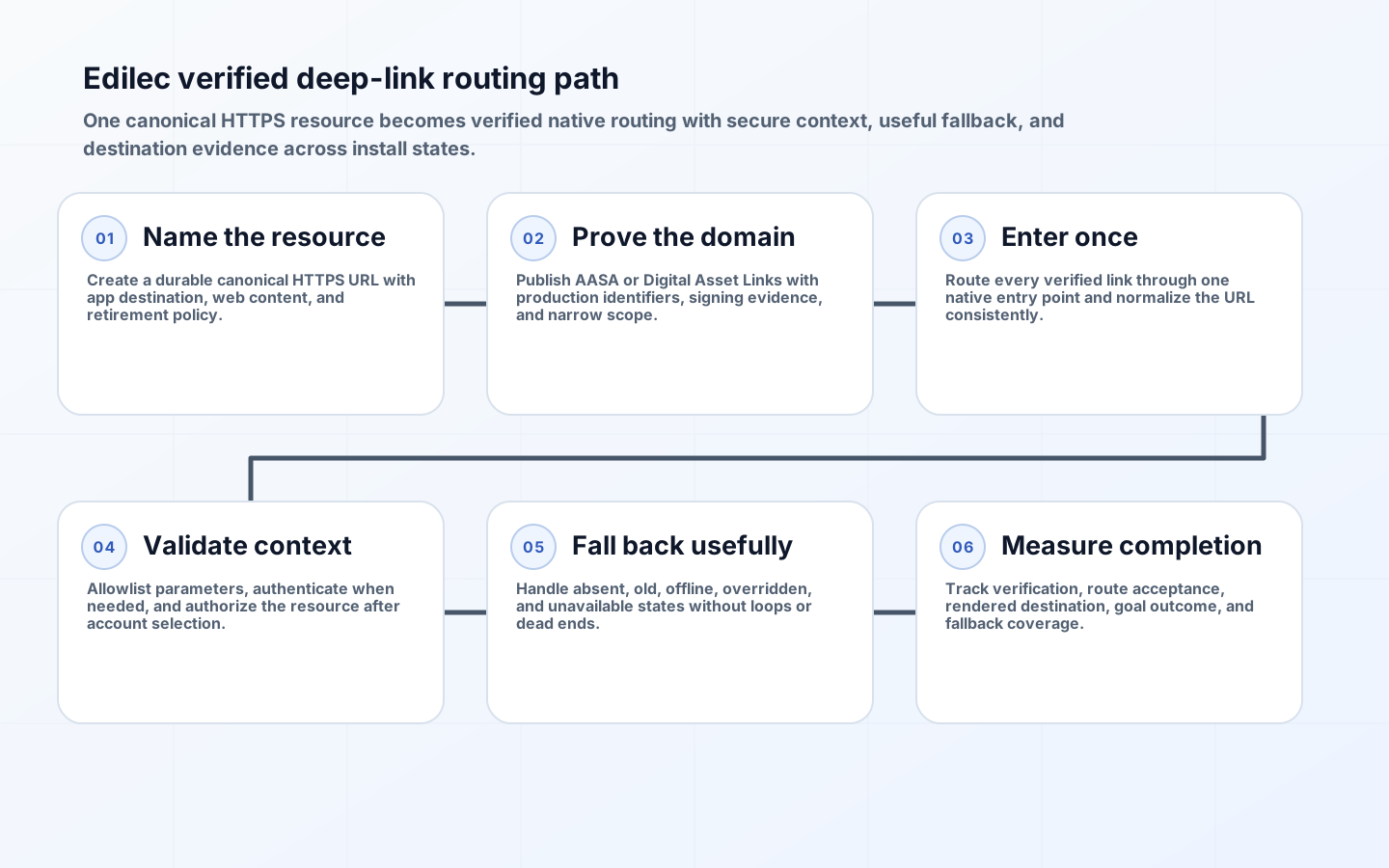
Universal links and Android App Links let one HTTPS URL represent the same destination on the web and in an installed app. Reliability depends on more than registering a route. The domain must prove which app may claim it, the installed build must understand the path, the web destination must remain useful without the app, and campaign context must survive handoffs without becoming an authorization token.
Design the link as a durable public contract. Email, QR codes, documents, search results, and messages can outlive a mobile release or marketing system. A short-lived redirect service, custom URI scheme, or path tied to one screen class creates future breakage. Start with a canonical HTTPS resource and make app opening an enhancement rather than the only successful outcome.
Model every link and install state before implementation
For each link family, specify the canonical web URL, app destination, authentication requirement, unavailable-content behavior, minimum app capability, and analytics event. Then enumerate iOS and Android states: app absent, current app installed, old app installed, signed out, signed in to the wrong account, offline, verification failed, and user preference set to browser. Product acceptance must cover the outcome, not merely whether the operating system launched an activity.

| State | Expected destination | Context handling | Safe fallback |
|---|---|---|---|
| App not installed | Canonical responsive web page | Retain campaign attribution in first-party storage | Offer store link without blocking content |
| Compatible app installed | Exact native resource | Pass opaque resource ID and approved attribution | Render web if app declines route |
| Old app installed | Supported parent or web route | Record unsupported route capability | Explain update only when material |
| Signed out | Authentication then intended destination | Store short-lived return intent server-side | Discard sensitive query data |
| Content removed or unauthorized | Native or web not-found/denied state | Log reason without exposing existence | Navigate to safe collection or home |
Configure the iOS association in both directions
Apple's universal-link documentation requires an association between the app entitlement and a file controlled by the website. Publish apple-app-site-association over HTTPS at the documented location, with the correct application identifiers and narrowly owned path rules. Serve it without an authentication challenge or redirect chain, with a valid content type, and coordinate CDN caching with release changes.
The app receives an NSUserActivity and must validate the URL before routing. Apple's handling guidance explicitly warns against allowing a link to perform a destructive or sensitive action directly. Resolve the resource on the server under the current user's authorization, make destructive actions require confirmation, and map unknown paths to a stable in-app fallback. Do not assume every Safari tap opens the app; same-domain navigation and user choice can preserve browser behavior.
Configure Android verification without overbroad routing
Declare browsable HTTP and HTTPS intent filters with android:autoVerify="true", then publish Digital Asset Links at /.well-known/assetlinks.json with the package and production signing-certificate fingerprint. Google's App Links configuration guidance notes that Play App Signing users should use the fingerprint shown by Play, not an unrelated local upload key. Treat each host as an independent production dependency.
On Android 12 and later, a successfully verified host can become the default app handler. Android 15 adds Dynamic App Links on supported devices, allowing server-side path refinement, but server rules cannot expand beyond the manifest's declared host scope. The current intent-filter guidance also warns that multiple activities resolving the same verified link have no guaranteed winner. Route through one entry point and dispatch internally.
| Control | iOS Universal Links | Android App Links | Operational check |
|---|---|---|---|
| App declaration | Associated Domains entitlement | Verified intent filter | Release artifact contains production setting |
| Website proof | AASA file | Digital Asset Links JSON | Public HTTPS response has expected body |
| Identity | Team and bundle application identifier | Package plus SHA-256 signing fingerprint | Matches store-distributed binary |
| Path scope | AASA component rules | Manifest scope plus optional dynamic rules | Unknown and excluded paths stay on web |
| Diagnosis | Associated-domain and device diagnostics | Domain verification commands and Play tools | Automated probe plus physical-device test |
Design routing, authentication, and attribution as separate concerns
Parse URLs with the platform URL library, normalize host and path, allowlist known query members, and reject malformed or duplicated security-sensitive parameters. The link should carry a public resource identifier, not a bearer credential, email address, or raw state mutation. If a login is needed, store a short-lived return intent associated with the browser or app session and re-authorize the target after login. Account switching must not leak whether another account can see the resource.
Keep attribution modest and durable. Record the incoming link ID and campaign at first trusted receipt, then emit one deduplicated open outcome after routing. Expect browser privacy controls, install transitions, and cross-device use to break perfect person-level attribution. A deferred deep-link provider can improve continuity after installation, but it adds an SDK, network dependency, privacy disclosure, and failure mode; use it only when the incremental measurement value exceeds that cost.
Test verification, routing, and fallback continuously
Automate HTTP checks for association-file status, redirects, JSON structure, expected app identifiers, certificate fingerprints, and cache age. Google's verification guide documents automatic host checks, while its test guide covers device-level verification. Run those checks against production-signed builds because debug fingerprints can create false confidence.
Maintain a device matrix for fresh install, upgrade, uninstall, app-disabled, and user-overridden association states. Tap links from browsers, email, messaging, QR scanning, webviews, and copied text; programmatic launches can behave differently from a real user gesture. Test redirects, uppercase and encoded paths, fragments, expired content, offline launch, process death, and duplicate taps. Monitor web fallback rate, verified-open rate, route-not-found, authentication return success, and destination completion by app build.
Govern domains, redirects, and link retirement
Assign an owner for every linked host, association file, signing identity, redirect rule, and canonical route. Domain migration requires an overlap period in which old and new hosts both serve useful web content and valid associations for supported builds. Coordinate certificate renewal, CDN behavior, DNS, and app releases; a marketing team must not repurpose a linked subdomain without mobile review. Keep automated probes outside the same deployment path so they can detect an externally visible failure.
Retire campaign links by preserving the canonical resource or returning a deliberate web destination, not by deleting the redirect database. Set retention from the lifetime of email, printed QR, contracts, receipts, and indexed pages. Record redirect hops and cap them to prevent loops, attribution duplication, or verification-host changes. For partner links, establish who owns destination mapping and what happens when the partner app, tenant, or content no longer exists.
Use canonicalization consistently across app and web routers. Decide how trailing slashes, case, percent encoding, Unicode paths, repeated query keys, fragments, and locale prefixes behave, then maintain shared fixtures for both implementations. Redirect before rendering only when the resulting URL remains within the verified contract. Security tests should cover open redirects, path traversal-like encodings, oversized parameters, injected control characters, and links that attempt to invoke privileged native actions.
For analytics, distinguish link issued, link clicked on web infrastructure, native route accepted, content authorized, destination rendered, and goal completed. These events occur in different systems and may be missing independently. Deduplicate with a short-lived opaque link-attempt identifier, avoid placing identity in the URL, and publish coverage assumptions with campaign reports. This prevents a verification outage from being mistaken for weak campaign interest or an app open from being counted as a completed customer outcome.
Document a support fallback for users who intentionally chose browser handling. Respect that preference and provide an explicit open-in-app control where the platform permits, rather than forcing redirect loops that fight the operating system.
Key takeaways
- Make every deep link a useful canonical HTTPS URL before adding native routing.
- Prove domain ownership with production app identity and monitor the association files like an API.
- Use one native entry point, validate every parameter, and re-authorize the destination after sign-in.
- Design explicit outcomes for absent, old, signed-out, offline, and user-overridden app states.
- Measure destination completion and fallback quality, not only whether an app process opened.
FAQ
Should custom URL schemes still be used?
Use verified HTTPS links for public content because they have a web fallback and domain proof. A custom scheme may remain for tightly controlled app-to-app integrations where no web resource exists, but schemes can collide or be claimed by another app and need separate validation.
Do Universal Links provide deferred deep linking after installation?
Not by themselves. With no app installed, the HTTPS link opens the web. Preserve the destination through a first-party authenticated flow or adopt a reviewed provider with clear privacy and reliability tradeoffs. Never promise deterministic attribution across every install and browser state.
How quickly do association-file changes take effect?
Device and CDN caches mean changes are not instantaneous. Plan file changes ahead of client releases, keep old and new associations compatible during overlap, and verify on freshly installed physical devices. Avoid using an association edit as an emergency kill switch.
Conclusion
Reliable deep linking is a cross-platform routing service with a web contract, domain proof, secure app dispatch, and tested fallbacks. When every install state has a deliberate destination and verification is monitored continuously, links remain useful long after the campaign or build that first introduced them.