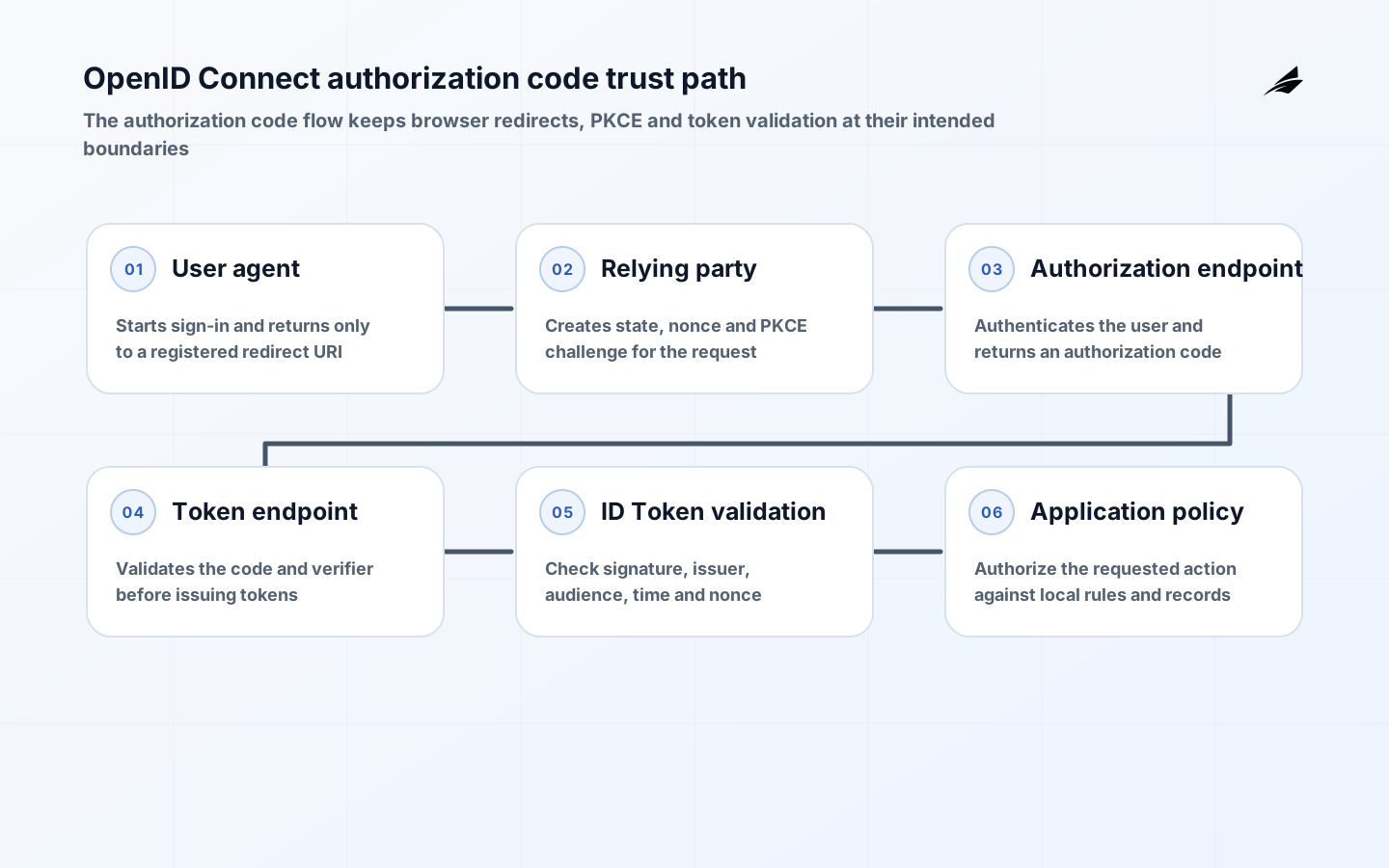
OpenID Connect adds an identity layer to OAuth 2.0 so an application can authenticate a user and receive identity claims in a standardized form. That concise description hides several independent decisions: who issues identity, which client types are supported, which redirect locations are trusted, which claims the application needs, how sessions end and how the application authorizes a request after authentication. Treating OIDC as a login button produces fragile integrations because the visual experience is only the visible edge of a trust boundary. A sound implementation starts by identifying the relying party, authorization server, user agent, protected resources and the business action that the authenticated session is allowed to perform.
Map the identity boundary
Separate authentication, authorization and application session management in the design. The OpenID Provider authenticates the user and issues an ID Token for the relying party; it does not automatically decide whether that person may approve a payment, edit a record or access a tenant. Those decisions belong to the application or resource server and should use application policy, resource context and, where appropriate, selected claims. Inventory every client before choosing a flow: a server-rendered web application can keep a confidential client secret, while a browser-based or native application cannot protect a distributed secret in the same way. The client type determines how redirects, tokens and session material must be handled.
| Component | Primary responsibility | Implementation decision |
|---|---|---|
| User agent | Carries the user through redirects | Which application origins and return routes are allowed |
| Relying party | Starts authentication and validates identity response | How state, nonce and local session are stored |
| OpenID Provider | Authenticates and issues tokens | Which issuer, endpoints and signing keys are trusted |
| Resource server | Protects APIs and data | Which access token audience and scopes it accepts |
| Application policy | Authorizes business actions | Which roles, attributes and record constraints apply |
Choose a flow and register clients deliberately
For interactive user sign-in, authorization code flow is the common starting point. Public clients should use PKCE, which binds the authorization request to the token exchange using a verifier and challenge. Register exact redirect URIs rather than broad patterns, and treat changes to them as security-relevant configuration. Generate a high-entropy state value to correlate the request and response; use nonce where the ID Token flow requires it to associate a token with the authentication request. Discovery metadata can supply provider endpoints and JSON Web Key Set locations, but metadata does not remove the need to configure the expected issuer and client identifier explicitly. An integration should fail closed when those expectations do not match.
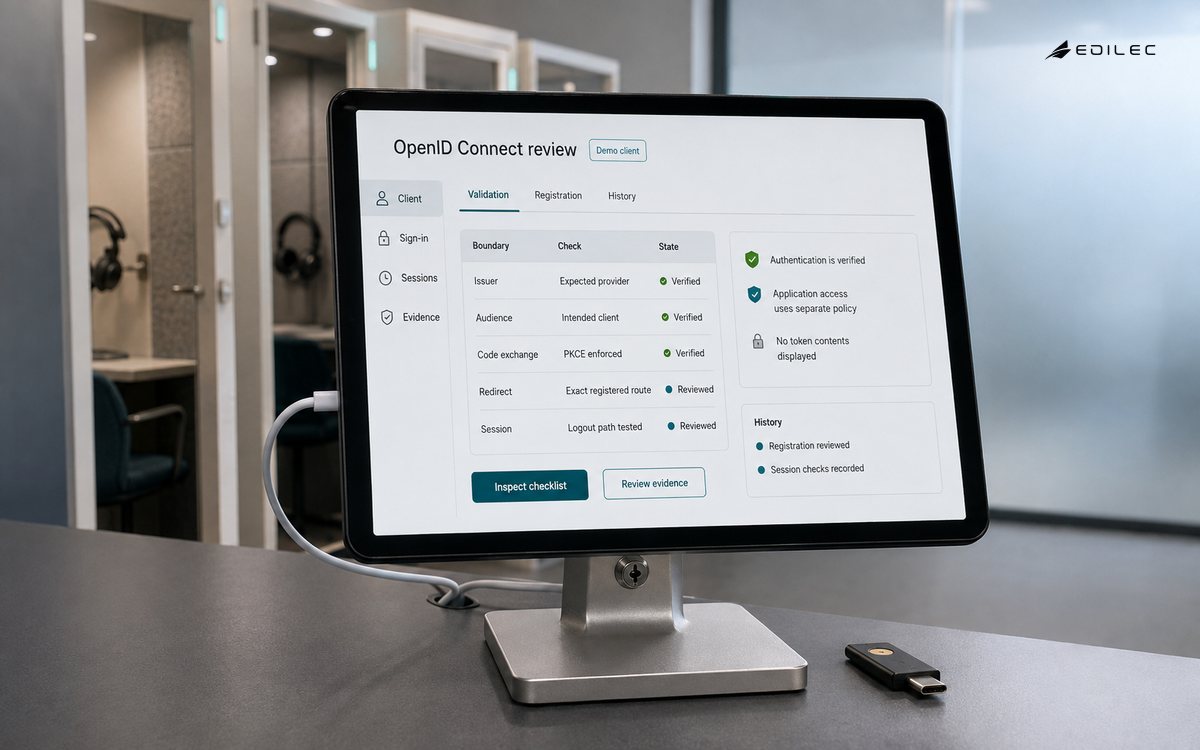
Avoid allowing flow choice to become an accidental property of an SDK default. Document the grant type, response mode, redirect behavior, PKCE requirement, client authentication method and consent policy for each client. Administrative portals, mobile applications, service-to-service jobs and customer-facing web applications often need different registrations and different security review. Shared registrations make audit trails weaker and make a redirect exception for one application affect another. A small registry with a named owner, purpose, environments, allowed redirects and planned review date is easier to operate than an identity estate built from untracked console settings.
| Registration field | Why it matters | Check before release |
|---|---|---|
| Redirect URI | Controls where authorization results can be sent | Every URI is exact, owned and environment-specific |
| Client type | Determines whether credentials can be protected | Public and confidential clients are not treated alike |
| PKCE policy | Protects code exchange for public clients | Verifier is required and enforced where applicable |
| Requested scopes | Limits consent and token privileges | Each scope supports a real application need |
| Owner and expiry | Makes changes reviewable | A responsible team can renew or retire the client |
Validate tokens at the right boundary
Never treat a decoded token as a validated token. The relying party must verify the ID Token signature using trusted keys and check the issuer, audience, expiration and any other claims required by the protocol and application. It should also check nonce when it supplied one. A resource server validates an access token for its own use; an ID Token is evidence of authentication for the client and is not a general API credential. Keep token type, expected audience and accepted issuer separate so a token minted for one recipient cannot be casually reused at another. Algorithm selection must be explicit: accepting whatever algorithm appears in a token header creates an avoidable verification weakness.
Claim handling deserves restraint. Request only claims that support a declared experience or authorization decision, map them to stable internal semantics and decide what happens when a claim is absent, stale or changes format. A display name may be convenient; it is rarely a reliable authorization key. Subject identifiers and tenant context need special care because user migration, account linking and multi-tenant boundaries can change the consequences of a mapping error. Record which component is authoritative for membership and entitlements. The identity provider may assert a group, but the application should still enforce the record-level decision where the protected data lives.
Protect sessions, logout and errors
The local application session is its own security surface. Set an explicit lifetime, bind it to appropriate browser protections, rotate or renew it according to the application model and invalidate it when risk or business policy requires. Decide what local logout means and what provider logout means; the two can differ, particularly when a user has several relying-party sessions. Do not put tokens in locations that expose them unnecessarily to browser script, logs or referrer headers. Error pages and callback handlers should be equally disciplined: they must not disclose raw tokens, client secrets, internal exceptions or user details to a browser or log stream that lacks the right access controls.
Test, roll out and operate the integration
Test the whole trust path in a non-production environment that uses representative redirect rules, signing keys and tenant behavior. Include cancelled sign-in, expired authorization codes, bad PKCE verifiers, changed signing keys, clock skew, missing claims, denied consent, deprovisioned accounts and cross-tenant attempts. A happy-path test only confirms that the UI is connected. The integration is ready when it fails safely and leaves enough evidence for an operator to distinguish a user error, provider incident, configuration drift and attempted abuse. Keep structured events for request correlation and validation outcomes, while avoiding raw credential or token values in logs.
Roll out with observability and a reversal plan. Monitor authentication success by client and failure category, callback errors, token-validation rejections, unexpected redirect activity and authorization denials that may signal incorrect claim mapping. A sudden increase in sign-in failures can be a provider change, an application deployment or a configuration error; named owners need a shared path to investigate it. Periodically review client registrations, redirect URIs, scopes, key-rotation behavior and unused applications. Identity integrations age quietly, so lifecycle ownership matters as much as initial protocol correctness.
Manage keys and provider configuration
Signing keys, provider metadata and client configuration are production dependencies. Use discovery and key sets through a controlled implementation, cache them according to provider guidance and make refresh behavior observable. A validation component must tolerate normal key rotation without accepting a token from an unexpected issuer or key source. Test a rotation or simulated metadata outage before it becomes an incident. Record who owns provider configuration changes, how an emergency redirect or credential change is approved and how each environment is kept distinct. Identity problems often arise from a small configuration difference that passed unnoticed between test and production.
Service accounts and machine-to-machine access require their own design rather than a borrowed interactive user flow. Define the workload identity, authorized audience, rotation method, scope and audit trail. Do not reuse a human client registration or long-lived token because it is convenient for an integration test. Keeping human sign-in and workload authorization separate makes access review, incident response and eventual retirement much more reliable.
Document the recovery path for identity-provider disruption as well. Applications may need a planned maintenance response, a customer communication route and a clear rule against weakening validation in an emergency. A hurried fallback that bypasses normal token checks can turn an availability incident into an access-control incident.
Key takeaways
- Model the relying party, provider, resource server and application policy as separate enforcement points.
- Register clients with exact redirect URIs, named owners and client-type-appropriate protections.
- Use authorization code flow with PKCE for public interactive clients and verify protocol state carefully.
- Validate token signature, issuer, audience, time and token purpose before using claims.
- Operate OIDC as a changing integration with tests, logs, key rotation and registration review.
Frequently asked questions
Is OpenID Connect the same as OAuth 2.0?
No. OAuth 2.0 provides an authorization framework. OpenID Connect builds an identity layer on it, including the ID Token and standardized discovery. Many deployments use both, but their tokens and responsibilities should not be confused.
Can an API accept an ID Token?
Usually an API should validate an access token intended for that resource. An ID Token is issued to the relying party to convey authentication information and does not automatically carry the audience or authorization semantics an API needs.
Is PKCE only for mobile applications?
PKCE was designed to protect public clients and is especially important where a client cannot keep a secret. Teams should select it according to client type and current provider support, rather than treating it as a mobile-only UI feature.
Conclusion
OpenID Connect is reliable when protocol validation, application authorization and operational ownership reinforce each other. Keep the identity boundary small, verify every assertion at its intended recipient, protect the local session and rehearse failures before users depend on the path. That gives a team more than single sign-on: it gives it an identity integration that remains intelligible when configuration, providers and applications change.