A Field Guide to Workspace Models for Growing Teams
Growing teams often discover that their first workspace model was optimized for one founder, one customer, or one happy path. As more people join, the questions become operational: who owns the workspace, how are roles changed, what happens when a contractor leaves, which records can be exported, and how does support investigate a customer issue without bypassing the boundary? This field guide helps a team keep the model understandable while usage, integrations, and organizational complexity grow.
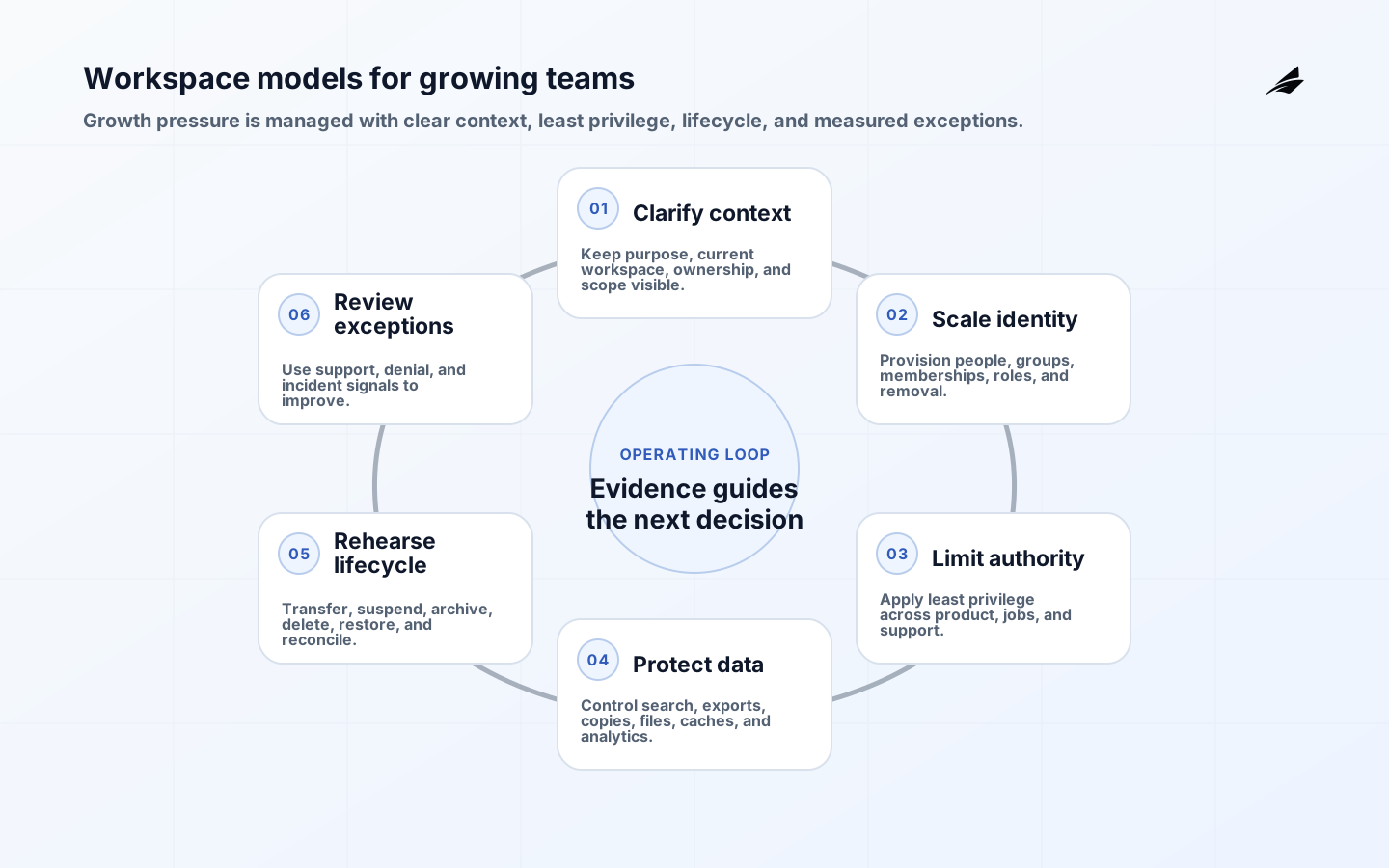
Keep workspace context visible as the team grows
A workspace should answer three questions at a glance: what work belongs here, who can act here, and which settings govern it. Make the current workspace visible in navigation and in high-consequence forms. Use stable identifiers behind the scenes and friendly names in the interface. If a person belongs to several workspaces, switching context should be deliberate and should change every scoped read, write, search, export, and notification.

Revisit the boundary as the team grows. A workspace may begin as a customer account and later need projects, teams, environments, or business units beneath it. Do not add a second hidden hierarchy without defining ownership and inheritance. Record which data is shared, inherited, or isolated. A clear model is easier to explain to customers and less expensive to secure than a collection of accidental relationships.
| Growth pressure | Decision | Operational check |
|---|---|---|
| More members | Which roles and invitations are needed? | Membership and removal tests |
| More customers | Where is tenant isolation enforced? | Cross-workspace access tests |
| More integrations | Which external identity owns each side effect? | Retry and revoke tests |
| More support | Which privileged actions are safe and audited? | Support access review |
| More data | What is export, retention, and deletion policy? | Lifecycle and reconciliation drill |
Add people without losing membership ownership
Separate the person, identity provider, organization, workspace membership, and role. This lets one person use a personal or federated identity while belonging to several customer contexts. NIST's digital identity guidelines help frame authentication and assurance; the product still decides what an authenticated identity may do in a specific workspace. Avoid making an email address the sole durable key when people can change employers, domains, or login providers.
When directory integration becomes valuable, map group membership to explicit product roles and define conflict behavior. SCIM supports provisioning and deprovisioning patterns, but an external directory event should not silently override a local owner decision without a documented policy. Keep pending, active, revoked, and suspended membership states and make the source of each transition visible.
Expand roles without expanding default authority
Small teams often share one broad role because trust is high. That role becomes risky when customers add finance, contractors, administrators, and automation. Define permissions by action and resource, then compose roles that fit real jobs. The OWASP authorization guidance supports deny-by-default, server-side enforcement, and explicit testing. Apply the matrix to APIs, jobs, webhooks, exports, and support tools, not only to visible menus.
Do not confuse role visibility with authority. Hiding a button improves the interface but does not stop a direct request. Recheck current workspace state and membership when a job executes. Record actor, scope, action, policy version, and outcome. For sensitive changes, require an approval or recent authentication that is proportionate to the consequence.
Follow workspace scope into exports and jobs
Add a workspace relation to every scoped record and enforce it with constraints or shared access libraries where practical. Review search, cache, analytics, object storage, data exports, and notification templates. A correct database query cannot protect a file URL whose authorization is missing. Keep a data inventory that states sensitivity, owner, retention, and deletion behavior. The growing-team question is not only how to add data; it is how to remove it safely when a customer leaves.
Treat imports, copies, and sharing as boundary-changing operations. Require an explicit source and destination, permission check, conflict policy, and audit record. If a shared template becomes customer data, define when that happens and who owns later changes. These decisions prevent a convenience feature from creating an unreviewed data path.
| Path | Risk | Control |
|---|---|---|
| Search | Stale membership exposes results. | Filter current authorization at query time |
| Export | A link outlives access. | Scope, expiry, audit, and revocation |
| Cache | Old context is reused. | Include workspace and role in key |
| Job | A delayed action uses old permission. | Reauthorize at execution |
| Analytics | Aggregates reveal customer detail. | Classify, minimize, and limit access |
Practice suspension, transfer, and restoration
Define what happens when a workspace is suspended for billing, abuse, security, or a customer request. Users may need read-only access, export, appeal, or a recovery window. Archive should not mean delete unless the product says so. Deletion should be staged, cancellable where appropriate, and reconciled across integrations and files. Every state change needs an owner, reason, timestamp, and a way to understand what remains.
Rehearse transfer of ownership, directory deprovisioning, integration failure, and recovery from an accidental deletion request. Growing teams need a safe path that does not rely on one engineer's memory. Keep the runbook close to the product and test it with a person who was not involved in the original implementation.
Watch exceptions, denials, and customer friction
Track activation, invitation acceptance, time to first shared outcome, role-change failures, authorization denials, exports, support overrides, lifecycle transitions, and stale membership. Use workspace and actor context in traces and logs. OpenTelemetry semantic conventions can make technical context more consistent, but avoid retaining raw customer content when identifiers and outcomes are enough. Segment product metrics by workspace type and size so a large customer does not hide a failure for smaller teams.
Review exceptions, not only adoption. Repeated manual membership fixes, unexplained access denials, or support edits are signals that the model or interface needs improvement. Give each signal an owner and a decision threshold. A metric that does not change a product or operating decision is not yet useful.
Turn model changes into reviewable releases
Use small releases that add one boundary or workflow at a time. For each change, keep the permission matrix, migration plan, negative tests, audit behavior, support instructions, and rollback or repair decision. The NIST SSDF is a useful reference for integrating secure design and testing into normal delivery rather than treating them as a final review.
Use Edilec's billing workflows field guide, customer feedback loops field guide, and multi-tenant architecture checklist to pressure-test the workspace model against financial, feedback, and reliability needs. The point is not to copy a pattern but to expose assumptions before customers do.
Create a workspace readiness review for each meaningful growth step. Check identity source, membership lifecycle, role changes, data paths, exports, integrations, support access, observability, retention, and recovery. Use a real customer-like workspace with several roles and a realistic amount of data. The review should produce decisions and owners, not only a score.
Use quotas and boundaries to protect neighbors. A large import, export, webhook burst, or analytics job should not make every workspace slow. Scope queues, rate limits, caches, and storage by workspace or customer where the consequence justifies it. Communicate throttling and provide a resumable path so the control does not become an unexplained failure.
Make workspace changes observable to the people who own them. Owners should see invitations, role changes, integrations, exports, and lifecycle actions with status and timestamps. Internal operators need a more detailed audit, but the customer-facing view helps catch errors early. A clear activity history is both a trust feature and a recovery aid.
Reserve time for boundary cleanup. Growing teams accumulate old roles, unused integrations, abandoned invitations, and records with unclear ownership. Schedule reviews and make cleanup reversible where possible. A workspace model remains reliable when it is actively maintained, not only when it is launched with a clean diagram.
As the team grows, document exceptions with the same care as the default path. A temporary access grant, manual export, or ownership repair should state why it exists, who owns it, when it expires, and how it will be removed. Otherwise a one-off customer accommodation becomes an undocumented feature with a wider blast radius than anyone intended.
Use customer size and workflow consequence to choose controls, not to justify weaker boundaries. A small customer still deserves correct isolation, while a large customer may need additional workflow, quota, or audit support. Keep the core model consistent and add deliberate capabilities around it. This makes the product easier to operate across segments and reduces special-case code.
Keep a small set of architectural invariants as the team adds features: every scoped request has current workspace context, every role change is attributable, every export is bounded and expiring, every background job rechecks authority, and every lifecycle transition is recoverable or explicitly final. Review these invariants in design and incident work. They provide a stable center while the product surface changes around them.
Use workspace-level capacity and fairness controls as the team grows. Large imports, exports, automation bursts, or a noisy integration can consume shared resources and create a product-wide incident. Scope queues and limits where practical, show customers when work is queued, and keep operations resumable. Fairness clearly belongs in workspace architecture because one customer's workload should not silently change another customer's access or reliability.
Review the model after every material organizational change. A new sales motion, enterprise directory, regional requirement, or support tier can expose a boundary that the original product did not need. Ask whether the workspace still explains ownership and whether the new workflow can be enforced without a private exception. Deliberate evolution is cheaper than letting the model drift through urgent requests.
Keep the customer-facing and internal names aligned. If the product calls something a workspace while support calls it an account or engineering calls it a tenant, people will eventually make a scope mistake. Use a glossary, consistent labels, and a visible identifier in the product and support tool. Shared language is a low-cost control for a growing organization.
Key takeaways
- Keep workspace purpose, current context, membership, and ownership visible.
- Separate identity provider events from application membership and role policy.
- Apply least privilege and current authorization to every product and support path.
- Treat sharing, export, copy, lifecycle, and deletion as boundary-changing operations.
- Measure exceptions and support interventions as signals of model quality.
- Ship incremental changes with negative tests, migration evidence, and a repair path.
Frequently asked questions
When should a growing team introduce a tenant layer?
Introduce one when customer ownership, billing, data residency, or isolation differs from the collaboration workspace. Do not add it merely because other SaaS products use the term. First document the relationship between customer, tenant, workspace, member, and resource, then enforce that relationship consistently.
Which workspace metrics should founders watch?
Watch time to a shared outcome, invitation acceptance, failed role changes, authorization denials, support overrides, export and deletion requests, and unresolved membership state. Combine these with customer feedback and incident evidence; adoption alone can hide a boundary or usability problem.
Conclusion
Growing teams do not need a perfect workspace model, but they do need an explicit one. Keep purpose and ownership clear, scale identity and authorization deliberately, protect every data path, model lifecycle, and use exceptions to guide improvement. That is how a workspace becomes a dependable product capability rather than a collection of customer-specific rules.