Onboarding flows are the first operating experience a customer has with a SaaS product. A good flow does more than show a tour. It helps a specific person reach a valuable, safe outcome using the information and permissions available to them. An administrator may need to connect a data source; a contributor may need to complete one task; a buyer may need proof that the workspace is ready. Treating all three as one generic journey produces long checklists and unclear next steps.
Why Onboarding Flows Matter
The first session reveals whether the product can explain its own state. New users arrive with partial context, incomplete permissions, and different urgency. If a required integration fails, an honest flow says what happened, what information is needed, and how to recover. If an action is unavailable, the product explains the role or workspace requirement rather than presenting a dead end. These details reduce support load while protecting security and customer confidence.
Begin by interviewing or observing real new users, including the people who abandon setup and those who need assistance. Identify the earliest outcome that proves value for each role. Do not mistake account creation for activation. A project tool's first value may be importing a live request, assigning an owner, and seeing a due date; an empty dashboard with a completed progress bar has not solved the user's job.
Define First Value by Role
Describe each role's starting context, required prerequisites, first valuable action, evidence of completion, and likely recovery path. A workspace owner may have permission to configure billing while a teammate does not. An invited user may wait for approval. A service account may need a token instead of an interactive tour. This role map stops onboarding from exposing controls people cannot safely use and prevents the product from measuring every account against the wrong milestone.

| Role | First valuable outcome | Helpful next step |
|---|---|---|
| Workspace owner | Sets a trusted workspace configuration. | Invite the person who will operate the daily workflow. |
| Contributor | Completes or contributes to one real work item. | See the next assigned task or review request. |
| Analyst | Finds a current, scoped answer. | Save or share an approved report. |
| Support administrator | Diagnoses a bounded issue safely. | Exit the support context with an audit record. |
Keep steps progressive. Ask for the minimum data required to reach the current milestone, then request deeper configuration when it becomes relevant. A blank-state screen can present one primary path and a clearly labeled alternative for users who are not ready. Do not force people through an interactive walkthrough to use an urgent feature. The flow should be resumable, with saved progress derived from actual completed work rather than a fragile client-side checklist.
Design for Clear Recovery
Every setup dependency needs a recovery path. An integration authorization may be denied, a CSV may fail validation, a teammate may not accept an invitation, or a customer may lack an administrator role. Show errors in place, identify the failed step in plain language, preserve safe input, and offer the next permitted action. Avoid hiding the problem behind a generic success toast. Accessibility matters here: errors need programmatic association, visible focus, sufficient contrast, and instructions that do not rely on color alone.
Onboarding must respect authorization. Do not invite a user to upload sensitive data before the workspace and roles are established, and do not use a client-side completion state as proof that a privileged configuration succeeded. Server-confirmed outcomes are more reliable milestones. If a person changes workspaces during setup, the flow must re-evaluate what is complete and what they may do; progress from one customer boundary should never appear in another.
Implement Resumable Progress
Represent onboarding state as a small server-side model tied to the workspace and role: prerequisites satisfied, current recommendation, completed outcomes, and dismissed guidance. Derive as much as possible from domain facts such as an integration record or first project, rather than toggling a boolean when a page loads. This lets the product rebuild the journey after a migration, offer relevant guidance to another owner, and explain why a step is incomplete.
| Flow state | Source of truth | Customer-safe message |
|---|---|---|
| Integration pending | Authorization request and callback status. | 'Connection awaiting approval; you can return later.' |
| Data import failed | Validated import result. | 'Rows need correction before this workspace can use them.' |
| First outcome complete | Server-side domain record. | 'Your first project is ready for the team.' |
| Guidance dismissed | Workspace-role preference. | 'You can reopen setup help from workspace settings.' |
Test the flow with keyboard-only navigation, small screens, slow networks, expired invitations, missing permissions, and an interrupted setup resumed days later. Also test non-happy paths in the API. A progress indicator is misleading if the server rejected the action or the underlying job has not completed. Include support staff in the test: they should be able to see enough state to help, without gaining unrestricted access to customer data.
Measure Learning, Not Just Clicks
Measure time to first value, completion of the domain outcome, recovery rate after errors, assistance requests, and durable use after the first week. Segment by role and product configuration, but avoid claiming that a click-through rate alone proves onboarding worked. Pair quantitative signals with a small number of customer conversations and support transcripts. A step with high completion may still be confusing if users finish it only after a call with the implementation team.
Example: Connecting a Data Source
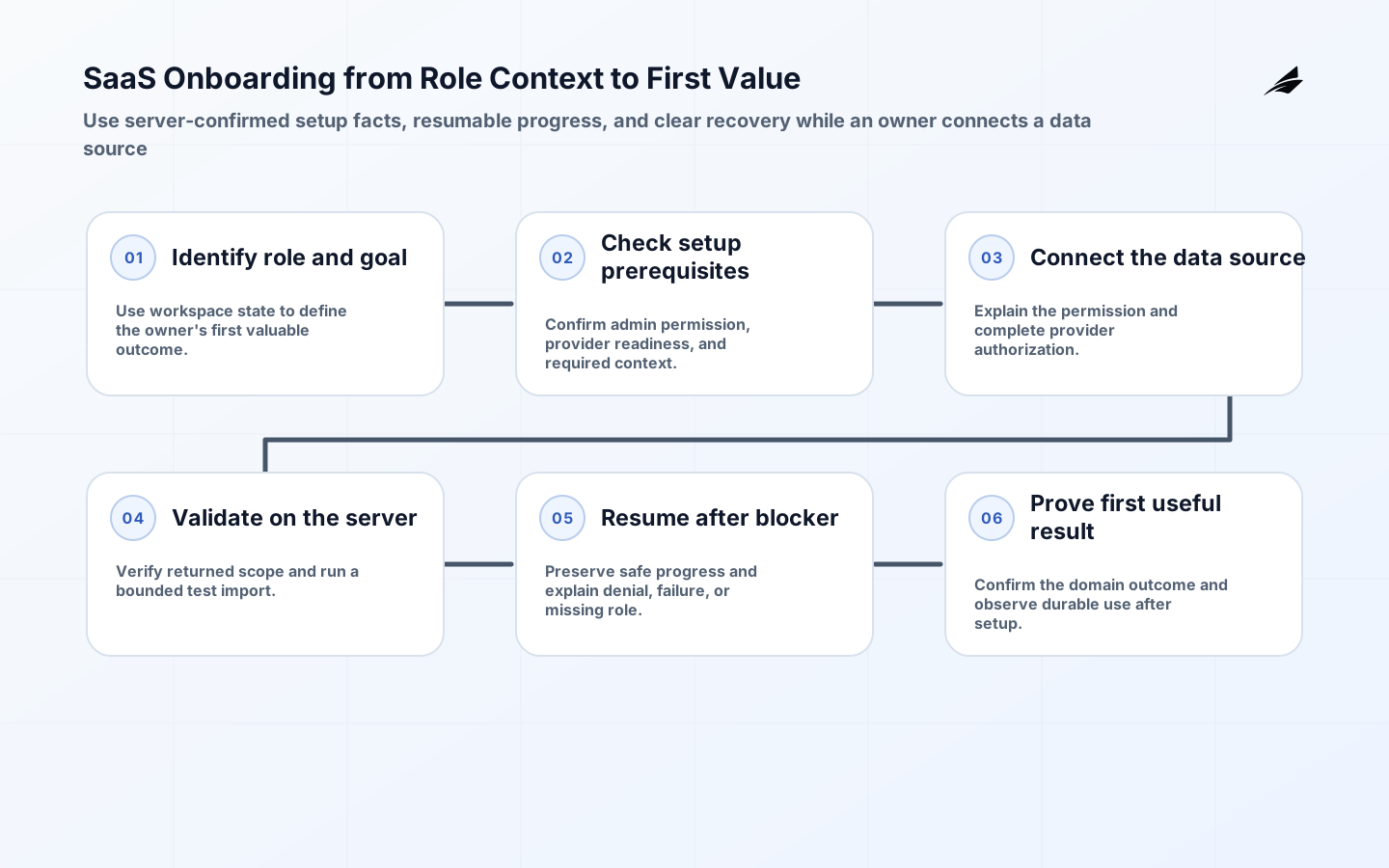
A reporting product's owner needs to connect a data source before the team can use it. The flow explains why the permission is needed, sends the owner through provider authorization, validates the returned scope, and starts a server-side test import. Until the test completes, the workspace sees an accurate pending state rather than a finished checklist item. If validation fails, the product names the field category or permission issue and preserves a path to retry. The first value is a trusted report, not the connection button click.
The product onboarding systems guide can help teams map those role-specific outcomes before implementation. Use the guide with real customer evidence, then select one friction point where better state, language, or recovery will make the most difference.
Review Onboarding Evidence
Review onboarding with a cross-functional sample once each release cycle. Watch a new customer or realistic test persona perform the journey, inspect the server-side state they create, and read the support trail for users who stopped. Compare the designed milestones with actual task completion. This exposes mismatches such as a checklist calling an integration complete before data is usable, or a recommended step that belongs to a different role. Changes should improve one verified point of friction rather than adding another universal tour.
Keep setup language under change control. Product copy often makes commitments about permissions, data movement, timing, or billing. When the underlying behavior changes, review the instructions, error messages, emails, and help content together. An inaccurate onboarding message can cause a customer to share data incorrectly or wait for a process that will never run. The best flow is concise because its state and promises are precise, not because it omits the difficult cases.
Plan the handoff from onboarding to ordinary product use. A customer should not remain trapped in a permanent setup layer after reaching first value, nor lose helpful guidance because one optional task is incomplete. Give owners a way to see readiness and return to configuration, while contributors move directly into their work. Review this handoff with customer-success teams: they often know which early signals predict a healthy account and which apparent completion states hide a blocked implementation.
Build the first-value path with realistic data, not a pristine demo alone. Empty workspaces, imperfect imports, existing spreadsheets, legacy permissions, and multiple teammates are the conditions customers bring. Provide templates or sample data only when they help users understand an action, and label them so they cannot be mistaken for production records. This makes the onboarding flow durable across both self-serve adoption and assisted implementation, where the team may prepare the workspace but the customer must still understand the resulting state.
Give implementation teams a clear way to hand off assisted setup. Record which prerequisites they completed, which remain the customer's responsibility, who owns the next step, and how long any temporary access lasts. The customer-facing view should mirror this state in plain language, so a successful kickoff call does not create a false sense of completion. This reduces the gap between a carefully managed pilot and a scalable onboarding experience that ordinary customers can complete with confidence.
Key Takeaways
- Define first value as a real role-specific outcome, not account creation.
- Use server-confirmed domain facts to represent setup progress.
- Design errors and interruptions as normal parts of the journey.
- Measure recovery and durable use alongside completion.
Frequently Asked Questions
Should every new user see the same onboarding checklist? No. Tailor recommendations to their role, workspace state, and prerequisites, while keeping a clear route to core work. When should a team add a product tour? Use one only when it supports an immediate task. A tour should not block the user or substitute for clear controls, useful blank states, and recoverable setup.
Conclusion
Thoughtful onboarding flows help customers reach a credible first outcome and help teams see where the product needs improvement. When role, state, accessibility, authorization, and recovery are designed together, the first experience becomes an extension of the product's operating model rather than a one-time tour.
Sources
Use WCAG 2.2 for accessible interaction requirements, OpenTelemetry for observability patterns, the OWASP ASVS for secure verification, and NIST SP 800-207 for access-control principles.