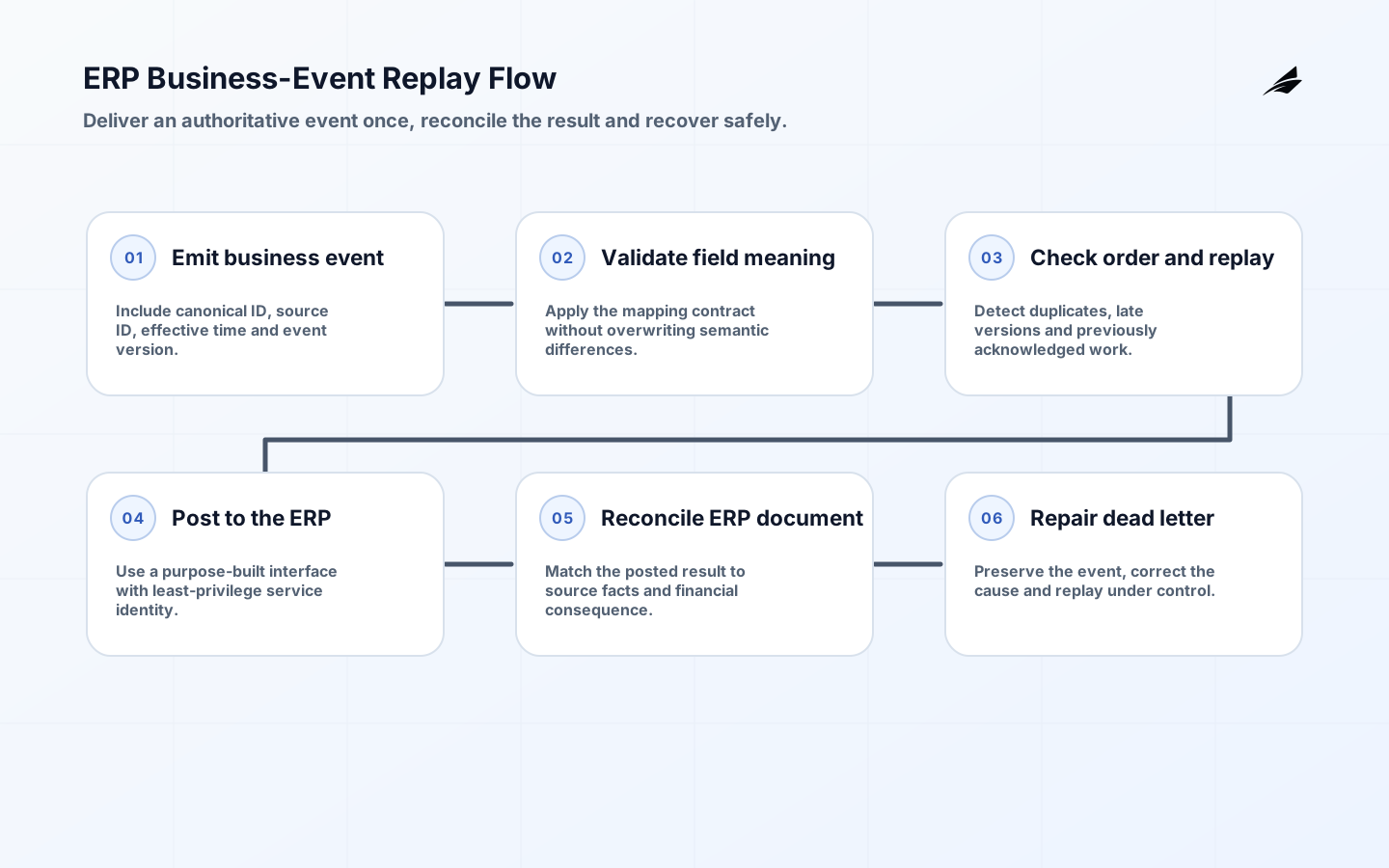
ERP integration failures usually begin before the first connector is built. A team copies fields without agreeing whether the ERP, commerce platform, warehouse, or CRM owns the business fact, then discovers that updates arrive out of order or that a retry creates a second financial document. The pre-build work is therefore a set of business decisions expressed as contracts, not a debate over middleware brands.
Set the decision boundary for ERP integration
Choose one business capability such as order-to-cash, procure-to-pay, or inventory availability. Map its triggering event, the record that becomes authoritative at each step, the financial or fulfillment consequence, and the exception owner. Keep scope narrow enough to show how a source update becomes an ERP transaction and how the result returns to the originating operation.
| Design concern | Decision to make | Evidence to retain |
|---|---|---|
| Business event | Order accepted, receipt posted, invoice approved, or stock moved | Stable event and source transaction IDs |
| Ownership | System allowed to create or change a fact | Field-level source rule and effective time |
| Transformation | Meaning, format, and validation rule | Versioned contract and test examples |
| Outcome | Accepted, rejected, held, or compensated | ERP document reference and reason code |
Keep records that explain the outcome
Name the canonical identifier and retain the originating-system ID, ERP document reference, business event type, effective time, and version. Do not use display names as integration keys. When fields differ in meaning, document the semantic rule rather than converting silently. A customer name may be descriptive in one system while the ERP account code determines credit, tax, and ledger treatment.
Design ERP integration as an accountable flow
Prefer explicit business events and purpose-built APIs over a shared database or periodic blind overwrite. Define schemas, ordering expectations, replay rules, and dead-letter handling. An integration should acknowledge receipt separately from completed processing. For a multi-step action, publish an outcome event so upstream teams know whether the ERP accepted, rejected, or held the transaction.
| Operating stage | Control to design | Signal to review |
|---|---|---|
| Transport | Authentication, timeout, and idempotency behavior | Latency, retry, and duplicate suppression |
| Processing | ERP validation and business rule execution | Acceptance, rejection, and hold volume |
| Exception path | Dead-letter ownership and replay procedure | Aged failures and manual repair count |
| Reconciliation | Source-to-ERP comparison by identifier | Unmatched documents and value differences |
Put authority and evidence into the controls
Map duties and approvals before exposing transaction creation. Service accounts need the least privilege required for a specific interface, secrets need rotation, and audit records need enough correlation to join an API call to an ERP document. Establish how errors containing customer or financial data are masked and who can access replay tools.
For ERP integration, NIST's Cybersecurity Framework is a useful reminder that business interfaces have identification, protection, detection, response, and recovery duties. SP 800-53 informs service-account control, while SP 800-34 and SP 800-92 support replay planning and traceable integration outcomes.
Release with exceptions in view
Use a representative data set that includes cancellations, partial fulfillment, changed tax treatment, and a retry during an outage. Reconcile source facts to ERP results before enabling full volume. Cut over one flow at a time, keep an agreed rollback or containment option, and avoid a migration window that leaves both systems able to originate the same business document.
Measure operating reliability, not activity alone
Track acceptance and rejection by event type, processing latency, duplicate suppression, unreconciled document count, replay age, and schema-version adoption. Investigate recurring manual repairs as design evidence. A stable transport layer with growing business exceptions is still an unsuccessful integration because users cannot rely on the outcome.
Pre-build decision register
- For ERP integration, confirm one canonical identifier per business object; write the rule, named owner, effective time, audit evidence, failure signal, and recovery action into the build decision record before release.
- For ERP integration, test one canonical identifier per business object with normal, delayed, corrected, and failed inputs; retain the result so the operating team can explain and safely repeat the decision.
- For ERP integration, confirm field ownership across the ERP and source platform; write the rule, named owner, effective time, audit evidence, failure signal, and recovery action into the build decision record before release.
- For ERP integration, test field ownership across the ERP and source platform with normal, delayed, corrected, and failed inputs; retain the result so the operating team can explain and safely repeat the decision.
- For ERP integration, confirm semantic mapping for values with similar names; write the rule, named owner, effective time, audit evidence, failure signal, and recovery action into the build decision record before release.
- For ERP integration, test semantic mapping for values with similar names with normal, delayed, corrected, and failed inputs; retain the result so the operating team can explain and safely repeat the decision.
- For ERP integration, confirm event ordering and out-of-order handling; write the rule, named owner, effective time, audit evidence, failure signal, and recovery action into the build decision record before release.
- For ERP integration, test event ordering and out-of-order handling with normal, delayed, corrected, and failed inputs; retain the result so the operating team can explain and safely repeat the decision.
- For ERP integration, confirm idempotency keys for created business documents; write the rule, named owner, effective time, audit evidence, failure signal, and recovery action into the build decision record before release.
- For ERP integration, test idempotency keys for created business documents with normal, delayed, corrected, and failed inputs; retain the result so the operating team can explain and safely repeat the decision.
- For ERP integration, confirm schema version compatibility and retirement; write the rule, named owner, effective time, audit evidence, failure signal, and recovery action into the build decision record before release.
- For ERP integration, test schema version compatibility and retirement with normal, delayed, corrected, and failed inputs; retain the result so the operating team can explain and safely repeat the decision.
- For ERP integration, confirm accepted, rejected, and held outcome contracts; write the rule, named owner, effective time, audit evidence, failure signal, and recovery action into the build decision record before release.
- For ERP integration, test accepted, rejected, and held outcome contracts with normal, delayed, corrected, and failed inputs; retain the result so the operating team can explain and safely repeat the decision.
- For ERP integration, confirm least-privilege integration-account permissions; write the rule, named owner, effective time, audit evidence, failure signal, and recovery action into the build decision record before release.
- For ERP integration, test least-privilege integration-account permissions with normal, delayed, corrected, and failed inputs; retain the result so the operating team can explain and safely repeat the decision.
- For ERP integration, confirm masking of sensitive error payloads; write the rule, named owner, effective time, audit evidence, failure signal, and recovery action into the build decision record before release.
- For ERP integration, test masking of sensitive error payloads with normal, delayed, corrected, and failed inputs; retain the result so the operating team can explain and safely repeat the decision.
- For ERP integration, confirm dead-letter queue ownership and replay authority; write the rule, named owner, effective time, audit evidence, failure signal, and recovery action into the build decision record before release.
- For ERP integration, test dead-letter queue ownership and replay authority with normal, delayed, corrected, and failed inputs; retain the result so the operating team can explain and safely repeat the decision.
- For ERP integration, confirm source-to-ERP reconciliation dimensions; write the rule, named owner, effective time, audit evidence, failure signal, and recovery action into the build decision record before release.
- For ERP integration, test source-to-ERP reconciliation dimensions with normal, delayed, corrected, and failed inputs; retain the result so the operating team can explain and safely repeat the decision.
- For ERP integration, confirm cutover rules for in-flight transactions; write the rule, named owner, effective time, audit evidence, failure signal, and recovery action into the build decision record before release.
- For ERP integration, test cutover rules for in-flight transactions with normal, delayed, corrected, and failed inputs; retain the result so the operating team can explain and safely repeat the decision.
Key takeaways for ERP integration
- Decide ownership and business meaning before selecting transport or middleware.
- Use durable identifiers, versioned events, and explicit processing outcomes.
- Treat retries, replays, and reconciliation as normal operating paths.
- Limit integration privileges and correlate every action to the ERP document it produced.
Frequently asked questions
Should an ERP integration use real-time APIs for every update?
No. Choose synchronization timing by business consequence. Some reporting data can be asynchronous; an availability or financial commitment may need faster, confirmed processing.
What is the most important mapping document?
A field and event contract that states business meaning, ownership, validation, transformation, and outcome handling.
How do we handle failed events?
Preserve the original message and context, route it to an accountable exception queue, correct the cause, and replay under controlled conditions.
Conclusion
A dependable ERP integration implementation is a system of explicit choices: what is authoritative, who can decide, which state is real, how an exception is recovered, and how the team verifies the result. Build the smallest flow that proves those choices with real evidence, then extend it deliberately. Related reading: ERP integration in production, master data management, approval workflows.