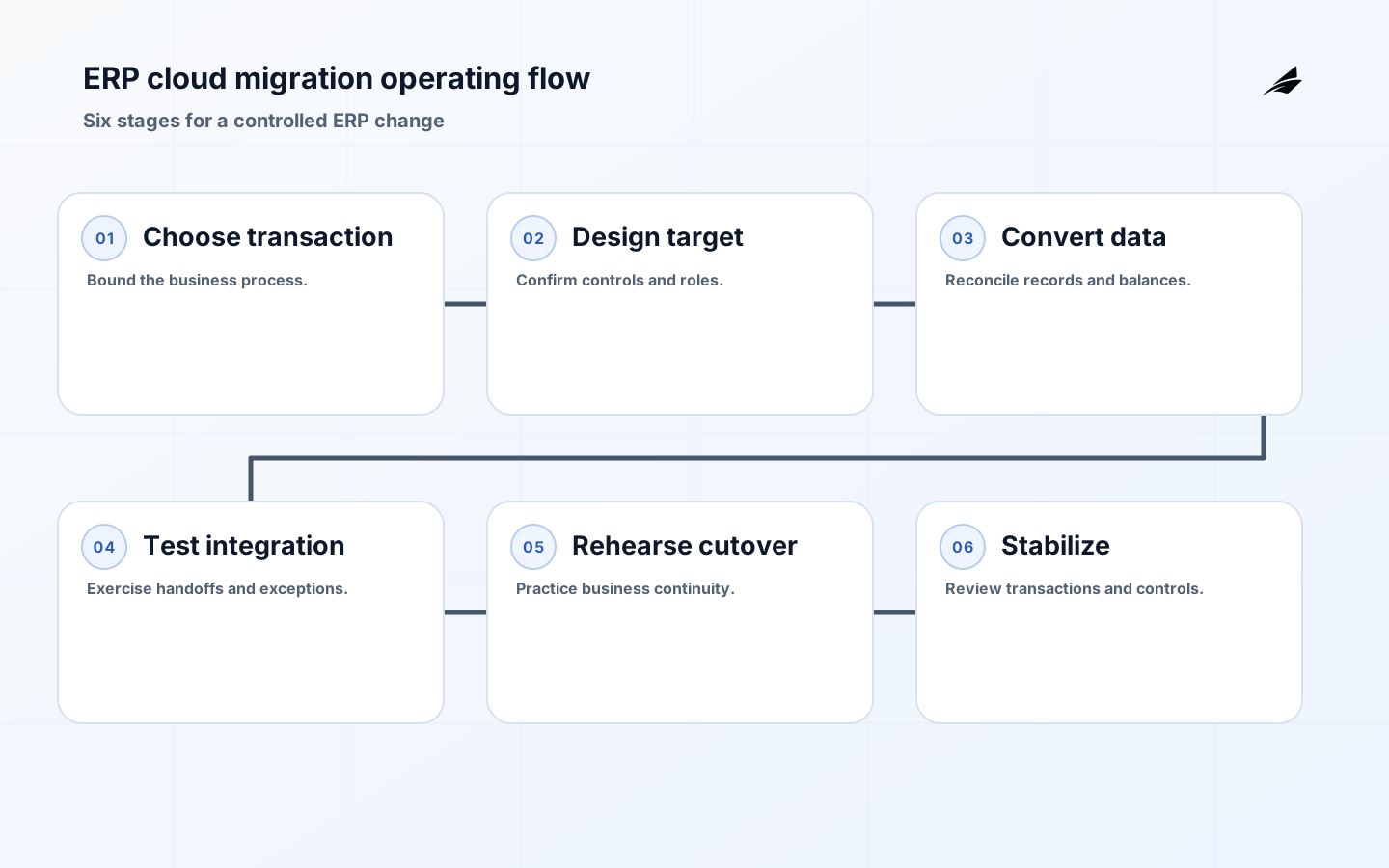
An ERP modernization planning checklist for a cloud migration should begin with a bounded transaction family, not a promise to replace every legacy screen. Choose work such as procure-to-pay, order-to-cash, inventory adjustment, or financial close, then observe how it is actually performed. Capture approvals, evidence, data handoffs, manual workarounds, close deadlines, and the exceptions that experienced staff resolve quietly. ERP modernization changes controls and operating habits as much as software. A credible plan protects the business's ability to transact, reconcile, and explain results throughout the transition.
Choose a transaction slice with accountable outcomes
Define the start event, required records, state transitions, approvals, completion evidence, and owner for the first slice. Separate standard process, necessary configuration, and a genuinely justified extension. Teams often preserve every legacy variation because no one has decided whether it remains policy. Put that decision with the business process owner, using evidence from transaction volume, customer impact, financial materiality, and control requirements. A smaller scope with a complete exception path gives more confidence than a broad design that postpones the difficult decisions until cutover.
| Planning area | Question | Evidence |
|---|---|---|
| Process | What must remain controlled and explainable? | Current cases, approvals, and reconciliation. |
| Data | Which identifiers and balances must convert? | Source profile and conversion rules. |
| Access | Who may initiate, approve, post, or adjust? | Role matrix and segregation review. |
| Continuity | How will business work during a failure? | Fallback, decision authority, and communication. |
Prove data conversion and historical access
Treat conversion as a repeatable reconciliation exercise rather than a one-time load. Profile duplicates, invalid codes, missing relationships, inactive records, open balances, and transactions near a reporting boundary. Define record-by-record conversion rules, including what will be archived and how a user retrieves it. Reconcile counts, values, identifiers, and material statuses in each rehearsal; investigate differences before moving on. Preserve source-to-target mappings and conversion decisions so finance, operations, and auditors can understand a migrated result. Historical access needs security and retention rules even when the old application is no longer operational.
Design controls and roles in the target process
Cloud ERP roles should be derived from protected actions and business relationships, not copied from job titles or legacy menus. List who may create a supplier, change bank information, enter a journal, approve a purchase, release a payment, or adjust inventory. Test combinations for conflicting authority and document compensating controls where separation is impractical. Build approval delegations with scope and expiry, not shared credentials. Configure audit history, evidence attachments, and exception queues before the first production transaction. A migration that posts successfully but cannot demonstrate who approved a material action has moved risk rather than reduced it.
| Cutover risk | Control | Decision owner |
|---|---|---|
| Open transaction omitted | Reconcile open items and retain exception list. | Process owner |
| Balance mismatch | Stop progression until agreed tolerance and remedy. | Finance controller |
| Role too broad | Test least-privilege scenarios and review conflicts. | Access owner |
| Integration failure | Queue, reconcile, and use a tested business fallback. | Integration lead |
Rehearse cutover and recovery with business teams
A technical migration rehearsal is incomplete without a business day simulation. Process a representative purchase, receipt, invoice, sale, correction, close activity, and outage case. Verify that staff can find work, approve it, diagnose a failure, and reconcile the outcome. State the go or no-go criteria, who may make the call, how late changes are frozen or captured, and when rollback remains possible. Communicate to users in operational terms: what is unavailable, what alternative path exists, and how work entered during the window will be resolved.
Stabilize with operating evidence
After release, review transaction throughput, unreconciled balances, failed interfaces, access requests, manual journals, support patterns, and close-cycle outcomes. Use a daily rhythm initially, with accountable owners and clear escalation. Resist declaring success solely because the system is available. Stabilization ends when normal teams can complete and evidence controlled work without extraordinary help, and when remaining exceptions have a sustainable owner. Feed recurring workarounds back into the process design; they often reveal missing training, data, authority, or configuration.
Implementation checklist
- Start with a bounded transaction family and an accountable process owner.
- Separate standard process, justified configuration, and true extensions.
- Rehearse conversion with counts, values, identifiers, and open-work reconciliation.
- Design target roles around protected actions and conflicting authority.
- Practice a business cutover, outage, rollback, and late-change scenario.
- Stabilize on transaction and control evidence, not availability alone.
Frequently asked questions
Should customizations be migrated automatically? No. Assess each against current policy, volume, control need, and target capability. Retain an extension only when its business owner can explain the value and the organization can test and operate it. Migration is a chance to retire accidental complexity.
How much historical data should move? Move what current operations, reporting, legal obligations, and customer service need, and provide controlled access to the rest. The decision should be recorded by record class, rather than treated as an all-or-nothing archive question.
Implementation evidence worksheet
- ERP cloud migration checkpoint 1: Write the business outcome in one sentence and name the person who can accept that outcome on behalf of the organization.
- ERP cloud migration checkpoint 2: List every material state, its entry condition, its permitted next states, and the evidence that proves a change is legitimate.
- ERP cloud migration checkpoint 3: Create a field register for identifiers, effective dates, owner, sensitivity, source, consumer, and correction route before configuring automation.
- ERP cloud migration checkpoint 4: Run a normal case and a deliberately incomplete case with the people who will operate the process; capture every manual step and undocumented decision.
- ERP cloud migration checkpoint 5: For every handoff, state what the sender guarantees, what the receiver validates, how duplicate delivery is handled, and who owns a rejection.
- ERP cloud migration checkpoint 6: Define a customer-safe or requester-safe status for each delay so frontline staff can explain progress without exposing internal notes or speculation.
- ERP cloud migration checkpoint 7: Prepare a reconciliation that compares counts, material values, state, and age between the initiating record and the resulting operational record.
- ERP cloud migration checkpoint 8: Choose thresholds that open owned work rather than merely sending alerts; record the queue, service target, escalation point, and recovery authority.
- ERP cloud migration checkpoint 9: Test a failed dependency, an out-of-order update, an unauthorized action, and a correction after downstream work has begun; retain the resulting evidence.
- ERP cloud migration checkpoint 10: Document which roles may read, change, approve, export, administer, or override the process, including temporary access and delegated authority.
- ERP cloud migration checkpoint 11: Keep original context when a fact is corrected: prior value, source, time, actor or process, reason, approving authority, and correlation identifier.
- ERP cloud migration checkpoint 12: Publish the smallest useful contract for each interface or report: purpose, scope, required inputs, freshness expectation, limits, owner, and support route.
- ERP cloud migration checkpoint 13: Rehearse a support conversation around a confusing or delayed case so the communication path is as deliberate as the technical recovery path.
- ERP cloud migration checkpoint 14: Inspect a sample of completed cases for evidence quality, not only elapsed time; a quick result that cannot be explained is not an operational success.
- ERP cloud migration checkpoint 15: Set a release decision with explicit go, hold, and rollback criteria, and identify who can make each decision when information is incomplete.
- ERP cloud migration checkpoint 16: Use a short post-release review cadence that pairs operational measures with a few real cases and records a single accountable improvement for each finding.
- ERP cloud migration checkpoint 17: Version rules, definitions, mappings, and approval thresholds. Explain historical comparison breaks rather than silently replacing prior meaning.
- ERP cloud migration checkpoint 18: Minimize the data carried into the workflow or view, and review access, retention, sharing, and export behavior against the stated business purpose.
- ERP cloud migration checkpoint 19: Identify the workaround that experienced staff use today, then decide whether the target design should formalize, retire, or replace it with an owned exception.
- ERP cloud migration checkpoint 20: Give every exception a stable identifier, severity, current state, next action, accountable owner, and a link to the business record it affects.
- ERP cloud migration checkpoint 21: Confirm training with hands-on completion of a real task and an exception, rather than attendance alone; update the runbook from what the exercise reveals.
- ERP cloud migration checkpoint 22: Review recurring overrides and repeated corrections as design evidence. They often signal unclear policy, bad data, missing capacity, or a brittle integration.
- ERP cloud migration checkpoint 23: Protect audit and operating evidence from routine cleanup. Retention and retrieval instructions should let a future reviewer reconstruct a material decision.
- ERP cloud migration checkpoint 24: End the implementation review by deciding what evidence would prove the next expansion is safe, useful, and supportable for the people doing the work.
Key takeaways
- ERP modernization is a transaction and control redesign, not only a technology move.
- Conversion proof requires reconciled values, identifiers, states, and history.
- Target roles must protect consequential actions and conflicts.
- A business rehearsal and stabilization cadence make cutover safer.
Conclusion
ERP modernization planning succeeds when a cloud migration preserves the ability to transact, reconcile, and explain. Start small enough to prove a full process, treat conversion and access as controls, rehearse recovery with the business, and stabilize from real evidence. That turns a major platform change into an operable improvement rather than a leap of faith.