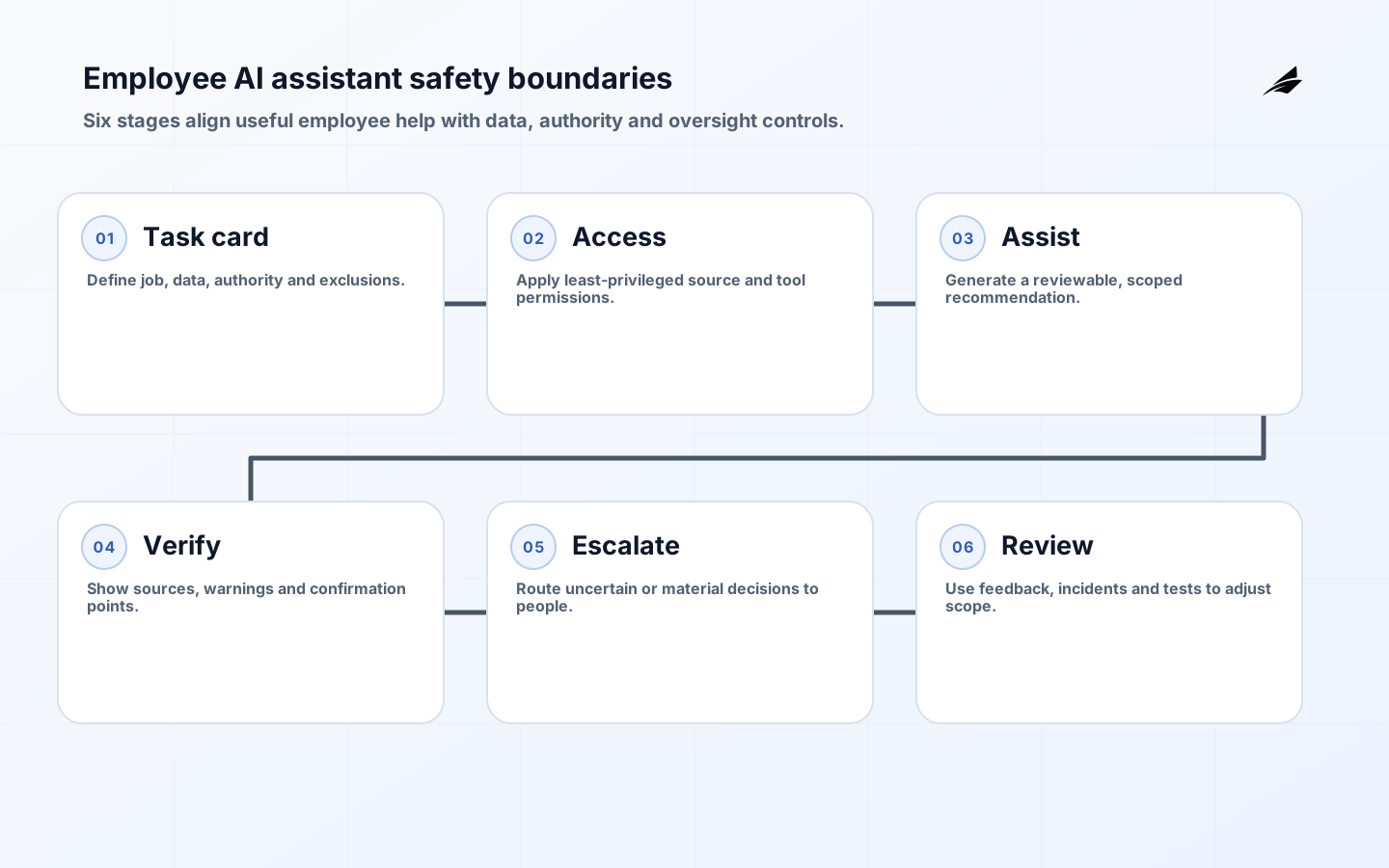
Safe AI assistants for employees begin with a modest promise: help people complete an approved task without bypassing the company’s existing responsibilities for data, decisions and customer commitments. Growing companies often need a useful alternative to ungoverned personal tools, but a broad chatbot connected to every system is not a sensible first answer. Start with a small set of tasks such as drafting from employee-provided notes, explaining a public process, summarizing an approved document set or preparing a support handoff. State what the assistant must not do, which data classes are excluded, when it must ask the employee to verify a result and who owns the service. A clear boundary makes adoption safer and makes training concrete.
Choose approved jobs and excluded actions
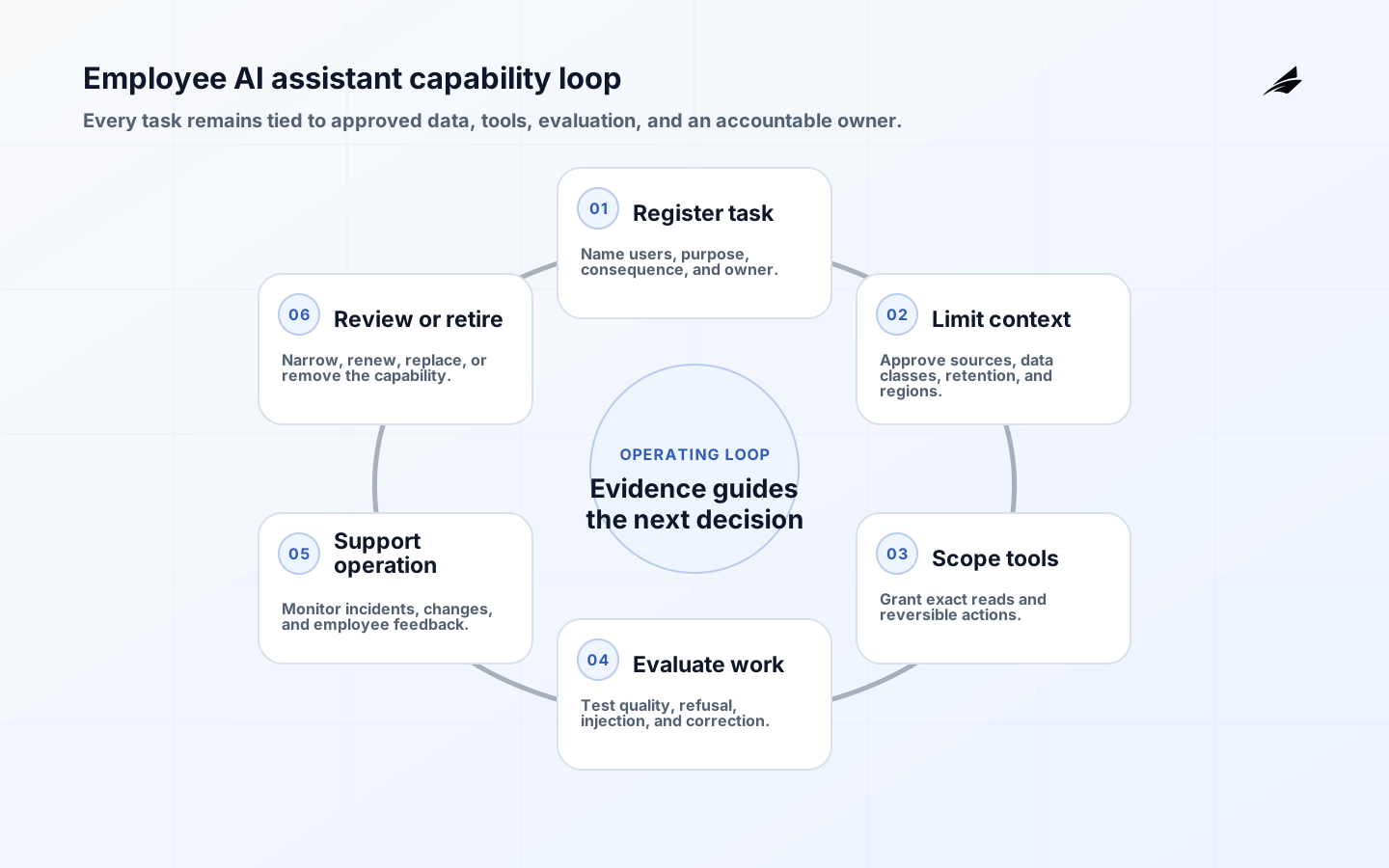
Write task cards that describe the user, input, expected output, decision consequence, permitted tools, data classification and escalation route. A card for meeting-note drafting is very different from a card that recommends a customer entitlement. The latter may require verified source data, role checks and human approval; the former may simply need a retention rule and a warning not to include confidential information. Avoid labels such as low risk without naming why. A task is lower risk when the output is advisory, the user can easily verify it, no restricted source is accessed, and a wrong answer has limited consequence. Reassess the card when the capability gains access to a new repository or tool.

| Task class | Permitted behavior | Required safeguard |
|---|---|---|
| Drafting | Create employee-reviewed text | No automatic sending |
| Knowledge help | Answer from approved sources | Citations and access filtering |
| Analysis | Summarize supplied data | Minimization and verification |
| Workflow support | Prepare a proposed action | Human approval and server-side validation |
| Restricted decision | Do not automate initially | Route to qualified owner |
Protect data and tools
Apply least privilege to the assistant as a workload, not only to its users. If the assistant can search, send, update or export, each capability should have a separate permission, constrained parameters and independent policy enforcement. Model instructions cannot replace authorization. Keep high-impact tool actions behind a confirmation surface that shows the intended target and effect, then validate the action on the server using the employee’s authority. Minimize data sent to providers, set retention terms deliberately and separate production secrets from conversational context. Avoid placing credentials, internal system prompts or broad exports into a prompt. Audit material tool requests and administrative changes with enough metadata to investigate misuse without turning every employee interaction into a surveillance record.
Employees should be taught that documents, emails and web pages may contain hostile instructions. An assistant that reads untrusted content can be manipulated into ignoring its purpose or attempting an unauthorized action. Treat retrieved material as data; screen it where appropriate, limit what the assistant can do with it and require human confirmation before external side effects. Provide a clear way to report a suspicious output, data concern or unsafe suggestion. Training should use examples from actual roles: a recruiter should know what candidate data is excluded, while a support agent should know when a response needs a source and approval. Good training equips people to recognize limits; it does not ask them to memorize a large policy document.
| Threat | Control layer | Employee action |
|---|---|---|
| Sensitive data in a prompt | Input guidance and data controls | Remove or use approved route |
| Hostile document instructions | Untrusted-context handling | Report unexpected requests |
| Overbroad tool use | Least privilege and confirmation | Review target and effect |
| Incorrect answer | Sources and verification step | Check before relying on it |
| Provider outage | Fallback process | Use normal workflow |
Evaluate before broad access
Evaluate each task against representative, difficult and prohibited examples. Test factual support, confidentiality, instruction-following boundaries, tool authorization, accessibility and the user’s ability to correct an output. Include attempted prompt injection, requests for restricted information and ambiguous employee intent. A pilot group should have a feedback channel and a support owner who can inspect patterns, not only individual complaints. Measure useful completion, correction effort, unsafe suggestion rate, blocked requests, support demand and time saved where that can be observed responsibly. Do not use adoption alone as proof of safety; employees may adopt a shortcut precisely because its risk is invisible.
- Publish task cards with permitted inputs, outputs and escalation paths.
- Use a controlled pilot cohort before connecting new systems.
- Test hostile context, data-boundary and tool-authorization cases.
- Keep external actions confirmable and independently authorized.
- Give employees a simple route to report a concern or correction.
Make ownership visible
Every employee assistant needs a business owner, technical service owner, data owner and security contact. Their responsibilities should be visible in the product and in the support process. Maintain an inventory of tasks, connectors, model versions, data classes, evaluation status and next review date. When a staff member requests a new capability, assess whether it changes the task boundary or merely improves an approved one. That distinction prevents incremental additions from quietly turning a drafting tool into an autonomous workflow system. When a tool is retired, remove connections, preserve required records, update employee guidance and point users to the authoritative replacement process.
Operate with feedback and review
Review assistant performance at a rhythm that matches its consequence. A drafting assistant may need a monthly service review; a tool that touches customer records may need more frequent sampling and incident readiness. Look for repeated corrections, blocked requests that indicate an unmet need, access anomalies, policy changes and provider changes. Make it easy to tighten a capability quickly by disabling a connector or action while leaving harmless assistance available. This graduated response is more practical than treating every concern as either a full shutdown or a minor bug. The organization’s confidence should come from its ability to inspect, contain and improve the assistant under ordinary operating pressure.
Maintain an employee assistant capability register
A policy that says employees may use an approved assistant is too broad to operate. Maintain a capability register that lists each task, eligible user group, data classes, retrieval sources, model and provider, enabled tools, output destination, owner, evaluation set, retention rule, and kill switch. Version the entry when any of those properties changes. The register should distinguish a general drafting surface from a connector that searches contracts or an action that creates a ticket. NIST's AI RMF Core asks organizations to define roles, train personnel, document third-party risks, and establish contingency processes. A concise register turns those outcomes into something security, privacy, IT, and business owners can review together.
Connect the register to access reviews and change management. When a team requests a new repository, ask which task needs it, which records are excluded, how authorization is preserved at retrieval time, and what evaluation proves the change useful. The NIST Generative AI Profile identifies risks specific to generative systems, while the OWASP Top 10 for LLM Applications and its prompt injection prevention guidance give implementation teams concrete abuse cases to test. When a provider changes model behavior or retention terms, identify every affected capability instead of sending an abstract policy notice. Usage analytics should protect employee privacy while still revealing unsafe submissions, repeated refusal, high correction burden, or an abandoned feature. A quarterly review can retire unused capabilities and narrow those that create more review work than value. This keeps enterprise AI automation aligned with real employee work instead of accumulating invisible privileges.
Key takeaways
- Begin with bounded, employee-verifiable tasks.
- Use task cards to state data, tools, authority and escalation explicitly.
- Enforce permissions in systems and services, never in prompts alone.
- Treat retrieved content as untrusted and external actions as confirmable.
- Evaluate safety and correction burden before expanding access.
- Maintain clear owners and a practical route to contain a risky capability.
Frequently asked questions
Why not simply allow any employee AI tool?
Unmanaged tools make it difficult to apply data rules, investigate incidents, support employees or verify how a business decision was influenced. An approved assistant can still be useful while giving the company defined boundaries, support and a way to improve safely.
What should employee training cover?
Cover approved tasks, prohibited data, how to verify an answer, how tool actions are confirmed, common hostile-content patterns and how to report a concern. Tailor examples to the employee’s work so the guidance is usable at the moment of decision.
Handle vendor and model change deliberately
An employee assistant depends on more than the interface employees see. Provider behavior, model versions, pricing, data terms, safety settings, hosted tools and regional availability can all change its operating profile. Keep an inventory of these dependencies and decide which changes require regression testing, renewed approval or employee communication. Run representative task cards before accepting a material model change, including restricted-data and hostile-context cases. When a provider incident or unexpected output pattern occurs, the service owner needs a ready option to reduce scope, switch to a reviewed fallback or pause the assistant while preserving ordinary business work. This is especially important for growing companies that have limited capacity to investigate a fast-moving platform change during a busy day.
Set a practical support model
Employees need to know where to go when the assistant is unavailable, gives an unexpected answer or blocks an intended task. Publish a support route that distinguishes a how-to question from a security concern, a source-quality correction and an access request. Support staff need a safe way to capture identifiers and versions without asking employees to paste sensitive content into a general ticket. Define expected response times and the escalation path for a suspected disclosure or unintended action. A visible support model reduces the temptation to work around controls and provides the service owner with evidence about where the assistant’s boundaries are too unclear or too restrictive.
Conclusion
The safest employee assistant is not the one that promises to do everything. It is the one whose help, data access and authority are clear enough for employees and owners to use confidently and correct quickly.