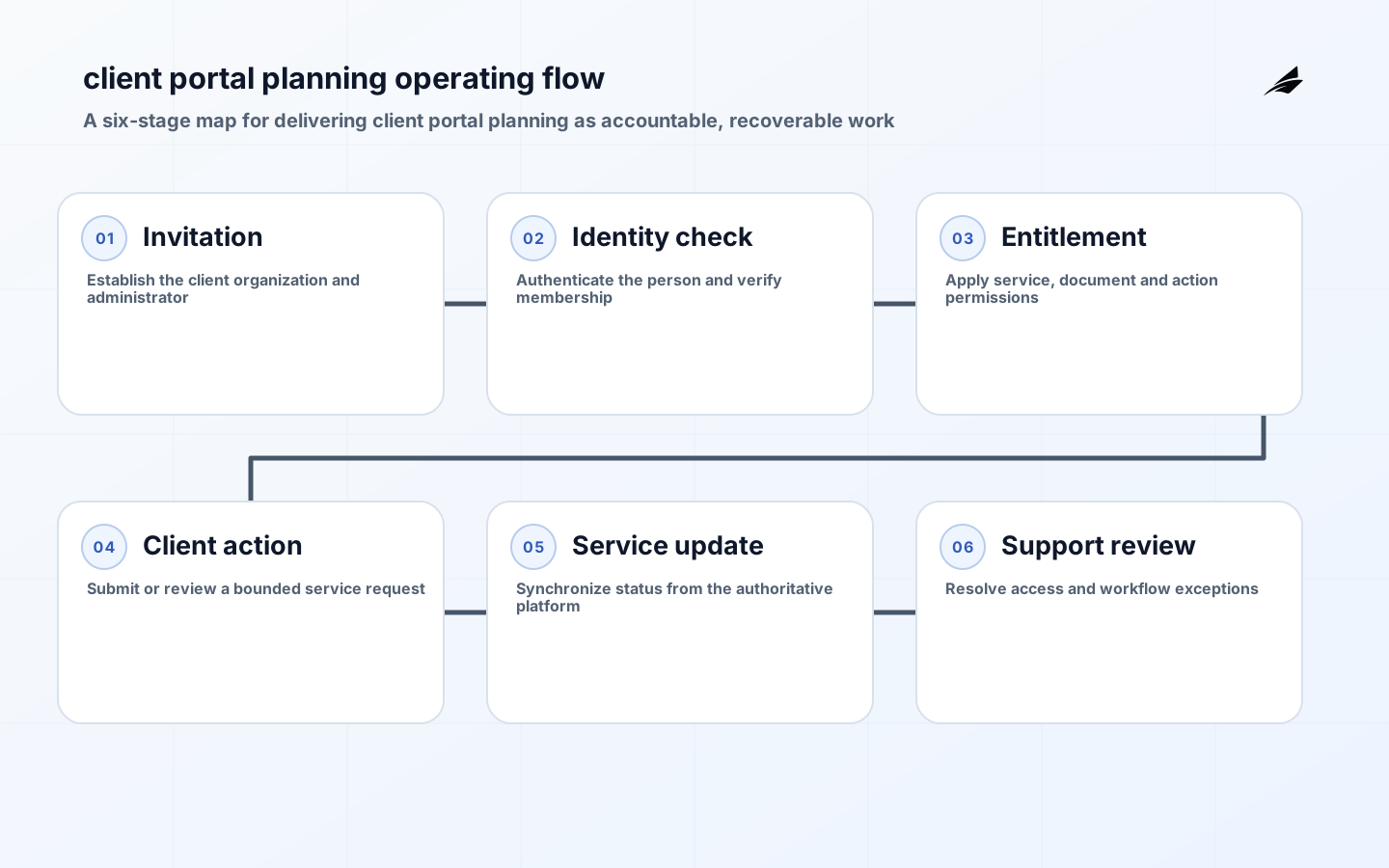
Client portal planning should begin with the work, not a component library. Operations, service and account teams need a practical way to achieve one outcome: give clients a dependable way to submit, review and act on service information without exposing internal complexity. Start by watching a representative client request or service case move through the existing process. Ask what event starts it, who changes it, which record can be trusted, what happens when information is missing, and how a person proves that the work is complete. This makes client portal planning a delivery decision with observable boundaries, rather than a promise to digitize everything at once. The first release should leave users able to explain the current state, recover a stalled item and identify the accountable owner without opening a private spreadsheet or asking an engineer to inspect a database.
Key takeaways
- Treat client portal planning as a defined operating workflow, not a collection of screens.
- Name the authoritative record for every decision and show where state is copied or derived.
- Model normal work and a client lacks an entitlement, disputes a status, or uploads information that cannot be accepted before estimating delivery.
- Build evidence into the workflow: actor, timestamp, prior state, decision and reason.
- Release a narrow invite a client user, submit a request, view a status, exchange a document, and receive a resolution journey, then measure self-service completion, response time, avoidable contacts and access-review findings.
Define the client portal planning operating boundary
A useful boundary begins with this trigger: a client signs in, supplies information, reviews a status or accepts a deliverable. Write the workflow in plain language, then mark every moment where someone can create, view, change, approve, cancel or reopen the client request or service case. The needed authority is equally important: the portal presents governed views of the service platform rather than becoming an unsynchronized shadow database. That distinction prevents a new interface from silently inventing competing data. Interview people who perform the work as well as people who answer questions about it later. Their disagreement is valuable design material. It often reveals undocumented thresholds, off-system communications or handoffs that a happy-path diagram omits. Keep the first boundary small enough that a team can run a real case through it end to end and learn whether it reduces friction without moving risk somewhere less visible.
| Boundary question | Decision to make | Evidence to keep |
|---|---|---|
| Trigger | What event creates the work? | Example input and source identifier |
| Authority | Which record wins when values differ? | Owner and reconciliation rule |
| Actor | Who may take each action? | Role, policy and access-review owner |
| Exception | a client lacks an entitlement, disputes a status, or uploads information that cannot be accepted | Escalation target and recovery path |
Model states, decisions and exceptions
For client portal planning, describe states as facts that change only through named actions, not as loose labels on a page. A state model should distinguish waiting for information, active work, review, completion and cancellation where those distinctions matter. Define the roles as client administrator, client contributor, account owner and service coordinator. For each transition, record the allowed actor, the preconditions, the required data, the event emitted and the result visible to the next person. This is where difficult cases belong: a client lacks an entitlement, disputes a status, or uploads information that cannot be accepted. A workflow that cannot represent those cases will push them into email, direct messages or unlogged administrator changes. That makes reporting unreliable and support expensive. It is better to expose an explicit exception state with a reason and owner than to pretend that exceptions are rare.
- Use stable identifiers for work, people and source records so events can be joined during investigation.
- Keep transition rules close to the server-side decision point; a hidden button is not an authorization control.
- Make cancellation, correction and rework first-class actions with a visible reason.
- Show users what will happen next, who owns it and when an escalation path becomes available.
- Test state transitions with representative policy combinations before polishing secondary views.
Design the data and access model
Data design for client portal planning: a practical guide for operations teams is less about selecting a database than deciding what each field means and who may rely on it. Separate the business object from the work record, attachments, comments, notifications and audit events. Retain source references rather than copying large records merely for display. Access should be evaluated for the action and object in context, especially where a user can see one organization, case or reporting period but not another. The OWASP Application Security Verification Standard is useful here because it turns technical security controls into testable requirements. Pair those checks with accessible interaction: error messages, keyboard paths and status updates must work for the people doing the work, not only for a demo account.
Build a thin vertical slice
The first implementation should support this complete action: invite a client user, submit a request, view a status, exchange a document, and receive a resolution. For operations, service and account teams, that means including the real identity path, the minimum integration, validation, audit event, notification and support view needed for that action. Stub only what is genuinely outside the learning goal, and make the stub obvious. A vertical slice is stronger than a set of disconnected front-end pages because it reveals whether contracts, permissions and operational ownership fit together. Apply NIST SSDF practices to the slice: keep code and dependencies under control, verify security requirements, protect the build and retain evidence of what was tested. The goal is not paperwork; it is making later change less surprising.
| Release concern | Minimum acceptance evidence | Operational owner |
|---|---|---|
| Correctness | Representative normal and exception cases complete | Process owner |
| Security | Authorization and input validation tests pass | Application owner |
| Accessibility | Keyboard, labels and status feedback checked | Product owner |
| Recovery | Failed integration or decision can be retried or reversed | Support lead |
Instrument the workflow and measure the outcome
Instrumentation should answer a useful operational question, not simply count clicks. For client portal planning, review self-service completion, response time, avoidable contacts and access-review findings. Emit events when work enters a state, is assigned, becomes overdue, fails validation, is escalated and reaches an outcome. Correlate those events with a stable work identifier, while avoiding unnecessary sensitive content in logs. NIST log management guidance is a sound reminder that records need collection, protection, retention and review practices. Put a small operational view beside the product experience: queue age, failed actions, integration health and unusual access denials help the people responsible for the service act before users are stranded.
Release with accountability
Launch client portal planning to a bounded group whose work resembles the intended audience and whose support needs can be met quickly. Agree who handles access problems, content corrections, data mismatches and production incidents before invitations go out. Use a feature flag, cohort or controlled route when it lets the team contain impact without maintaining two permanent processes. Define a rollback in business terms as well as deployment terms: if the new path fails, where does the client request or service case go, who informs the affected person, and how is the duplicate avoided? A release is successful when the organization can operate the changed process calmly, not merely when the deployment finishes.
Review risk and improve deliberately
The recurring risk for this topic is treating a portal as a polished dashboard while leaving identity, permissions and support paths undefined. Counter it with a weekly review of completed work, queue aging, exceptions, feedback and unreconciled records. Ask whether the delivered path changed the intended outcome, whether any role acquired more access than needed, and whether a manual side route has appeared. Use the evidence to choose one improvement at a time: simplify an input, clarify a state, repair an integration contract, revise a policy threshold or stop a feature that does not earn its operating cost. DORA research is helpful as a directional guide: delivery performance and organizational outcomes need regular measurement, not confidence based on a project plan alone.
Common failure modes
A few patterns repeatedly undermine client portal planning: a practical guide for operations teams. Teams often build for a nominal role instead of the person resolving an unusual case; they allow bulk exports without a clear purpose; or they log a final result but not the decision that produced it. Another common problem is treating integration success as a single yes-or-no event. Real dependencies delay, retry, duplicate and change their contracts. Design for idempotent updates, visible failures and a human recovery route. Finally, do not confuse a polished interface with adoption. Observe whether people can complete the intended work without parallel notes, and investigate the workaround before adding another feature.
Frequently asked questions
What belongs in the first client portal planning release?
For client portal planning: a practical guide for operations teams, include one high-value journey that crosses the real boundary: a trigger, a permitted actor, a state transition, a trusted record, an exception path and an outcome someone can verify. Leave broad administration, advanced analytics and less common variations for later unless they are necessary for that journey to operate safely.
Should client portal planning be bought, configured or built?
Decide from the workflow and operating constraints of client portal planning: a practical guide for operations teams. A configurable product may be suitable when its state model, access controls, integrations and audit evidence match the work with little distortion. Custom delivery earns its cost when the differentiating journey, data boundary or operational recovery model cannot be represented responsibly otherwise. In either case, make ownership and acceptance evidence explicit.
Conclusion
A durable client portal planning initiative gives people a better way to complete real work while making state, authority and recovery clearer. Begin with the observable client request or service case, set a narrow boundary, encode accountable decisions, test the difficult path and release with people ready to support it. The next investment should follow evidence from the first journey, not an assumed feature roadmap. That approach produces software that is easier to trust, change and hand over when the organization grows.