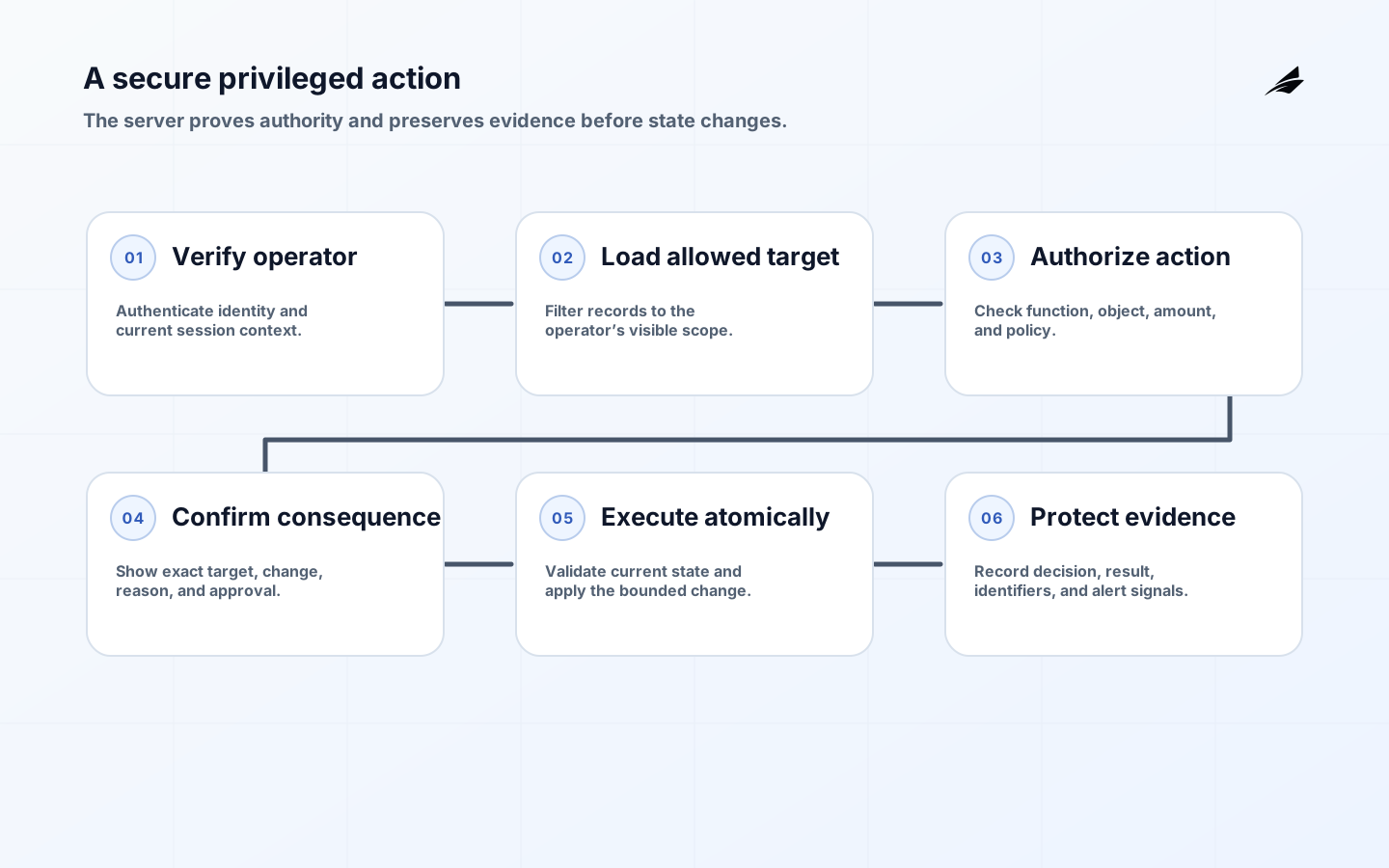
Secure admin panel design protects the operational surface where a small number of users can reset identities, alter entitlements, refund money, export sensitive records, impersonate customers, or change production configuration. “Internal only” is not a security boundary. Every action still needs authenticated identity, server-side authorization over the target object and requested function, deliberate interaction design, bounded data exposure, and an audit record that an investigator can understand. The panel should help a legitimate operator act accurately while making unauthorized, accidental, and ambiguous actions difficult.
Identify high-impact work before designing screens
Inventory actions, not pages. A seemingly modest customer lookup may reveal payment details; an edit form may alter tenant-wide configuration; a support tool may initiate an irreversible export. Classify each action by the harm caused by error, abuse, or a compromised administrator. Ask whether it changes confidentiality, integrity, availability, money, identity, or customer commitments. This produces a focused backlog: read-only operational work can have a different path from deletion, impersonation, bulk export, or permission changes. It also exposes functions hidden behind background jobs and API endpoints, where a carefully designed user interface cannot compensate for weak server checks.
| Operation class | Expected control | Example |
|---|---|---|
| Routine lookup | Authenticated role check and minimal data display. | A support agent views a customer's plan status without seeing secrets or unrelated tenants. |
| Sensitive change | Resource-level authorization, clear confirmation, and durable event record. | An operator updates a tenant's verified domain after validating the request. |
| High-impact action | Strong authentication, narrowly assigned authority, and often independent approval or delay. | A finance administrator changes payout instructions or issues a large credit. |
| Emergency action | Time-bound elevation, incident reference, and post-action review. | An on-call engineer disables a failing integration to contain an outage. |
Design the control path on the server
Every protected operation needs an authorization decision where the application performs the work. The server should resolve the authenticated identity, load the target resource and relevant tenant context, evaluate the specific action, and reject the request before changing state. A hidden button, client-side route guard, or role name in a browser token is not enough because a user can call the endpoint directly. Prefer deny-by-default behavior, explicit permissions, and checks that are close to the resource. When an action spans multiple objects, verify the relationship among them rather than authorizing each identifier independently.
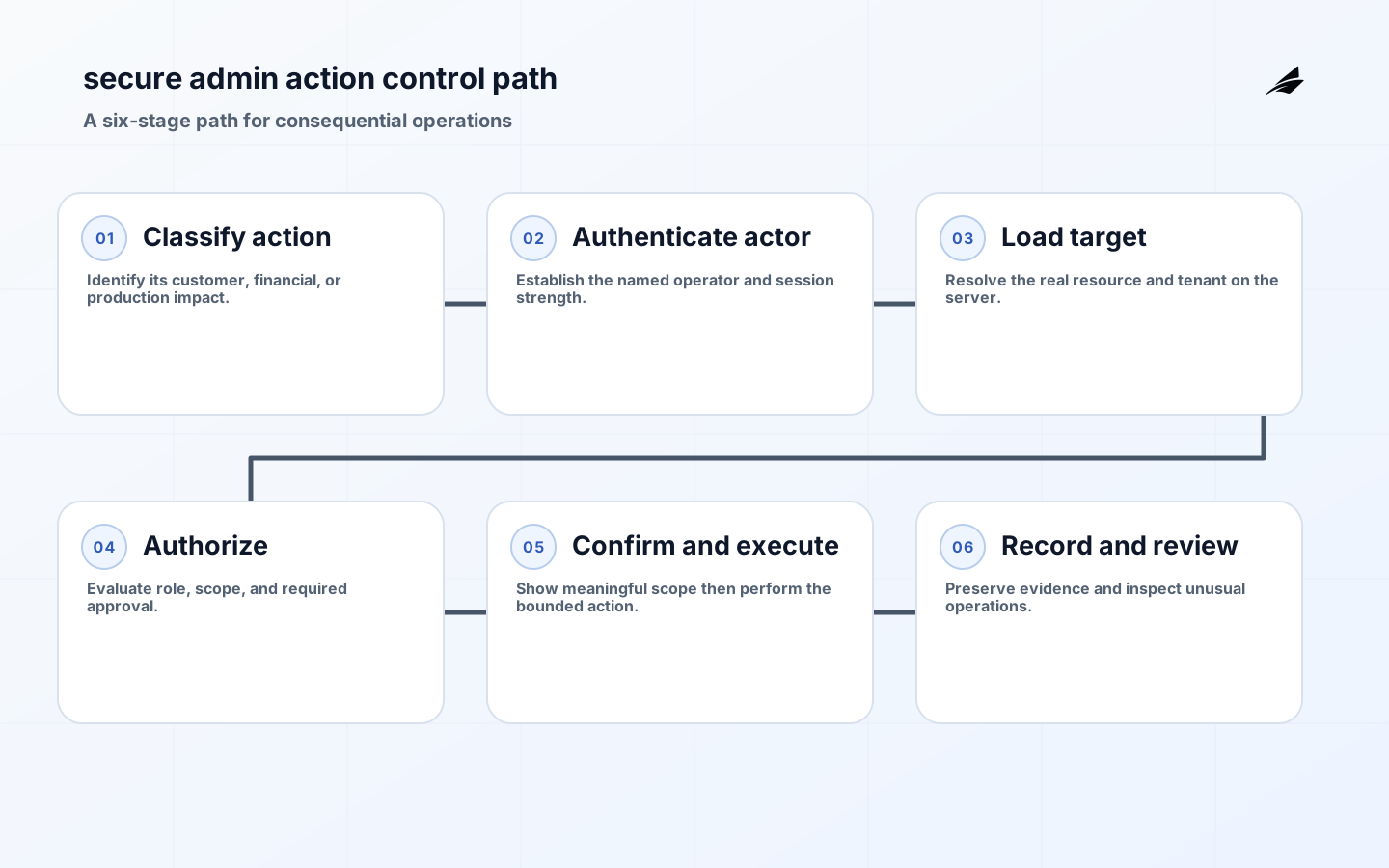
- Use separate permissions for viewing, changing, approving, exporting, impersonating, and administering; a broad 'admin' role ages badly.
- Pass tenant and resource context through the trusted server path, then verify that the actor may operate on that exact target.
- Require recent or stronger authentication before actions that create a large blast radius.
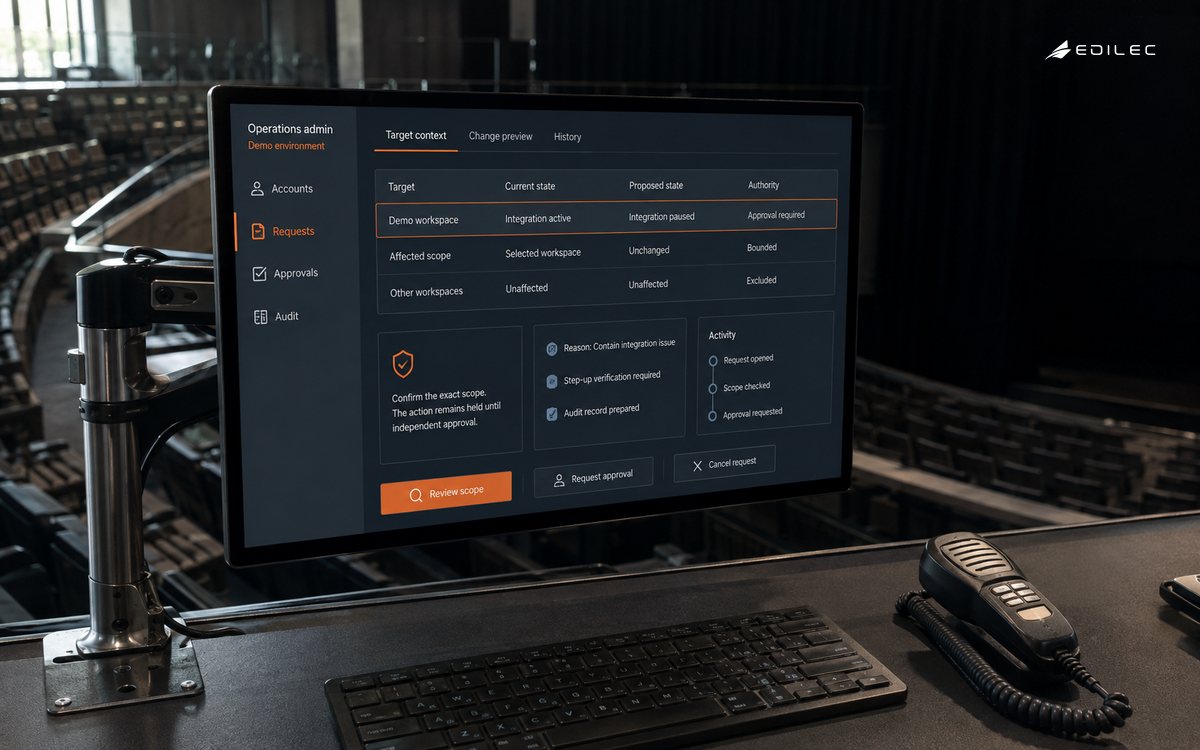
- Show a clear summary before irreversible work, including target, scope, and consequence.
- Make bulk actions bounded, reviewable, and resumable rather than accepting an unexamined upload or wildcard selection.
Reduce operator error without weakening accountability
Good controls help an authorized operator avoid the wrong action. Put the customer or tenant identifier, environment, scope, and irreversible effect next to the command, not in a distant tooltip. For destructive work, require an intentional confirmation tied to the displayed target; for especially consequential changes, use a second approver or a short delay that permits cancellation. Avoid security theater such as asking staff to retype a generic word while leaving the wrong tenant selected. The interface should make unusual scope obvious and provide a safe route to stop. Confirmation improves human reliability; it never replaces authorization and audit evidence.
Create an audit trail people can investigate
Audit events should answer who performed which operation on what target, from which authenticated session, when, with what result, and under what approval or ticket context. Include a correlation identifier so an investigation can join the interface event to downstream work. Record denied as well as successful attempts when they are relevant to security review, but do not write passwords, session tokens, full payment data, or other secrets to logs. Protect access to the records and make retention and retrieval practical. Audit logs for SaaS platforms offers a useful companion design lens.
| Test case | What should happen | Failure to investigate |
|---|---|---|
| Changed object identifier | The server rejects access to a tenant or record outside the operator's authority. | Authorization depends only on a visible screen path. |
| Expired elevation | A temporary privilege cannot execute a sensitive action after its end time. | Old emergency access remains usable. |
| Bulk request | Scope, permissions, and limits are checked for every affected object. | One approved item authorizes an entire unbounded set. |
| Audit retrieval | A reviewer can reconstruct a recent high-impact change quickly. | Events lack target, outcome, or a stable actor identifier. |
Operate and review the panel as a production service
Admin tools need change control, dependency awareness, monitoring, and a way to revoke access quickly. Review privileged roles and sensitive functions after product changes, newly integrated vendors, incidents, or organizational shifts. Exercise a realistic support scenario and an attempted misuse scenario. Look for workflows that require direct database edits, shared accounts, copied credentials, or undocumented browser steps; those are design signals, not merely operator habits. Track failed high-impact requests and repeated use of emergency access, then investigate whether they indicate a broken permission model or a process that does not reflect genuine work.
Run a practical operating exercise
Run a secure admin panel design exercise on the most consequential operation before the tool receives another feature. Have an operator perform the normal request in a nonproduction environment, then repeat it with a changed tenant identifier, insufficient role, expired elevation, missing approval, and an attempted bulk scope. Observe what the server rejects, what the interface communicates, and what an investigator can retrieve afterward. Include the ordinary recovery path: a customer needs urgent help, but the operator's normal authority is not enough. The preferred solution is a narrowly bounded, attributable escalation, not a shared master account or a database edit. Invite support and on-call engineering to the session because they see the workarounds that product specifications omit. The result should be a short list of changes to policy, user experience, evidence, or emergency procedure, plus an owner for each one.
Add a short review session whenever a support request affecting a customer-owned production setting changes the assumptions behind secure admin panel design. Bring support leads, application engineers, and the system owner together and start with the actual request rather than a control label. Trace the request from the authoritative record through identity, configuration, policy, implementation, and the evidence an investigator would use. Ask whether the true target, authority, and result can be reconstructed. Then introduce one realistic failure: a delayed directory update, unavailable dependency, stale configuration, unexpected retry, or departure of the person who normally knows the workaround. The group should choose a safe response before the next urgent event forces improvisation. Capture only concrete outcomes: a missing owner, an unclear approval limit, a test that does not reach the enforcement point, a recovery step that is too broad, or an evidence record that cannot be retrieved. Assign each outcome to a person and date, and rerun the same scenario after the change lands. This practice keeps secure admin panel design connected to daily operations. It also reveals when a process appears complete because a document exists, while the service itself still depends on unwritten knowledge or standing privilege. Over time, retain a small decision history so new team members can understand why the boundary exists and which assumptions must be revisited as the product, vendors, and workforce change.
Trace a high-impact action end to end
Take a large customer refund. The list view should expose only the records the operator may see. Opening a case must not prove authority to refund it; the server evaluates role, business unit, amount, account state, separation-of-duty rules, and any required approval at execution time. OWASP’s authorization guidance recommends deny-by-default, validation on every request, and authorization tests. The user interface then presents customer, amount, currency, consequence, and reason before confirmation. For exceptional amounts, a second accountable person approves a server-side pending operation rather than sharing a session or code.
The event record needs more than “admin clicked refund.” The OWASP Logging Cheat Sheet calls for consistent event data while warning against recording secrets. Capture actor, authentication context, target, before and after state or a safe change summary, reason, approval, request identifier, policy result, outcome, and trusted timestamp. Alert on repeated denials, unusual exports, privilege changes, and emergency overrides. Use Edilec’s secure admin implementation checklist, the admin panel versus dashboard guide, and the engineering team guide to carry these rules into delivery. The OWASP ASVS provides testable application-security requirements.
| Threat or mistake | Design control | Verification case |
|---|---|---|
| Changing an object outside the operator’s scope | Server checks object and function authorization together | Allowed role is denied when target tenant changes |
| Confusing similarly named accounts | Show stable identifier and critical context at confirmation | Operator can distinguish two same-name customers |
| Privilege hidden in a bulk action | Preview exact affected set and require explicit scope | Stale selection cannot expand after confirmation |
| Impersonation without accountability | Separate mode, visible banner, purpose, expiry, restricted actions | Session ends automatically and prohibited changes fail |
| Audit record altered by an administrator | Append-oriented protected logging with restricted readers | Admin cannot edit or delete its own event |
| Compromised session performs rapid damage | Step-up checks, limits, anomaly detection, kill switch | Response team can terminate sessions and suspend capability |
Key takeaways
- Secure admin panel design starts by classifying operations by consequence, not by visual screen.
- Authorize every action on the server against the real actor, target, tenant, and operation.
- Use deliberate confirmation and readable scope to reduce mistakes by authorized staff.
- Make impersonation, bulk changes, exports, and emergency elevation especially constrained and visible.
- Preserve protected, retrievable evidence for successful and material denied actions.
Frequently asked questions
Conclusion
Secure admin panel design lets operations teams move quickly without creating an invisible back door into the product. Make authority specific, keep enforcement on the server, show operators the true scope of a change, and retain records that explain the outcome. The result is a tool that supports accountable operations even when the request is urgent.