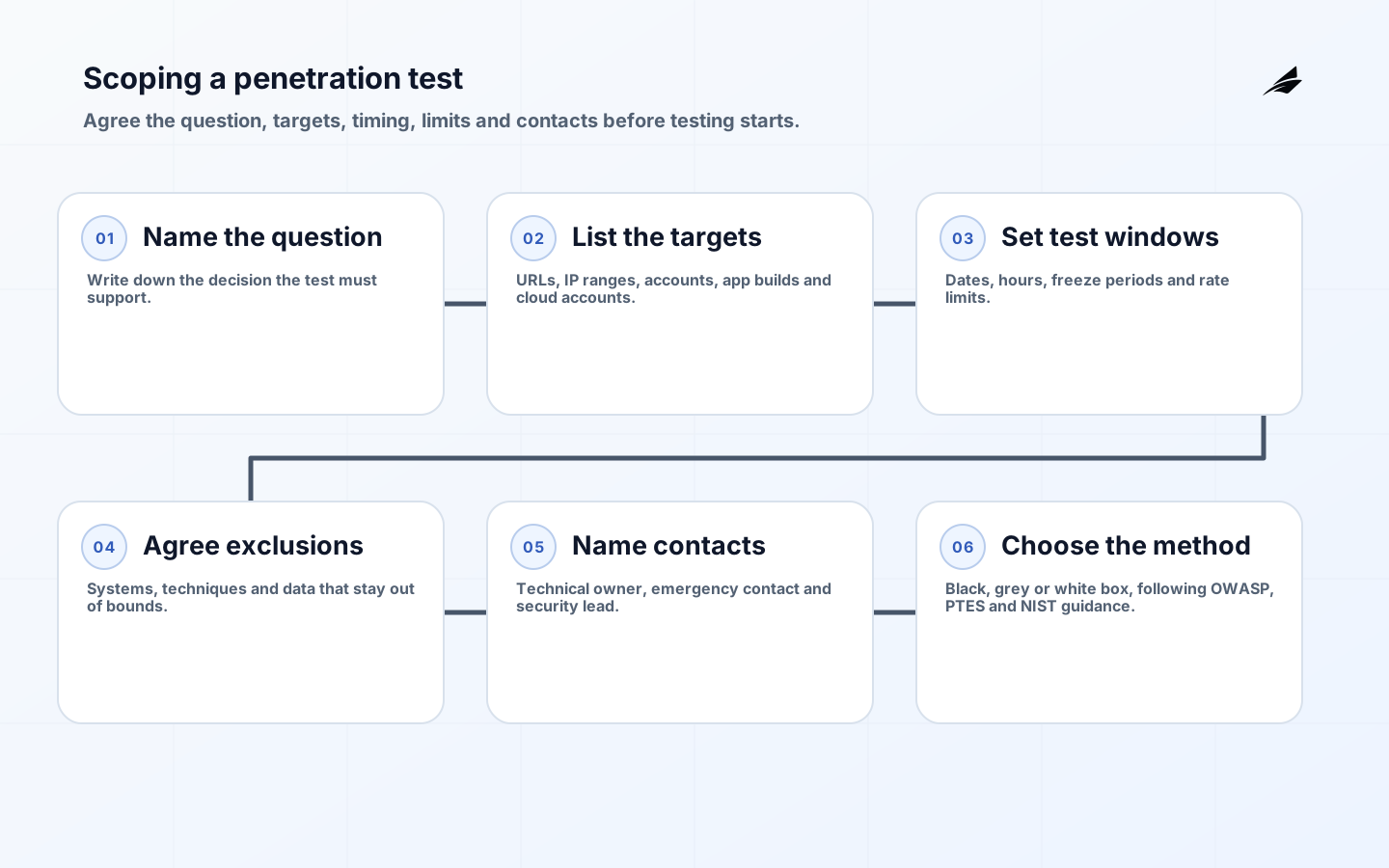
A penetration test is only as good as its scope. Scoping decides which systems are tested, when the testing may run, what must not be touched, who answers the phone if something looks wrong, and what the testers need to start. A clear scope protects your live operations, keeps the testers inside the law and makes the final report useful, because every finding maps to something you asked to have tested.
At Edilec, scoping is the first of five steps in every engagement, followed by written authorization, testing, reporting and retesting. Nothing is tested until the scope is agreed and signed. This guide walks through the questions we ask, so you can prepare the answers before the first call.

Start with the question you need answered
The most useful scopes start from a decision, not a list of hosts. "Can a customer see another customer's records?", "Can our new payments integration be abused?" and "Can a vendor account reach our internal network?" each lead to a different scope, a different method and a different report. Write down the question first, then the systems that answer it.
- A release question: is the new app, API or feature safe to launch?
- An assurance question: will our controls hold up for a customer, auditor or regulator who asks for evidence?
- A change question: did a migration, new vendor or new cloud setup open a path that was closed before?
- A detection question: would our team notice and respond to a realistic attack? (This one usually points to a red team exercise rather than a penetration test.)
List the targets precisely
Targets must be specific enough that a tester can tell, without guessing, whether a request is in scope. Vague targets such as "our website" lead to either gaps or accidental testing of systems you do not own.
| Target type | What to list | What testers also need |
|---|---|---|
| Web applications | Exact URLs and environments (production, staging) | Test accounts for each role, and any features that send real emails or payments |
| APIs | Base URLs, versions and the API documentation or collection | Tokens or keys for test clients, with rate limits you expect |
| Mobile apps | App store builds or test builds for Android and iOS | The backend APIs the app calls, and test accounts |
| Cloud | Accounts, subscriptions or projects in AWS, Azure, Google Cloud or a private cloud | Read-only access for configuration review, and which services may be actively tested |
| Networks | External IP ranges and internal segments | Confirmation that each range belongs to you or that its owner has authorized testing |
| Identity | Sign-in, single sign-on, MFA and account recovery flows | Accounts in each role, including a low-privilege starting account if escalation is in scope |
Set test windows and pace
Test windows say when testing may happen and how hard the testers may push. Business-hours testing makes it easier to reach people if something looks wrong; out-of-hours testing reduces the impact on customers. Many engagements use both: lighter checks during the day, heavier automated scanning in an agreed quiet window.
- Dates and hours for testing, with time zones written out.
- Freeze periods: sales campaigns, month-end close, releases or audits when testing must pause.
- Rate limits for automated tools on fragile or shared systems.
- How to pause and resume testing if your team asks.
Agree exclusions in writing
Exclusions protect systems that must not be touched and techniques that are not wanted. At Edilec, destructive attacks, ransomware and safety-critical systems are always excluded. Everything else is decided per engagement.
- Systems: core infrastructure, devices or third-party services that are out of bounds.
- Techniques: denial of service, social engineering and phishing, physical access. Phishing simulation is included only when you ask for it and approve it in writing.
- Data: what testers may view to prove a finding, and what they must never download or keep.
- Accounts: real customer or staff accounts that must not be used; testers work with dedicated test accounts and synthetic data.
Name the contacts and the escalation path
Every scope names who to call. A tester who finds a critical weakness, sees signs of a real attacker or affects a live service needs a person who answers, not a shared inbox. At Edilec, critical findings go to your named contact immediately, not at the end of the engagement.
| Contact | Why they are needed |
|---|---|
| Technical owner | Answers questions about the systems and approves changes to the plan |
| Emergency contact | Reachable during test windows to pause testing or handle an incident |
| Security or risk lead | Receives critical findings straight away and decides on urgent fixes |
| Hosting or cloud provider contact | Needed when the provider must be told or must approve testing |
Choose the method and the depth
The method follows the question. We work from the OWASP Web Security Testing Guide and the OWASP mobile guide for applications, the Penetration Testing Execution Standard (PTES) and NIST SP 800-115 for the overall approach, and MITRE ATT&CK for red team activity. The scope should state whether testing is black box (no inside knowledge), grey box (accounts and documentation) or white box (source code access as well). Grey box usually finds more in the same time, because testers spend less effort discovering what you could simply tell them.
A scoping checklist
- The question the test must answer, in one sentence.
- Every target, by URL, IP range, account or app build.
- Test accounts for each role, and the test data to use.
- Test windows, freeze periods and rate limits.
- Written exclusions for systems, techniques and data.
- Named technical, emergency and security contacts.
- Third-party permissions for anything you do not run yourself.
- How findings will be reported, and how retesting works under your contract.
When the scope is agreed, it goes into a signed rules-of-engagement document and an authorization letter. That is the subject of the next guide, Rules of engagement and authorization letters. If you would like help scoping a test, see Penetration Testing and Red Team Services.